
Commerce API · public alpha
One commerce API, from the cart to the return.
Catalog, promotions, tax, inventory, checkout, payments, subscriptions, shipping, and returns are one API, and all of them read and write the same order. You build the storefront. Flint prices the cart, takes the payment, and runs the store behind it.
3.79% + 35¢ on cards · no monthly fee · free sandbox · no credit card
POST /v1/orders
curl -X POST https://api.withflintpay.com/v1/orders \
  -H "Authorization: Bearer YOUR_API_KEY" \
  -H "Idempotency-Key: cart-7781" \
  -d '{
    "line_items": [
      { "variant_id": "var_1kmn0aBeanie", "quantity": 2 },
      { "variant_id": "var_1kmn0aTote", "quantity": 1 }
    ],
    "discounts": [{ "promotion": { "promotion_code": "LAUNCH20" } }],
    "tax": {
      "enabled": true,
      "calculation": { "mode": "automatic", "price_mode": "additive" }
    }
  }'
Two variants, a code, and automatic tax. The request carries no prices and no totals, because Flint reads the catalog and computes them.
your storefront
Wool beanie$48.00
Canvas tote$25.00
LAUNCH2020% off your order
Subtotal$73.00
20% off your order-$14.60
Tax$4.67
Total$63.07
92
resource families under one API key
counted from the OpenAPI spec
574
endpoints, one auth scheme
counted from the OpenAPI spec
211
event types on one signed webhook stream
counted from the event catalog
01The stack
Eight services to keep in sync, or one order.
A composable backend gives every job to a different service. Each one has its own credentials, its own webhooks, and its own copy of the customer, and your team writes the code that keeps them agreeing. On Flint each job is a field on the order, so that code never gets written.
A composable backend
no shared record8 dashboards
Cart
Cart service
cart converted to an order at checkout
Catalog and pricing
Catalog service
prices synced into the cart
Promotions
Promotions engine
discounts pushed to the cart and the tax call
Tax
Tax service
sent a total another service computed
Inventory
Inventory service
stock holds released by your own timers
Payments
Payment provider
payment status copied back onto the order
Subscriptions
Billing platform
customers and invoices synced into orders
Returns
Returns tool
refunds and restocks matched up by hand
8 services · 8 sets of credentials · 8 integrations to build and run
The same store on Flint
ord_1kmn0aExampleGET /v1/orders/{order_id}
Cart
line_itemsPOST /v1/ordersCatalog and pricing
unit_price_moneyPOST /v1/productsPromotions
applied_discountsPOST /v1/promotionsTax
pricing_amounts.tax_moneyPATCH /v1/orders/{order_id}Inventory
inventory_reservation_idPOST /v1/inventory-adjustmentsPayments
settlement_amountsPOST /v1/checkout-sessionsSubscriptions
subscription_idPOST /v1/subscriptionsReturns
settlement_amounts.refunded_moneyPOST /v1/returns
1 record · 1 API key · 1 webhook stream · 1 customer
02Cart and catalog
The order is the cart.
Create an order when the buyer adds their first item, and keep changing it until they pay. Line items point at your catalog, so the price, the modifiers, and the bundle components come from the variant, and Flint recomputes every total on each change. Checkout has nothing to convert, because the buyer pays the record they have been building.
POST /v1/orders/{order_id}/line-items
# the buyer adds a tote twenty minutes later. same order.
curl -X POST \
  https://api.withflintpay.com/v1/orders/ord_1kmn0aExample/line-items \
  -H "Authorization: Bearer YOUR_API_KEY" \
  -H "Idempotency-Key: cart-7781-tote" \
  -d '{
    "line_items": [{ "variant_id": "var_1kmn0aTote", "quantity": 1 }]
  }'
The same order, twenty minutes later. Send the variant and the quantity, and the full repriced order comes back.
app.withflintpay.com/orders
Products and variants
Products carry variants with a SKU, a price, a tax category, and images. Look a variant up by SKU in one call, and put it on an order by id.
- POST /v1/products
- GET /v1/products?sku={sku}
- unit_price_money
Modifiers
Oat milk, gift wrap, an engraving. Modifier sets attach to products with their own price changes and taxability, and Flint enforces the minimum and maximum selections.
- POST /v1/modifier-sets
- unit_price_delta_money
- min_selected / max_selected
Bundles
A bundle sells several variants as one line at one price, and its components stay visible to inventory.
- POST /v1/bundles
- components
- bundle_id
03Promotions
Promotions run while the order is priced.
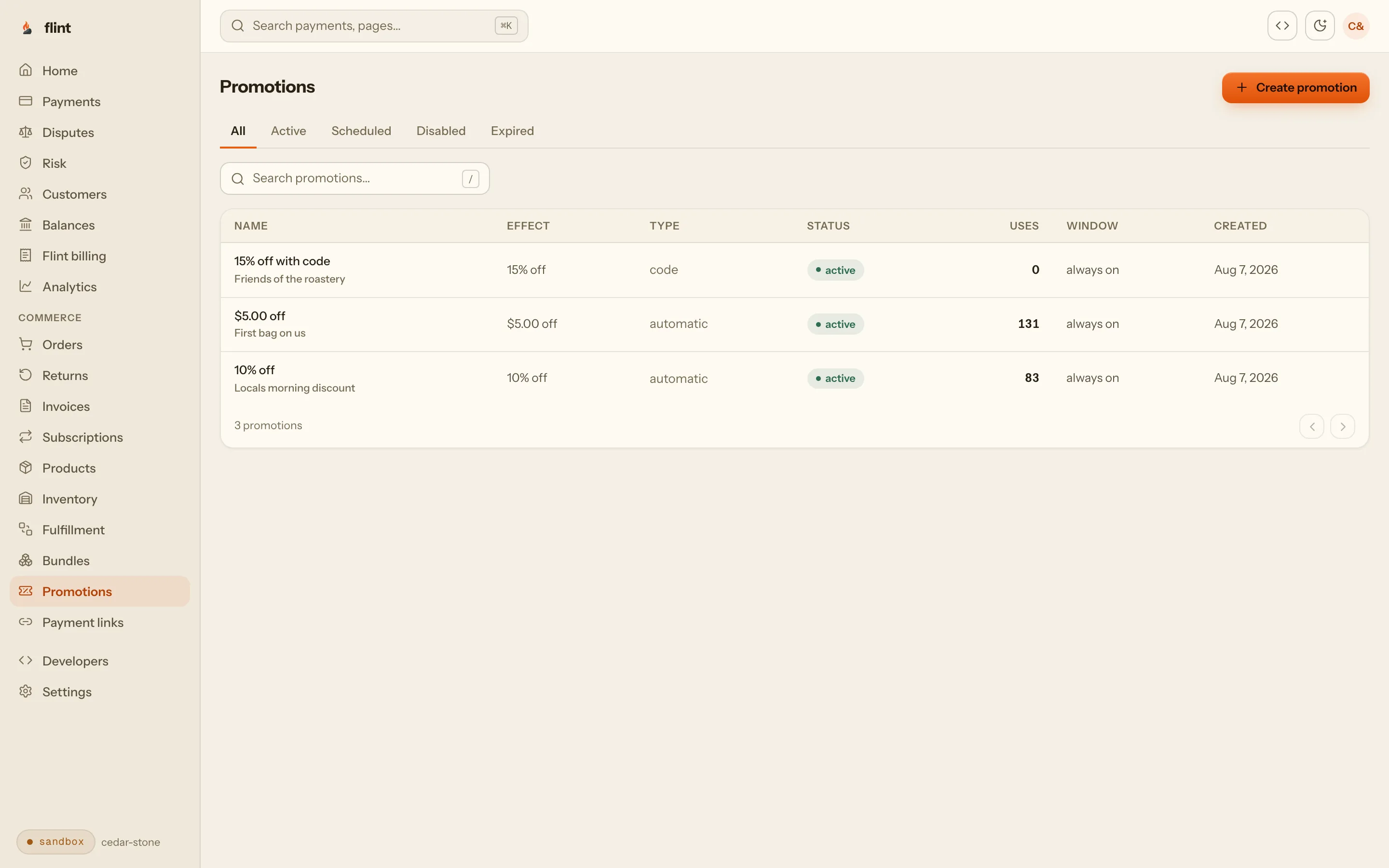
Automatic discounts, code campaigns, buy-X-get-Y, eligibility rules, and stacking control are part of order pricing. Every change to the order re-evaluates them, and a preview call tells your storefront what a code would do before the buyer commits to it.
POST /v1/promotions
curl -X POST https://api.withflintpay.com/v1/promotions \
  -H "Authorization: Bearer YOUR_API_KEY" \
  -H "Idempotency-Key: promo-launch-20" \
  -d '{
    "name": "Launch promotion",
    "display_name": "20% off your order",
    "redemption_type": "code",
    "discount_class": "order",
    "application_method": {
      "type": "percent_off",
      "percent_off": 20
    },
    "codes": [{ "code": "LAUNCH20", "max_uses": 500 }]
  }'
The promotion, its rule, and the code LAUNCH20 in one create. Set redemption_type to automatic and it applies with no code at all.
Automatic promotions apply while the order is priced. The buyer types nothing.
redemption_typeOne campaign holds many codes, each with its own cap and expiry.
POST /v1/promotions/{promotion_id}/codesEligibility rules read the order, the customer, or single line items, so an offer can target one category.
eligibility_rulesPreview returns how far the order is from the next offer, so the cart can say how much more to add.
gap_moneyYou decide which discounts stack, and which group of promotions keeps only its best offer.
combines_withapp.withflintpay.com/promotions
The promotions guide covers eligibility rules and conflict resolution in full.
04Tax
Tax is calculated on the order, after the discount.
Turn on automatic tax and Flint calculates it from the delivery address, per line item, on the discounted amount. When promotions and tax live in separate services, the sequence they run in decides what the buyer pays. On the order there is one sequence, and it is the same on every sale.
| pricing_amounts | tax called first | the order | |
|---|---|---|---|
| Subtotalsubtotal_money | $73.00 | $73.00 | |
| 20% off your orderdiscount_money | $14.60 | $14.60 | |
| Taxable base | $73.00 | $58.40 | |
| Tax at 8%tax_money | $5.84 | $4.67 | |
| Totaltotal_money | $64.24 | $63.07 | |
Automatic tax is calculated from the delivery destination, and falls back to the customer's address when nothing ships.
delivery_destinationEach jurisdiction's share is recorded on the order, per line item.
tax_breakdownsRefund a line item and its share of tax reverses with it.
tax_refund_modeAlready run a tax engine? Send its jurisdiction components and the order records them the same way.
calculation.components- pricing_amounts.discount_money
- pricing_amounts.tax_money
- pricing_amounts.total_money
Tax reports download as CSV. The sales tax guide covers locations, inclusive pricing, and refunds.
05Inventory
Paying the order holds the stock.
Stock lives at a location, and an order with tracked items claims it as part of payment. Flint holds the stock when the buyer pays, commits it when the payment succeeds, and releases it when the payment fails. If the stock is gone, the payment fails before any money moves, and you never write a timer that cleans up abandoned holds.
app.withflintpay.com/inventory
Two variants can sell from one stock pool by pointing at the same inventory item.
inventory_item_idWith several locations, an allocation policy ranks them and decides whether an order may split.
POST /v1/inventory-allocation-policiesRunning your own cart? Reserve stock directly, with an expiry, and commit it when you are paid.
POST /v1/inventory-reservationsReceiving, counts, and transfers are recorded as events, and Flint derives the levels from them.
POST /v1/inventory-adjustmentsA returned unit goes back on sale when you record where it landed and in what condition.
POST /v1/returns/{return_id}/dispositionsThe inventory guide follows one unit from the receiving dock to a paid, shipped order. For a store that ships physical goods, the ecommerce API page adds shipping, tracking email, and returns.
06Checkout and payments
The payment provider is already inside.
In a composable stack the payment provider is one more integration, wired in last and reconciled against your orders afterward. On Flint the order is paid through a hosted checkout, a payment link, an invoice, or your own form, and the balance settles on the order itself. Stripe processes every card underneath, with no processor account to open and no second bill.
A hosted checkout under your brand, with wallets and cards ready.
POST /v1/checkout-sessionsA payment link sells from a URL and creates a new order for every buyer.
POST /v1/payment-linksAn invoice adds a due date and reminders, and settles on the order it bills.
POST /v1/invoicesYour own payment form: a payment intent under the order takes its current balance.
POST /v1/orders/{order_id}/payment-intentsPayouts reach your bank, each one tied back to the payments inside it.
GET /v1/payoutsGET /v1/orders/{order_id}, after the buyer pays
{
  "data": {
    "order_id": "ord_1kmn0aExample",
    "status": "closed",
    "payment_status": "paid",
    "settlement_amounts": {
      "paid_money": { "amount": 6307, "currency": "USD" },
      "outstanding_money": { "amount": 0, "currency": "USD" }
    }
  }
}
The payment lands on the order, so your storefront reads what is paid and what is owed from the record it already has.
The payment API page covers declines, refunds, and the payment lifecycle. The checkout page covers branding, shipping, and tips on the hosted page.
07Subscriptions and invoices
Every renewal is an order.
A plan sells the same catalog on a schedule. Each cycle Flint creates an order, charges the saved card, retries a failed payment, and emails the receipt. Recurring revenue lands in the same order list, refunds the same way, and reaches the same reports as a one-time sale.
signup
Plans and subscriptions
Trials, setup fees, contract terms, pause, resume, and cancel. Buyers update their own card in the hosted account when a payment fails.
- POST /v1/subscription-plans
- POST /v1/subscriptions
- trial_period_days
Events your app grants access from
- subscription.activated
- subscription.payment_succeeded
- subscription.payment_failed
- subscription.past_due
- subscription.canceled
the buyer's invoice
Invoices
Due dates, reminders, and a hosted page the buyer pays on. The invoice settles into the order it bills, so receivables and sales are one list.
- POST /v1/invoices
- POST /v1/invoices/{invoice_id}/checkout-session
- invoice.paid
The subscriptions page and the invoices page walk through each one.
08After the sale
Shipping, returns, and refunds stay on the order.
Most of the work on an order happens after it is paid. Fulfillments and shipments record what left the building. A return records what came back and what the buyer is owed. A refund names a line item and Flint works out the discount and the tax. All of it updates the order the buyer paid, so support reads one history.
app.withflintpay.com/orders
Delivery methods price shipping, and the hosted checkout collects the address and the buyer's choice.
POST /v1/delivery-methodsFulfillments and shipments record what left, in which packages, and when it arrived.
POST /v1/orders/{order_id}/fulfillmentsReturn policies set the window, the restocking fee, and who pays return shipping.
POST /v1/return-policiesA return resolves as a refund, an exchange, or a replacement order.
POST /v1/returnsRefund a line item and Flint works out its share of the discount and the tax.
POST /v1/refundsRead the whole history of one order from one endpoint.
GET /v1/orders/{order_id}/activitiesEvents your systems subscribe to
- order.paid
- order.fulfillment.status_changed
- return.completed
- order.refunded
- inventory.level.updated
The returns guide covers mail-in returns, returns at the counter, exchanges, and warehouse receiving.
09The back office
Your team gets a dashboard you did not build.
Orders, returns, inventory, promotions, subscriptions, and payouts are already screens in the Flint dashboard, reading the records your storefront writes. Operations works there from day one, and the admin area drops off your roadmap.
app.withflintpay.com/analytics
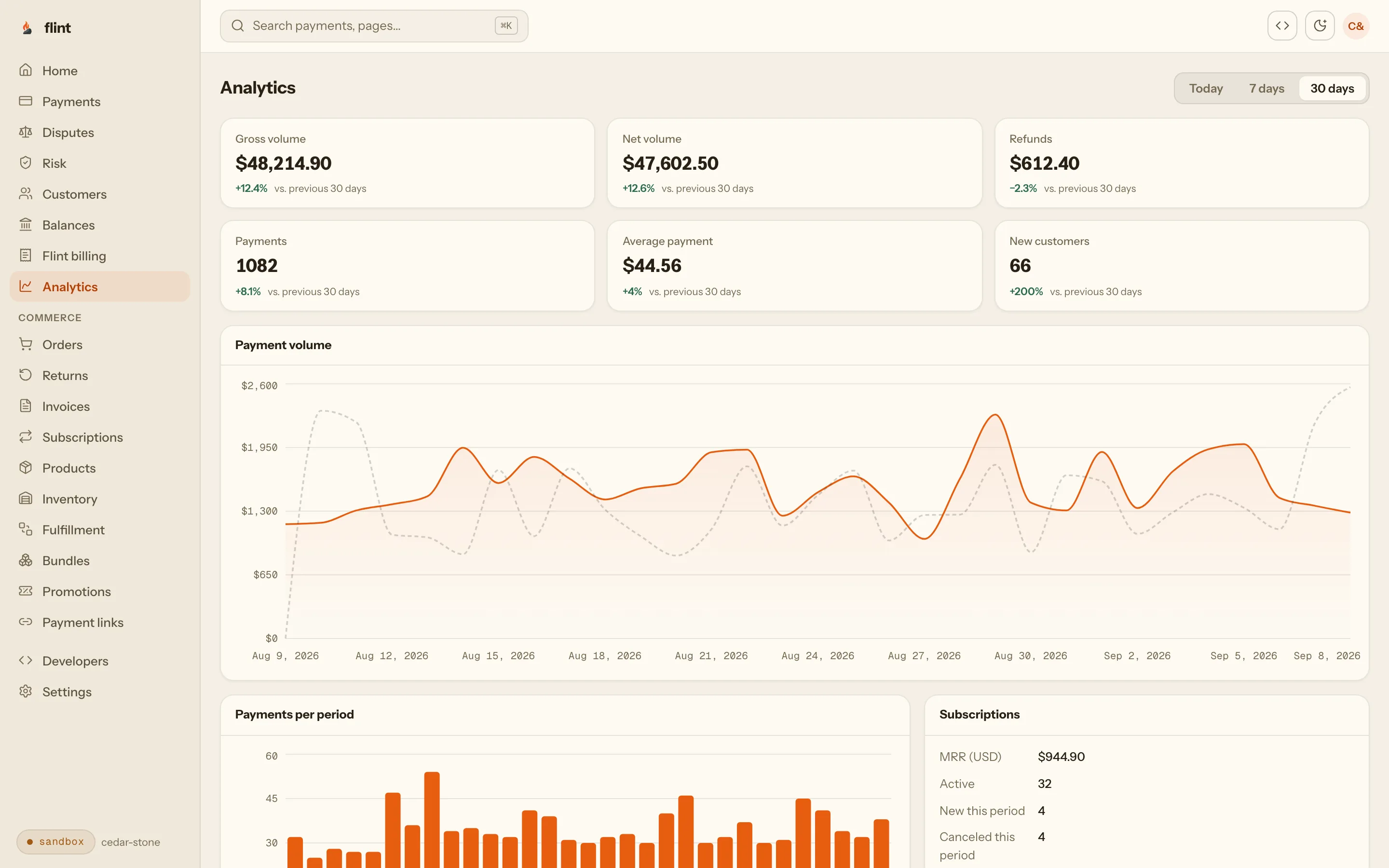
Versioned CSV reports for orders, payments, payouts, and tax, created and downloaded with your API key.
POST /v1/reportsEvery movement of your balance carries its fee, its net, and the order it belongs to.
GET /v1/balance-transactionsBuyers track orders, manage subscriptions, and start returns in a hosted account, on your domain when you want.
account.withflintpay.comWhat you get with the key
You build the storefront. The store behind it is already running.
1
API key for catalog, orders, payments, and returns
574
endpoints when you need more
211
webhook event types on one stream
20
dashboard sections before you write a line
Stripe processes every card · card data goes straight to Stripe · one processing fee per payment · samples validated against the published OpenAPI spec at build time
Public alpha
Alpha accounts get the changes first.
Real merchants take real payments on Flint today, and new parts of the API reach alpha accounts before general rollout. The order you create in the sandbox this afternoon is the same record you go live on.
shipped 2026-09-29 · Codes for saved details default to the auto channel
Building now?
Create an account from your terminal with flint signup. The sandbox is free, with no credit card.
10Start
Build one order end to end.
Install the SDK
npm install @flintpay/node
Install the CLI
npm install -g @flintpay/cli
Create a product, put its variant on an order, apply a code, turn on tax, and pay it with the test card 4242 4242 4242 4242. The sandbox is free, and the order that comes back already carries the discount, the tax, and the balance due.
Then read these, in order
- 01
- 02
- 03
- 04
- 05
- 06
FAQ
Questions worth asking first.
Does Flint have a cart API?
Orders are the cart. Create an order when the buyer adds their first item, then add and remove line items, apply codes, and set the delivery address while it is open. Flint recomputes the totals on every change. The buyer pays that same order through a checkout session, a payment link, an invoice, or a payment intent, so there is no cart to convert at checkout.
Does Flint have a promotions engine?
Yes. Promotions apply automatically during order pricing or through code campaigns that hold many codes under one promotion. They support percent off, amount off, and buy-X-get-Y, with eligibility rules on the order, the customer, or specific line items. combines_with, exclusivity groups, and stacking mode control which discounts stack, and a preview call shows what a code would do before it is applied.
Does Flint calculate sales tax?
Yes. Turn on automatic tax and Flint calculates it from the order's delivery destination, per line item, after discounts. The order records each jurisdiction's share, a line-item refund reverses its share of tax, and tax reports download as CSV. If you already run a tax engine, send its jurisdiction components in external mode and the order records them the same way.
Can Flint replace my composable commerce stack?
Flint covers the backend of the store on one API: catalog with variants, modifiers, and bundles, orders, promotions, tax, inventory across locations, checkout, payments, subscriptions, invoices, shipping, returns, refunds, reports, and webhooks. You keep your storefront and your content. Everything behind them reads and writes one order record under one API key.
Do I still need a payment provider?
No. Payments are part of the API: hosted checkout, payment links, invoices, and payment intents all settle on the order. Stripe processes every card underneath, and Flint’s processing fee covers the card processing, so there is no separate processor account or bill.
How do subscriptions relate to orders?
Every renewal is an order. A plan defines the price, the interval, and the trial from the same catalog. Each cycle Flint creates an order, charges the saved payment method, retries a failed payment, and emits subscription.payment_succeeded or subscription.payment_failed. Receipts, refunds, and reports treat a renewal like any other sale.
Does inventory work across multiple locations?
Yes. Stock is tracked per location, and an allocation policy ranks locations and decides whether an order may split between them. Paying an order holds the stock, commits it when the payment succeeds, and releases it when the payment fails. Two variants can share one stock pool by pointing at the same inventory item.
How are returns handled?
A return belongs to the order it came from. It tracks the decision, the merchandise, and what the buyer is owed as separate statuses, and resolves as a refund, an exchange, or a replacement order. Return policies set the window, restocking fees, and who pays return shipping. Recording where the returned unit landed puts it back in inventory.
What does it cost?
Cards cost 3.79% + 35¢, with no monthly fee. Invoices, subscriptions and automatic tax are add-ons with their own published rates. The sandbox is free and needs no credit card, and every endpoint works under the same key.
Start with one order.
Free sandbox, no credit card. The catalog, the promotions, the tax, the checkout, and the dashboard all come with the same key.
Skip the wait: npm install -g @flintpay/cli && flint signup creates your account and a sandbox key from the terminal. CLI guide
POST /v1/orders · the first call you make
Cedar & Stoneord_1kmn0aExample
Wool beanie x 2$48.00
Canvas tote$25.00
Subtotal$73.00
LAUNCH20-$14.60
Tax$4.67
Total$63.07
Paid