
Subscriptions
Every renewal lands as an order.
Create a plan and mint a signup link, and you are collecting recurring revenue: a hosted page that saves the card, a trial that converts on its own, a retry schedule that chases declined cards, and a buyer account where customers fix their own card. Every cycle produces an ordinary Flint order, so refunds, receipts, reports, fulfillment, and webhooks work on it from the first renewal. You do not integrate billing. You keep what you already built.
4
ways a buyer can sign up, three of them hosted
subscription_plan_id on links, sessions, embedded checkout, or the API
3
ways billing can begin
billing_start: immediate, scheduled, imported
12
subscription events on your webhook stream
webhook event catalog
01Signup
Two calls. No signup page to build.
A plan is one call. A link carrying its id is one more, and the URL that comes back is the whole frontend: it collects the buyer's email and card, creates the customer, starts the subscription, and sends you the same webhooks as the API flow. Signup is the only part of recurring billing with a screen in it, and that screen is already built.
curl -X POST https://api.withflintpay.com/v1/subscription-plans \
  -H "Content-Type: application/json" \
  -H "Authorization: Bearer YOUR_API_KEY" \
  -H "Idempotency-Key: plan-roasters-club-v1" \
  -d '{
    "name": "Roaster's club",
    "currency": "USD",
    "billing_interval": "monthly",
    "billing_interval_count": 1,
    "trial_period_days": 14,
    "line_items": [
      {
        "name": "Roaster's club",
        "quantity": 1,
        "unit_price_money": { "amount": 2900, "currency": "USD" }
      }
    ]
  }'
Prices in minor units. The plan holds the price, so the subscription never has to.
curl -X POST https://api.withflintpay.com/v1/payment-links \
  -H "Content-Type: application/json" \
  -H "Authorization: Bearer YOUR_API_KEY" \
  -H "Idempotency-Key: link-roasters-club-v1" \
  -d '{
    "name": "Roaster's club",
    "subscription_plan_id": "plan_1kmn0aExample",
    "customer_collection": { "require_email": true }
  }'
subscription_plan_id instead of line items. That is what makes a link a signup page.
{
  "data": {
    "payment_link_id": "pl_1kmn0aExample",
    "name": "Roaster's club",
    "subscription_plan_id": "plan_1kmn0aExample",
    "url": "https://checkout.withflintpay.com/pay/pl_1kmn0aExample"
  }
}
Live the moment it comes back. There is nothing to deploy.
Share this and you are selling
What arrives when a buyer completes it
- customer.created
- payment_method.saved
- subscription.created
In that order. The hosted page creates the customer and saves the card before it starts the subscription, so your handler never sees a subscription without a buyer behind it.
Four ways in. Pick the one your buyer is standing at.
Renewals, failed payments, pausing, and canceling work the same no matter how the customer signed up.
Payment link
One public URL per plan, for pricing pages, ads, bios, and QR codes. No frontend code.
- subscription_plan_id on POST /v1/payment-links
Checkout session
Your app starts signup for one known buyer and sends them to a hosted page under your name.
- subscription_plan_id on POST /v1/checkout-sessions
Embedded checkout
Your own signup UI collects the card for a first charge or a zero-balance trial. Flint stays authoritative for the result.
- surface: embedded
Direct API
Create the subscription yourself against a saved payment method, or the customer's default card.
- POST /v1/subscriptions
- POST /v1/payment-links
- POST /v1/checkout-sessions
- subscription_plan_id
- surface
- customer_collection
02The plan
Price anything, on any cadence.
A plan is what you would put on a pricing page. Daily, weekly, monthly, or yearly, spaced by any count, with a trial, a setup fee, a contract term, and line items sold straight from your catalog. Create it once and every subscriber snapshots it, so a price change is a new plan and never a surprise on an existing customer's card.
curl -X POST https://api.withflintpay.com/v1/subscription-plans \
  -H "Content-Type: application/json" \
  -H "Authorization: Bearer YOUR_API_KEY" \
  -H "Idempotency-Key: plan-wholesale-espresso-v1" \
  -d '{
    "name": "Wholesale espresso program",
    "currency": "USD",
    "billing_interval": "monthly",
    "billing_interval_count": 1,
    "setup_fee_money": { "amount": 15000, "currency": "USD" },
    "contract_term_months": 12,
    "early_termination_fee_money": {
      "amount": 20000,
      "currency": "USD"
    },
    "line_items": [
      { "variant_id": "var_1kmn0aExample", "quantity": 20 }
    ]
  }'
A catalog variant, a setup fee, a twelve month term, and the fee for leaving early, on one body.
"billing_interval_count": 3Any cadence
Daily, weekly, monthly, or yearly, spaced by a count. Monthly with a count of 3 bills quarterly. Renewals land on the anchor day you choose, or on the signup day.
- billing_interval
- billing_interval_count
- billing_anchor_day
"trial_period_days": 14Trials that convert themselves
Up to 365 days. The card is saved and validated at signup, so the trial ends in a charge, not in an email asking the buyer to come back.
- trial_period_days
- trial_end
"setup_fee_money": { "amount": 15000, "currency": "USD" }A setup fee, once
Charged when the subscription starts, in the plan's currency, and shown on the signup page as what today costs before the buyer commits.
- setup_fee_money
"contract_term_months": 12Contract terms
A commitment of 1 to 120 months and a fee for leaving early. Both come back on the cancel response, so your integration can present the consequences before the buyer confirms.
- contract_term_months
- early_termination_fee_money
{ "variant_id": "var_1kmn0aExample" }Sold from your catalog
A line can be a variant or a bundle from your catalog, with modifiers, so a coffee club bills the same product your store sells one-off and ships it every cycle. Ad hoc lines with a name and a price work too.
- variant_id
- bundle_id
- modifiers
"subscription_line_item_id": "sli_1kmn0aExample"Prices locked at signup
Each subscription snapshots the plan's lines when it is created. Editing a plan changes what new subscribers pay and never what existing ones pay.
- subscription_line_item_id
- version
- POST /v1/subscription-plans
- billing_interval
- billing_interval_count
- trial_period_days
- setup_fee_money
- contract_term_months
- early_termination_fee_money
- variant_id
- bundle_id
- modifiers
03The claim
Every renewal is an order.
So everything downstream already works. Left is a one-time sale from the hosted checkout. Right is the fourth month of a subscription. Read the keys, not the values.
{
  "data": {
    "order_id": "ord_1kmn0aExample",
    "origin": "checkout",
    "status": "closed",
    "payment_status": "paid",
    "line_items": [
      {
        "order_line_item_id": "oli_1kmn0aExample",
        "name": "Ceramic dripper",
        "quantity": 1
      }
    ],
    "pricing_amounts": {
      "total_money": { "amount": 2400, "currency": "USD" }
    },
    "settlement_amounts": {
      "paid_money": { "amount": 2400, "currency": "USD" },
      "outstanding_money": { "amount": 0, "currency": "USD" }
    }
  }
}
Nothing here knows what a subscription is.
{
  "data": {
    "order_id": "ord_2pqr7bExample",
    "origin": "subscription",
    "subscription_id": "sub_1kmn0aExample",
    "status": "closed",
    "payment_status": "paid",
    "line_items": [
      {
        "order_line_item_id": "oli_2pqr7bExample",
        "name": "Roaster's club",
        "quantity": 1
      }
    ],
    "pricing_amounts": {
      "total_money": { "amount": 2900, "currency": "USD" }
    },
    "settlement_amounts": {
      "paid_money": { "amount": 2900, "currency": "USD" },
      "outstanding_money": { "amount": 0, "currency": "USD" }
    }
  }
}
One field more, one value changed. Everything else is in the same place, with the same names.
The difference is origin and subscription_id. There is no separate billing object holding the money, no invoice table with its own lifecycle running beside your orders, and no second refund path to implement.
A report that sums orders already includes recurring revenue. A refund tool that works on orders works on renewals. A fulfillment worker listening for a paid order ships the subscription box the same way it ships a cart: the renewal carries the subscriber's address and shipping charge, and order.paid fires for every cycle. The buyer gets the same receipt. You did not integrate billing. You kept using the thing you already had.
Stripe Checkout offers shipping options in payment mode only. The lookup on Stripe subscription shipping covers charging and shipping each renewal there.
"order_id": "ord_2pqr7bExample"Refund the ordinary way
Name the renewal order and the line on it. No subscription-specific refund endpoint exists because none is needed.
origin=subscriptionFind every renewal
origin is a filter on the orders list, so recurring revenue is a query rather than an export from somewhere else.
order.paidFulfillment keeps firing
Each cycle raises the standard order and payment events beside the subscription ones. Order-keyed pipelines keep working with no special case.
"order_id": "ord_2pqr7bExample"Invoices join through the order
An invoice carries order_id and no subscription field. The order is the join, so a cycle's money is true in exactly one place.
curl -X POST https://api.withflintpay.com/v1/refunds \
  -H "Content-Type: application/json" \
  -H "Authorization: Bearer YOUR_API_KEY" \
  -H "Idempotency-Key: refund-nov-renewal" \
  -d '{
    "order_id": "ord_2pqr7bExample",
    "line_items": [
      {
        "order_line_item_id": "oli_2pqr7bExample",
        "quantity": 1,
        "tax_refund_mode": "automatic"
      }
    ]
  }'
The same call you already make for a one-time sale, with a different order id.
curl -G https://api.withflintpay.com/v1/orders \
  -H "Authorization: Bearer YOUR_API_KEY" \
  -d origin=subscription \
  -d subscription_id=sub_1kmn0aExample \
  -d sort_by=created_at
Drop the subscription_id and you have every renewal on the account.
- GET /v1/orders
- POST /v1/refunds
- origin
- subscription_id
- order_id
04Recovery
Break the renewal. Watch it recover.
Anything can charge a card on the eleventh. The month the card says no is where a billing system earns its keep, and here it is already handled: past_due, four retries over sixteen days, an email to the customer, a buyer account where they fix the card themselves, and a manual retry for the moment they do. Decline a charge below, fix it mid-dunning, pause, cancel. Every status, event, and retry day is the live API's vocabulary.
Click a settled cycle to inspect the record behind it. Every one is a real order or a real subscription state, one GET away.
The engine is simulated; the vocabulary is not. Every status, event, and field above is the live API's, and the default story has already run before you touch it.
The retry schedule is visible and yours to set. By default four attempts across sixteen days, then the end action you chose. The window is a billing setting, not something you build. Flint emails the customer a payment-failure notice when the charge fails, and the subscription stays past_due, still owning its period, while the retries run. Any successful retry restores it to active and moves the period forward.
When every retry fails, subscription.dunning_exhausted tells you which end action fired: cancel, pause, or notify_only, which leaves the subscription past_due and hands the account to your recovery process instead of ending it. Each is a setting, and subscriptions on an external schedule can have their own.
Your customer fixes the card. You find out over a webhook.
The dunning email links to the buyer account, where the subscriber sees what failed and changes the card without opening a ticket. Charges always use the subscription's current payment method, so the next scheduled retry bills the new one. Or collect on it now.
curl -X PATCH \
  https://api.withflintpay.com/v1/subscriptions/sub_1kmn0aExample \
  -H "Content-Type: application/json" \
  -H "Authorization: Bearer YOUR_API_KEY" \
  -d '{ "payment_method_id": "pm_2pqr7bExample" }'
Point the subscription at any active card belonging to the same customer.
curl -X POST \
  https://api.withflintpay.com/v1/subscriptions/sub_1kmn0aExample/payment-retries \
  -H "Authorization: Bearer YOUR_API_KEY" \
  -H "Idempotency-Key: retry-sub-001" \
  -d '{}'
The card was fixed on a Tuesday and the next retry is Friday. Past-due subscriptions only, idempotent, and a failure here does not spend one of the automatic retries.
- POST /v1/subscriptions/{subscription_id}/payment-retries
- PATCH /v1/subscriptions/{subscription_id}
- POST /v1/me/subscriptions/{subscription_id}/payment-method
- subscription_payment_retry_id
- order_payment_attempt_id
Three events run your access control.
Provision when a payment succeeds, warn when the subscription goes past due, revoke when it is canceled. The other nine are detail you can subscribe to when you want it.
curl -X POST https://api.withflintpay.com/v1/webhook-endpoints \
  -H "Content-Type: application/json" \
  -H "Authorization: Bearer YOUR_API_KEY" \
  -H "Idempotency-Key: webhook-billing-001" \
  -d '{
    "url": "https://example.com/webhooks/flint",
    "enabled_events": [
      "subscription.payment_succeeded",
      "subscription.past_due",
      "subscription.canceled"
    ]
  }'
Payloads carry identifiers, so a handler fetches the subscription and reconciles against its status. That keeps it idempotent and immune to out-of-order delivery.
- subscription.created
- subscription.updated
- subscription.activated
- subscription.trial_ending
- subscription.renewal_upcoming
- subscription.payment_succeeded
- subscription.payment_failed
- subscription.past_due
- subscription.dunning_exhausted
- subscription.paused
- subscription.resumed
- subscription.canceled
05The calendar
Bill on your calendar, or on Flint's.
Most billing systems assume the dates are theirs. Here the start, the anchor day, and the owner of the schedule are fields. Start now, on a future date, or mid-period from a system you are leaving, such as Stripe Billing, which the Stripe migration guide walks through. Let Flint compute every renewal, or hand it one date at a time.
"type": "immediate"immediate
Starts now. With a trial the buyer is trialing; without one the first charge runs and the subscription is active on success.
"starts_at": "2026-10-01T00:00:00Z"scheduled
Starts at a future instant. Flint creates no order and no charge before then, and you can move the date until it arrives.
"period_started_at": "2026-07-01T00:00:00Z"imported
Adopts a period the buyer already paid for elsewhere and charges nothing for it. Flint picks up at the next renewal.
The subscription itself carries almost nothing.
A plan, a customer, a payment method, when billing starts, who owns the dates, an optional day of the month to bill on, an optional service address, and metadata. No prices, because the plan has them. No totals, because the orders will.
curl -X POST https://api.withflintpay.com/v1/subscriptions \
  -H "Content-Type: application/json" \
  -H "Authorization: Bearer YOUR_API_KEY" \
  -H "Idempotency-Key: sub-ada-club-001" \
  -d '{
    "subscription_plan_id": "plan_1kmn0aExample",
    "customer_id": "cus_1kmn0aExample",
    "payment_method_id": "pm_1kmn0aExample",
    "billing_start": { "type": "immediate" },
    "billing_schedule": { "owner": "flint" },
    "billing_anchor_day": 11
  }'
Three fields are required: the plan, the customer, and when billing starts. Omit the payment method and the customer's default card is used.
{
  "data": {
    "subscription_id": "sub_1kmn0aExample",
    "status": "trialing",
    "subscription_plan_id": "plan_1kmn0aExample",
    "customer_id": "cus_1kmn0aExample",
    "payment_method_id": "pm_1kmn0aExample",
    "billing_schedule_owner": "flint",
    "awaiting_billing_schedule": false,
    "billing_anchor_day": 11,
    "trial_end": "2026-08-11T00:00:00Z",
    "current_period_start": "2026-07-28T00:00:00Z",
    "current_period_end": "2026-08-11T00:00:00Z",
    "next_billing_at": "2026-08-11T00:00:00Z",
    "cancel_at_period_end": false,
    "line_items": [
      {
        "subscription_line_item_id": "sli_1kmn0aExample",
        "name": "Roaster's club",
        "quantity": 1,
        "unit_price_money": { "amount": 2900, "currency": "USD" },
        "subtotal_money": { "amount": 2900, "currency": "USD" }
      }
    ]
  }
}
Dates, status, and the price snapshot this subscription will bill on every cycle. The period boundaries come from the anchor day, not from you.
Whose schedule it is, in one field.
Leave billing_schedule_owner on flint and the dates come from the plan interval and the anchor day; move a renewal by up to one interval, or skip a cycle for the month a customer is away. Set it to external and your system supplies each next_billing_at. After every successful cycle Flint waits, reports awaiting_billing_schedule, and lists the subscriptions waiting on you.
curl -X PATCH \
  https://api.withflintpay.com/v1/subscriptions/sub_1kmn0aExample/billing-schedule \
  -H "Content-Type: application/json" \
  -H "Authorization: Bearer YOUR_API_KEY" \
  -H "Idempotency-Key: schedule-sub-002" \
  -d '{
    "owner": "external",
    "next_billing_at": "2026-08-15T16:00:00Z",
    "initiated_by": "integration"
  }'
Send next_billing_at as null instead and the timer clears. The subscription keeps its status.
{
  "data": {
    "subscription_id": "sub_1kmn0aExample",
    "status": "active",
    "billing_schedule_owner": "external",
    "awaiting_billing_schedule": false,
    "current_period_start": "2026-07-15T16:00:00Z",
    "current_period_end": "2026-08-15T16:00:00Z",
    "next_billing_at": "2026-08-15T16:00:00Z"
  }
}
Both owners return the same object. What changes is who put next_billing_at there.
curl -X POST \
  https://api.withflintpay.com/v1/subscriptions/sub_1kmn0aExample/skip-cycle \
  -H "Content-Type: application/json" \
  -H "Authorization: Bearer YOUR_API_KEY" \
  -H "Idempotency-Key: skip-sub-001" \
  -d '{ "initiated_by": "buyer" }'
Moves the next date forward by exactly one plan interval without charging. The buyer account offers the same skip.
curl -G https://api.withflintpay.com/v1/subscriptions \
  -H "Authorization: Bearer YOUR_API_KEY" \
  -d next_billing_at_after=2026-11-09T00:00:00Z \
  -d next_billing_at_before=2026-11-16T00:00:00Z \
  -d sort_by=next_billing_at
A list filter, not a report you export. Filter by status, customer, plan, and a free-text query over customer name, email, and plan name too.
Move subscribers in without charging them twice.
A subscriber who already paid another system for the month they are in should not pay again to arrive here. imported adopts the period they are in and charges nothing for it, and Flint picks up at the next renewal. Pair it with an external schedule when your old system keeps the dates during the cutover.
curl -X POST https://api.withflintpay.com/v1/subscriptions \
  -H "Content-Type: application/json" \
  -H "Authorization: Bearer YOUR_API_KEY" \
  -H "Idempotency-Key: import-sub-001" \
  -d '{
    "subscription_plan_id": "plan_1kmn0aExample",
    "customer_id": "cus_1kmn0aExample",
    "payment_method_id": "pm_1kmn0aExample",
    "billing_start": {
      "type": "imported",
      "period_started_at": "2026-07-01T00:00:00Z"
    },
    "billing_schedule": { "owner": "external" }
  }'
Import while the period is still running. Once it has elapsed there is nothing left to adopt.
- PATCH /v1/subscriptions/{subscription_id}/billing-schedule
- POST /v1/subscriptions/{subscription_id}/skip-cycle
- billing_start
- billing_anchor_day
- billing_schedule_owner
- awaiting_billing_schedule
- next_billing_at_after
06Lifecycle
Trial, pause, cancel, and come back. Each one call.
A subscriber's whole life is six statuses and a handful of endpoints. Every transition emits an event, honors the time the buyer paid for, and returns the updated subscription.
"status": "trialing"Trials that convert on their own
trialing from the moment of signup, so provision access at once. At the trial's end Flint charges the first cycle and emits subscription.activated; a failed conversion follows the same recovery path as any renewal.
"pause_duration_cycles": 2Pause without losing prepaid time
Pause for a set number of cycles or until you say so. Resuming picks up the days already paid for; a fresh charge only happens if the paid period lapsed entirely during the pause.
"cancel_at_period_end": trueCancel at period end, by default
The customer keeps access through what they paid for, then the subscription ends on its own with the reason on the event. Pass cancel_immediately when you mean now.
"cancel_at_period_end": falseChange of heart
A scheduled cancellation reverses any time before the period ends, from your side or from the buyer's own account, without touching the current period.
"early_termination_fee_money": {"amount": 20000, "currency": "USD"}Contract terms enforced
When the plan has a term, every read and the cancel response carry the early termination fee until contract_end_at.
"payment_method_id": "pm_2pqr7bExample"Swap the card any time
Point the subscription at another saved card belonging to the same customer. Every charge from then on uses it, including the next scheduled retry.
curl -X POST \
  https://api.withflintpay.com/v1/subscriptions/sub_1kmn0aExample/pause \
  -H "Content-Type: application/json" \
  -H "Authorization: Bearer YOUR_API_KEY" \
  -d '{ "pause_duration_cycles": 2 }'
Omit the count to pause until an explicit resume. Only active subscriptions pause.
curl -X POST \
  https://api.withflintpay.com/v1/subscriptions/sub_3stu9cExample/cancel \
  -H "Content-Type: application/json" \
  -H "Authorization: Bearer YOUR_API_KEY" \
  -d '{}'
An empty body is the customer-friendly cancel: access through the paid period, then done.
{
  "data": {
    "subscription_id": "sub_3stu9cExample",
    "status": "active",
    "cancel_at_period_end": true,
    "current_period_end": "2026-12-01T00:00:00Z",
    "contract_end_at": "2027-06-01T00:00:00Z",
    "early_termination_fee_money": {
      "amount": 20000,
      "currency": "USD"
    }
  }
}
Still active, ending at the period's close, with the contract consequences your integration can show before the buyer confirms.
curl -X POST \
  https://api.withflintpay.com/v1/subscriptions/sub_3stu9cExample/reactivate \
  -H "Authorization: Bearer YOUR_API_KEY"
Clears the pending cancellation and leaves the current period alone.
- POST /v1/subscriptions/{subscription_id}/pause
- POST /v1/subscriptions/{subscription_id}/resume
- POST /v1/subscriptions/{subscription_id}/cancel
- POST /v1/subscriptions/{subscription_id}/reactivate
- pause_duration_cycles
- cancel_immediately
- early_termination_fee_money
07The screens
The screens are already built.
Recurring billing needs an operator view for whoever answers support and a self-serve view for the subscriber. Both ship with every Flint account, and both read the same records as the API.
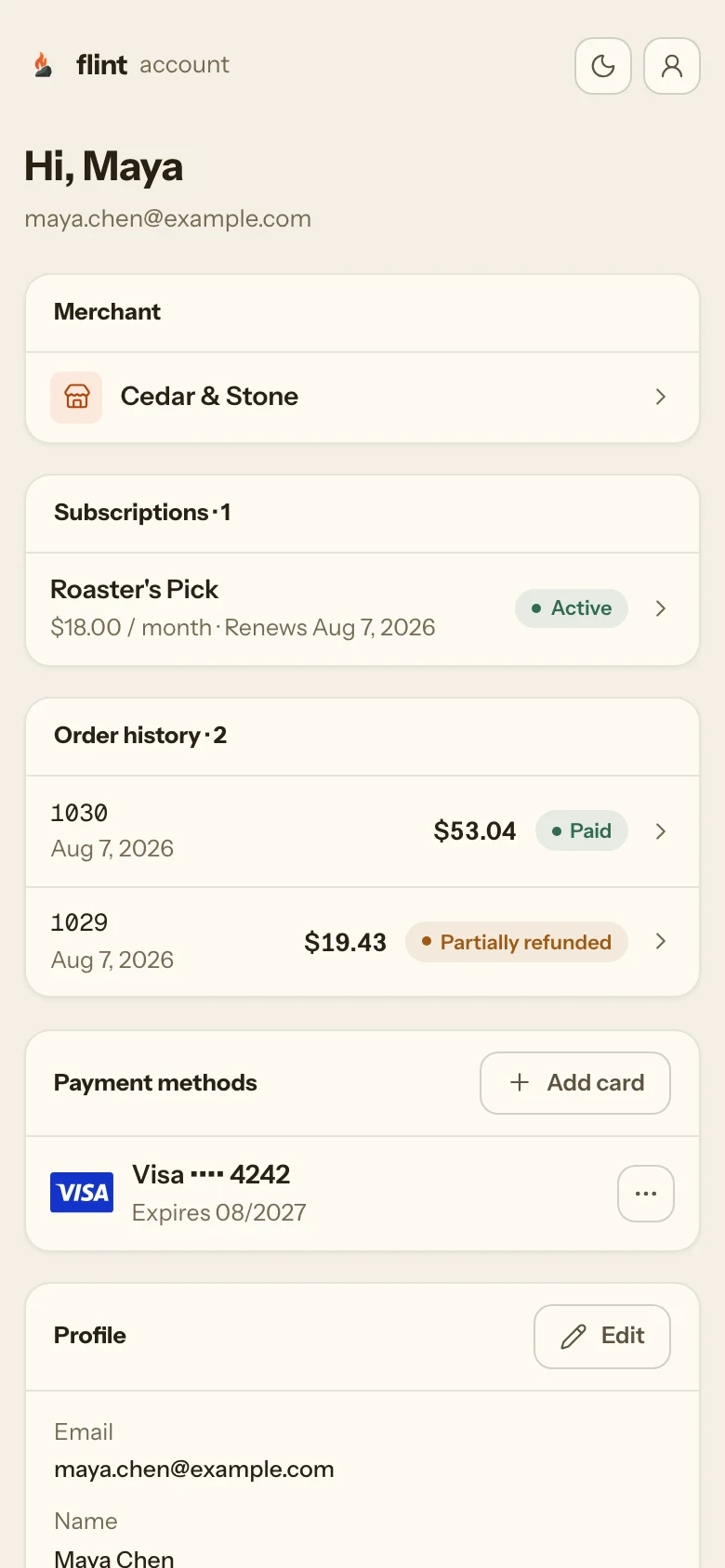
Self-serve, without your API key in the browser.
A subscriber can see the next renewal and its amount, update the card, pause and resume, reverse a scheduled cancellation, and cancel. The account is hosted, and it takes your colors, your name, and your domain. Building your own is the same six calls, scoped to the signed-in buyer. Customer accounts guide →
- GET /v1/me/subscriptions
- POST /v1/me/subscriptions/{subscription_id}/payment-method
- POST /v1/me/subscriptions/{subscription_id}/pause
- POST /v1/me/subscriptions/{subscription_id}/resume
- POST /v1/me/subscriptions/{subscription_id}/reactivate
- POST /v1/me/subscriptions/{subscription_id}/cancel
curl -G https://api.withflintpay.com/v1/subscriptions/sub_1kmn0aExample \
  -H "Authorization: Bearer YOUR_API_KEY" \
  -d expand=customer,payment_method,subscription_plan
The customer, the card, and the plan in the same response, for the support screen that has to answer in one look.
The numbers a recurring business runs on.
MRR, ARR, a count per status, and what was collected in the window. Computed from the same records as your orders, so the two cannot disagree.
curl -G https://api.withflintpay.com/v1/analytics/subscriptions \
  -H "Authorization: Bearer YOUR_API_KEY" \
  -d range=last_30_days \
  -d timezone=America/New_York
Today, the last seven days, or the last thirty, in your timezone.
{
  "data": {
    "range": "last_30_days",
    "timezone": "America/New_York",
    "snapshot_metrics": {
      "mrr_by_currency": [{ "amount": 482900, "currency": "USD" }],
      "arr_by_currency": [{ "amount": 5794800, "currency": "USD" }],
      "status_counts": {
        "active_count": 214,
        "trialing_count": 31,
        "past_due_count": 6,
        "paused_count": 4,
        "canceled_count": 39,
        "incomplete_count": 2
      }
    },
    "window_metrics": {
      "new_subscriptions": 18,
      "canceled_subscriptions": 5,
      "subscription_collected_money_by_currency": [
        { "amount": 470100, "currency": "USD" }
      ]
    }
  }
}- GET /v1/subscriptions
- GET /v1/analytics/subscriptions
- status
- query
- expand
- mrr_by_currency
- status_counts
08Reviewed
Every claim above, pinned to the API.
A payment link with a plan id is a hosted signup page.
subscription_plan_idA renewal is an order, tagged with where it came from.
originRefunds use the ordinary endpoint, per line and per quantity.
POST /v1/refundsEvery cycle raises the standard order events, so fulfillment keeps firing.
order.paidA fixed card can be collected on at once, without spending an automatic retry.
POST /v1/subscriptions/{subscription_id}/payment-retriesThe subscriber changes the card from their own account.
POST /v1/me/subscriptions/{subscription_id}/payment-methodFlint or your system owns the billing dates, and it is one field.
billing_schedule_ownerImported subscribers are not charged for the period they already paid for.
period_started_atCancel honors the paid period by default, and can be reversed.
cancel_at_period_endMRR, ARR, and status counts come from the same records as your orders.
GET /v1/analytics/subscriptionsreviewed 2026-09-15 against the subscription billing guide and the published API · corrections: Flint Help
09Start
A renewal within a day.
Free sandbox keys, no credit card. A daily plan bills in about twenty-four hours, which is the fastest way to watch a real renewal land as a real order.
1 · create a daily plan
2 · mint a signup link with its plan id
3 · open the link and pay
4242 4242 4242 4242 with any future expiry starts a subscription that renews cleanly. 4000 0000 0000 0341 saves the card and then declines every charge, which runs the whole past-due and retry path through your webhook feed by tomorrow.
4 · tomorrow, the renewal is an order
Node
CLI
Then read these
- 01Subscription billing guidePlans, signup, webhooks, the retry schedule, pause, cancel, and the schedule rules.
- 02Subscription signup linksThe hosted, no-frontend signup surface for a plan.
- 03Testing renewals and dunningThe card matrix and the webhook test tooling.
- 04RefundsRefunding one cycle's order.
- 05
- 06
Skip the wait: npm install -g @flintpay/cli && flint signup creates your account and a sandbox key from the terminal. CLI guide
FAQ
Questions worth asking first.
Does a subscription renewal create a real order?
Yes. Each cycle produces an order with origin set to subscription and the subscription_id on it. It carries line items, computed totals, and a payment status exactly like an order from a checkout, so it appears in the same list endpoint, refunds through the same endpoint, raises order.paid for your fulfillment handler, and sends the buyer a normal receipt. There is no parallel billing record to reconcile against your sales.
Do I have to build a signup page?
No. Create a plan, then a payment link carrying its subscription_plan_id, and the URL that comes back is a hosted signup page under your name. It collects the buyer’s email and card, creates the customer and the subscription, and sends you the same webhooks as the API flow. A checkout session with a subscription_plan_id does the same for one known buyer, embedded checkout lets your own UI collect the card, and the direct API creates a subscription against a saved payment method.
How do I refund one month?
With the ordinary refund call, naming the renewal order and the line item on it. A renewal is an order, so refunds by line and by quantity, tax handling, and the refund events all work the way they do for a one-time sale. No subscription-specific refund endpoint exists.
What happens when a card is declined?
The subscription moves to past_due, you get subscription.payment_failed and subscription.past_due, and Flint emails the customer a payment-failure notice. Flint then retries on a decaying schedule, by default four attempts over sixteen days, and any success restores the subscription to active. The customer can change the card from their buyer account, or you can point the subscription at a new payment method and start a manual retry at once. If every retry fails, subscription.dunning_exhausted reports the end action you configured: cancel, pause, or notify_only.
Can subscribers manage their own subscription?
Yes. Every Flint merchant has a buyer account at account.withflintpay.com on day one, and it can carry your brand or your own domain. A subscriber can see the next renewal and amount, update the saved card, change the shipping address or skip the next shipment, change how often it ships or the quantity among the options you offer, swap to another variant you allow, order the next shipment now, pause and resume, reverse a scheduled cancellation, and cancel. The same actions are available to a headless account through the /v1/me/subscriptions endpoints, with no merchant API key in the browser.
Can I move subscribers from another billing system?
Yes. Create the subscription with billing_start of type imported and the start of the period the buyer already paid for. Flint adopts that period without charging and picks up at the next renewal, so nobody pays twice for the month of the move. If your old system keeps owning the dates during the cutover, pair the import with an external billing schedule and supply each next_billing_at yourself.
Can a subscription sell physical products?
Yes. A plan's line items can come from your catalog by variant_id or bundle_id, so a refill, a coffee club, or a monthly box bills the same product your store sells one-off. The buyer picks a shipping method at signup, and every renewal is an order with their address, a shipping charge, tax for that address, and a fulfillment you ship like any other order. Subscribers can change their address or skip a shipment from their buyer account. If a renewal cannot ship, for example because you stopped shipping to the buyer's address, Flint holds it without charging and tells you and the buyer. A plan can offer several intervals and quantities for the buyer to choose from. Physical plans do not take a free trial, so offer the first box with a promotion code instead. To sell subscribe-and-save across your catalog, a subscription offer lets a buyer subscribe to any covered product from the cart, next to one-time items, with an optional discount on every shipment.
How do I test renewals?
Use a daily plan in the sandbox so a renewal arrives within a day instead of a month. Pay with 4242 4242 4242 4242 and every cycle succeeds; pay with 4000 0000 0000 0341 and the card saves but every charge fails, which runs the whole past_due and retry path through your webhook feed without waiting for a real decline. Test mode is a property of the key, so there is no environment flag to forget.