
Restaurant tech
Open tabs, tips, and split checks, already built.
Flint is the payments API for teams building restaurant POS, online ordering, kiosk, and pay-at-table software. A check is an order that prices its own modifiers, stays open while rounds are added, computes the tip, and settles across as many cards as the table puts down.
Table 12 at Lucia's: the order on your POS, the same check on the guest's phone with the tip picker, and the receipt after two cards paid it. Every number on all three came back from one order.
01What you skip
Seven systems you never build.
On an API whose unit is an amount, everything a restaurant needs is yours to write and yours to get right: modifier pricing, the tab, the tip math, the split, the 86 board. Each one is a table in your database and a place for a cent to go missing. On Flint, each one is a field on the order.
Written by your team
Modifiers
A modifiers table, price deltas, and tax flags
re-priced by your code before every charge
Open tabs
A tabs table and a running total
recomputed after every round
Tips
Tip math and a tip ledger
18% of which subtotal, asked vs collected
Service charges
Fees faked as line items
discounted by accident when a promotion lands
Split checks
Several charges and a balance you reconcile
penny rounding, stale totals, paid-twice guards
86-ing
A counter you decrement
oversold when two guests order the last one
Refund one dish
Refund arithmetic by hand
the dish, its modifiers, its share of tax
7 systems to write · 7 to keep correct · 0 shared records
Already on the order
Modifiers
modifier_total_moneyline_items[].modifiersOpen tabs
running_balance_moneyPOST /v1/orders/{order_id}/line-itemsTips
requested_tipsettled_tip_moneyService charges
charges[]POST /v1/orders/{order_id}/chargesSplit checks
outstanding_moneyPOST /v1/orders/{order_id}/pay86-ing
available_quantityPOST /v1/inventory-reservationsRefund one dish
refunded_quantityPOST /v1/refunds
1 order per check · totals computed by Flint · 1 webhook stream
reviewed 2026-09-19 against the orders, tips, inventory, and refunds guides · corrections: Flint Help
02The menu
Modifiers price and tax themselves.
Send a modifier id. The order comes back with the name, the price, and the tax treatment resolved from the menu, and each group enforces its own minimum and maximum selections. Your code never adds 2.50 to a burger.
curl -X POST https://api.withflintpay.com/v1/orders \
  -H "Authorization: Bearer YOUR_API_KEY" \
  -H "Idempotency-Key: table-12-round-1" \
  -d '{
    "line_items": [
      {
        "name": "Smash burger",
        "quantity": 1,
        "unit_price_money": { "amount": 1450, "currency": "USD" },
        "modifiers": [
          { "modifier_id": "mod_1kmn0aExample" },
          { "modifier_id": "mod_1kmn0bExample" },
          {
            "text": {
              "modifier_group_id": "mg_1kmn0aExample",
              "value": "no onions"
            }
          }
        ]
      }
    ]
  }'
A burger, two menu modifiers by id, and a free-text note for the kitchen. You send no modifier names and no modifier prices.
| line_items[0] | ||
|---|---|---|
| Smash burgerunit_price_money | $14.50 | |
| Add pattyunit_price_delta_money | $2.50 | |
| No picklesunit_price_delta_money | $0.00 | |
| Line subtotalsubtotal_money | $17.00 | |
- unit_price_delta_money
- min_selected / max_selected
- modifier_total_money
The catalog setup guide builds a menu item in two sizes, its modifier groups, and a combo, then sells them on one order.
03The tab
The check stays open all night.
Open the order with the first round and append to it until the table asks for the check. Every round reprices the same record, and the activity trail returns a running balance, so your tab screen shows a number it never had to compute.
# the next round appends to the same open order
curl -X POST \
  https://api.withflintpay.com/v1/orders/ord_7g2TableTwelve/line-items \
  -H "Authorization: Bearer YOUR_API_KEY" \
  -d '{
    "line_items": [
      {
        "name": "Buffalo wings",
        "quantity": 1,
        "unit_price_money": { "amount": 1195, "currency": "USD" }
      }
    ]
  }'
The response is the full order with the new totals, so there is no follow-up read.
{
  "data": [
    {
      "order_activity_id": "act_1kmn0aExample",
      "activity_type": "payment",
      "description": "Payment received",
      "balance_delta_money": { "amount": -1824, "currency": "USD" },
      "running_balance_money": { "amount": 1824, "currency": "USD" },
      "payment_intent_id": "pi_1kmn0aExample",
      "created_at": "2026-07-03T21:14:00Z"
    }
  ],
  "next_page_token": null
}
One row per thing that happened to the check, each with the balance after it.
- POST /v1/orders/{order_id}/line-items
- GET /v1/orders/{order_id}/activities
- running_balance_money
04The tip
Eighteen percent, computed once.
Percent tips compute on the server, on the subtotal after discounts and before tax and fees. A happy hour promotion cannot change what 18% means, and the amount the guest asked to tip stays separate from the amount collected, so tip reports reconcile to the payment.
curl -X PATCH \
  https://api.withflintpay.com/v1/orders/ord_7g2TableTwelve \
  -H "Authorization: Bearer YOUR_API_KEY" \
  -d '{ "requested_tip": { "percent": 18 } }'
From your own tip screen. Send a percent or a fixed amount. Sending it again replaces the tip in place, so the guest can change their mind.
{
  "tip": {
    "enabled": true,
    "tip_percent_options": [15, 18, 20],
    "default_tip_percent": 18,
    "is_custom_tip_enabled": true
  }
}
These presets are what the picker beside this shows. For small totals, switch to fixed amounts like $1, $2, and $5.
- PATCH /v1/orders/{order_id} requested_tip
- pricing_amounts.requested_tip_money
- settlement_amounts.settled_tip_money
Coming from Stripe Checkout? How to add a tip to an online Stripe checkout covers the workarounds and their coupon, tax, and refund traps.
Service charges that a promotion cannot shrink
A large-party service charge, a packaging fee, a delivery fee. Each is its own object on the order with its own tax flag, so a 10% promotion on the food leaves the fee alone, and you can refund the fee without touching the meal.
# party of eight: a 20% service charge, set by you
curl -X POST \
  https://api.withflintpay.com/v1/orders/ord_4p9TableFour/charges \
  -H "Authorization: Bearer YOUR_API_KEY" \
  -H "Idempotency-Key: table-4-service-charge" \
  -d '{
    "charge": {
      "name": "Service charge",
      "type": "service_fee",
      "percent": 20,
      "calculation_basis": "subtotal_post_discount",
      "tax": { "taxable": false }
    }
  }'
A percent charge names its basis, before or after discounts, so the math is stated rather than assumed.
Never a fake line item
Promotions discount products. A charge is not a product, so the fee your operator set is the fee the guest pays.
Taxed on its own terms
Each charge says whether it is taxable. Its tax lands on the charge and rolls into the order's tax total.
Charge types for restaurants
- service_fee
- delivery_fee
- packaging_fee
- small_order_fee
- rush_fee
- reservation_fee
05The split
As many cards as the table puts down.
Create a payment leg for each guest and settle them against one order. The balance runs down to zero, the tip is shared across the cards to the cent, and the paid event fires once. If the check changed after the guest saw the total, Flint rejects the payment before it charges anyone.
# one leg per guest. your code picks the amounts.
curl -X POST \
  https://api.withflintpay.com/v1/orders/ord_7g2TableTwelve/payment-intents \
  -H "Authorization: Bearer YOUR_API_KEY" \
  -H "Idempotency-Key: table-12-guest-1-leg" \
-d '{ "amount_money": { "amount": 1824, "currency": "USD" } }'# both cards are on the table: settle both legs in one call
curl -X POST \
https://api.withflintpay.com/v1/orders/ord_7g2TableTwelve/pay \
-H "Authorization: Bearer YOUR_API_KEY" \
-H "Idempotency-Key: table-12-close" \
-d '{
"action": "confirm_payment_intents",
"payment_intents": [
{
"payment_intent_id": "pi_1kmn0aExample",
"token": "pm_1kmn0aExample"
},
{
"payment_intent_id": "pi_2bqr7dExample",
"token": "pm_2bqr7dExample"
}
],
"expected_outstanding_money": {
"amount": 3648,
"currency": "USD"
},
"completion_behavior": "complete_order"
}'expected_outstanding_money is the guard. A round added since the guest saw $36.48 returns ORDER_CHANGED_REFRESH_REQUIRED, and no card is charged.
| Card | Share of tip | Charged |
|---|---|---|
| Guest 1 | $2.61 | $18.24 |
| Guest 2 | $2.60 | $18.24 |
| the balance | ||
|---|---|---|
| Check totaltotal_money | $36.48 | |
| Guest 1's cardbalance_delta_money | $18.24 | |
| Guest 2's cardbalance_delta_money | $18.24 | |
| Still owedoutstanding_money | $0.00 | |
- order.partially_paid
- order.paid
- order.closed
- POST /v1/orders/{order_id}/payment-intents
- POST /v1/orders/{order_id}/pay
- expected_outstanding_money
- payment_intent_allocations
06Pay at the table
The guest's phone is the card reader.
Create a hosted checkout for the open check and print its URL as a QR code on the bill. The guest scans it, picks a tip, and pays with Apple Pay, Google Pay, or a card. The payment lands on the order your POS already has open, so there is nothing to reconcile, no reader to ship, and no trip back to the register with someone’s card.
curl -X POST https://api.withflintpay.com/v1/checkout-sessions \
  -H "Authorization: Bearer YOUR_API_KEY" \
  -H "Idempotency-Key: table-12-check" \
  -d '{
    "order_id": "ord_7g2TableTwelve",
    "tip": {
      "enabled": true,
      "tip_percent_options": [15, 18, 20],
      "default_tip_percent": 18,
      "is_custom_tip_enabled": true
    }
  }'
Call it when the table asks for the check. The session points at the order that already exists, so the guest sees the totals your POS shows.
- POST /v1/checkout-sessions
- checkout_session.url
Your own kiosk or ordering app
Keep the payment form inside your product. The order tells the browser how to collect a card, wallets included, and your backend pays the order with the result.
- payment_collection
- POST /v1/orders/{order_id}/pay
A printed code at the counter
A payment link is one URL every guest can open, for the lunch special on a counter card or a catering deposit. Each payment creates its own order. checkout.withflintpay.com/pay/pl_1kmn0aExample
- POST /v1/payment-links
- origin: payment_link
Every register accounted for
Register each iPad, kiosk, and handheld against its location, and every order says which one rang it up.
- POST /v1/devices
- location_id
07The kitchen
Tickets and the 86 board come off the same order.
A fulfillment attaches to the order's line items, so the kitchen screen, the expo screen, and the text to the guest all follow one event stream. Stock is kept per location, and the last portion of the special cannot be sold twice.
curl -X POST \
  https://api.withflintpay.com/v1/orders/ord_7g2TableTwelve/fulfillments \
  -H "Authorization: Bearer YOUR_API_KEY" \
  -d '{
    "type": "pickup",
    "line_items": [
      { "order_line_item_id": "li_1kmn0aExample", "quantity": 1 }
    ]
  }'
The ticket is part of the order it came from, so there is no second record to keep in sync.
What your screens subscribe to
- order.fulfillment.status_changed
- order.fulfillment.event.created
- order.inventory_exception.created
- order.inventory_exception.resolved
- show_on_fulfillment
- show_on_receipt
86 the special at every location that ran out
A menu screen reads the level before it offers the dish. A checkout holds the last portions while the guest pays. If the stock is gone when the order is paid, the payment fails with INVENTORY_UNAVAILABLE before any money moves, so you never refund a dish the kitchen could not make.
# "is the special still on?" Read the current level.
curl "https://api.withflintpay.com/v1/inventory-levels?inventory_item_id=invi_1kmn0aExample&location_id=loc_1kmn0aExample" \
  -H "Authorization: Bearer YOUR_API_KEY"
Reading a level claims nothing, so a menu screen can refresh it as often as it likes.
- inventory.level.updated
- inventory.reservation.created
- inventory.reservation.committed
- inventory.reservation.hold_expired
- inventory.shortage.detected
- inventory.action_required
- GET /v1/inventory-levels
- POST /v1/inventory-reservations
- available_quantity
08After the meal
Refund the wings, not a number.
Name the line item and a quantity. Flint works out what that dish settled for, including its share of the tax, and the order records what came back. The guest gets an emailed receipt when the check is paid, and every check is in your dashboard with its payments, refunds, and timeline.
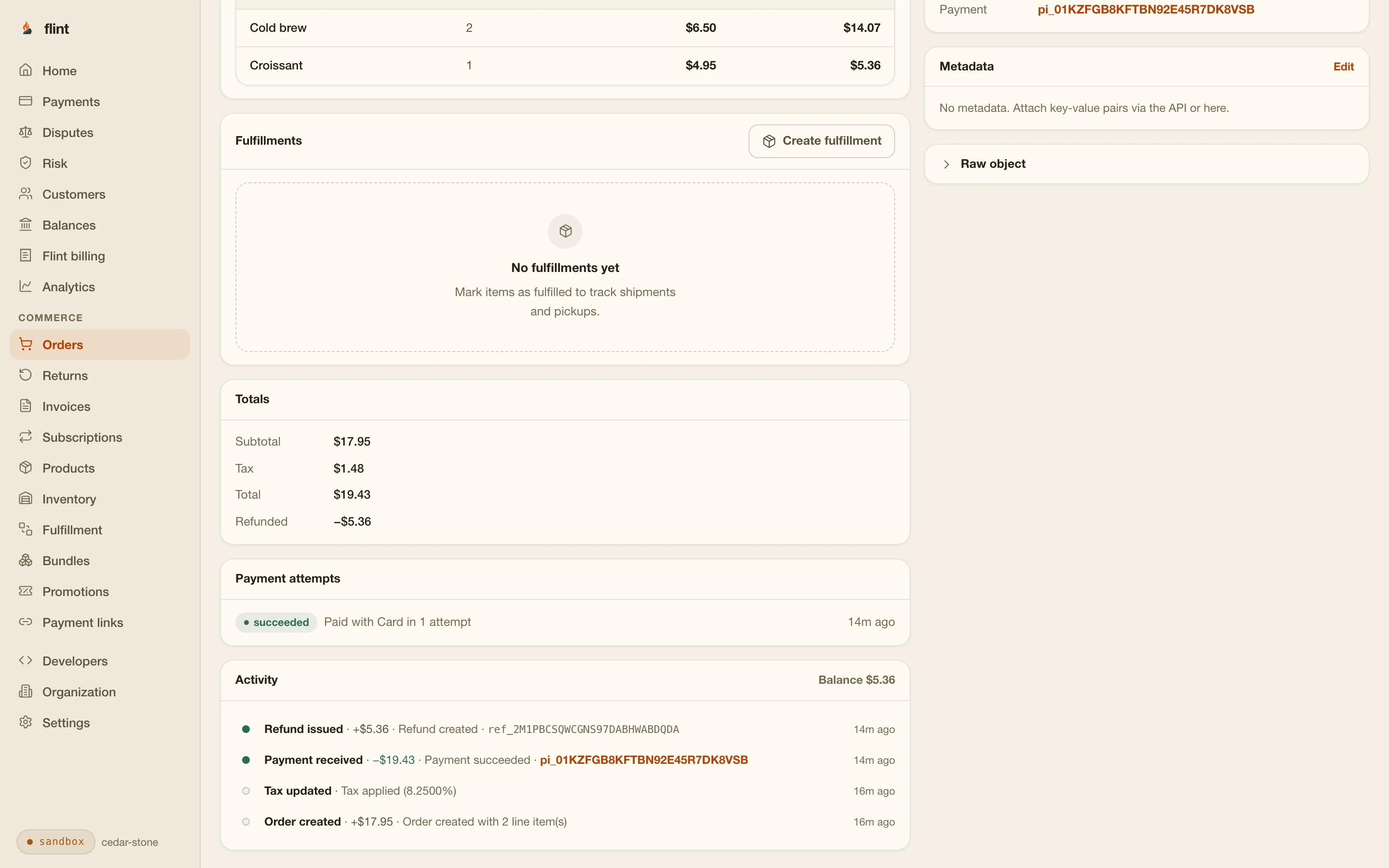
# the wings came out cold. refund the wings.
curl -X POST https://api.withflintpay.com/v1/refunds \
  -H "Authorization: Bearer YOUR_API_KEY" \
  -H "Idempotency-Key: table-12-wings" \
  -d '{
    "order_id": "ord_7g2TableTwelve",
    "line_items": [
      { "order_line_item_id": "li_2bqr7dExample", "quantity": 1 }
    ]
  }'
No amount in the request. The refund is computed from what the line settled for.
| the refund | ||
|---|---|---|
| Buffalo wings × 1line_items[].quantity | $11.95 | |
| Its share of the taxtax_money | $0.96 | |
| Back to the guestamount_money | $12.91 | |
- POST /v1/refunds
- line_item_allocations
- refunded_quantity
- refunded_tip_money
What comes with the key
Your team ships the restaurant product. The check is done.
Stripe processes every card · card data goes straight to Stripe · one processing fee per payment · samples validated against the published OpenAPI spec at build time
09Start
From a sandbox key to a paid tab in ten minutes.
Node
CLI
Sandbox keys are free and need no credit card. Create an order with a modifier on it, append a round, set the tip to 18 percent, then pay it down with two legs and watch the balance reach zero. Pay with 4242 4242 4242 4242, any future expiry, any CVC. Then refund the wings.
Then read these
- 01
- 02
- 03
- 04
- 05
- 06
- 07
- 08
- 09
Skip the wait: npm install -g @flintpay/cli && flint signup creates your account and a sandbox key from the terminal. CLI guide
FAQ
Questions worth asking first.
What do restaurant tech teams build on Flint?
POS systems, online ordering, kiosks, and QR pay-at-table products. You build the screens and the service flow. Flint holds the check as an order, prices the modifiers, computes tax and tip, collects the payment, and sends the webhooks your kitchen and guest screens follow.
How does an open tab work?
Create an order with the first round and leave it open. Each later round is a POST to the order's line-items route, and the response is the full order with totals recomputed. The activity trail returns every change with a running balance, so a tab screen renders the state without computing it. The order closes when the check is paid.
How do split checks work?
Create one payment leg per guest with POST /v1/orders/{order_id}/payment-intents, then settle them through the order's pay route with a payment_intents array. Send expected_outstanding_money with the call: if the check changed since the guest saw it, Flint rejects the payment before charging. The balance runs down as legs land, and order.paid fires once, when the whole check is covered.
Who works out the tip on a split check?
Flint does. A requested tip is intent until the payment lands. When several legs settle in one pay call, Flint shares the tip across them in proportion to each leg's amount, assigns the odd cents by a fixed rule, and freezes the result on the payment attempt. You read each card's share from the tip's payment_intent_allocations. Your code never sets a tip amount on a leg.
How do guests pay at the table?
Create a checkout session for the open order with tipping enabled, and print the returned checkout_session.url as a QR code on the check. The guest scans it, picks a tip, and pays with Apple Pay, Google Pay, or a card on their own phone. The payment settles into the same order your POS has open, and order.paid tells every screen the table is closed.
Can I add a service charge or an automatic gratuity?
Yes. A charge is its own object on the order, separate from line items and from tips. Add it as a fixed amount or as a percent with an explicit basis, before or after discounts, and state whether it is taxable. Promotions on the menu never shrink it, and it can be refunded on its own. Charge types include service_fee, delivery_fee, packaging_fee, small_order_fee, and rush_fee.
Can I 86 an item?
Yes. Mark the variant as tracked, and stock is kept per location. Read the inventory level to show whether a dish is still on, and create a reservation to hold the last portions for up to 15 minutes while a guest pays. If the stock is gone when the order is paid, the payment fails before any money moves.
Who processes the cards?
Stripe processes every card, and card details go from the guest's browser straight to Stripe. Hosted checkout includes Apple Pay and Google Pay, and you pay one processing fee per payment.
What does it cost to start?
Card payments are 3.79% + 35¢, with no monthly fee and unlimited test mode. The sandbox is free and needs no credit card, so you can open a tab, split it across two test cards, and refund a dish before you decide anything.