
AI app builders
Add payments to your app with one URL.
Lovable, v0, Bolt, and Replit build the app. Flint is everything after the Buy button: a hosted checkout with Apple Pay and Google Pay, tax computed on every order, emailed receipts, refunds by item, a buyer account page, and a dashboard that is already your back office. The integration is a link, so the generated code holds no API key and no card form, and there is no server to stand up.

<a href="https://checkout.withflintpay.com/pay/pl_1kmn0aExample">
  Buy the sampler
</a>
The price behind the link was fixed when the link was created, so the URL is safe in a button, a bio, or a QR code.
Create it in the dashboard, paste it into a prompt
The URL stays the same for the life of the link. Regenerate the app as often as you like and the button still opens the same store.
5
ways to pay on the page your button opens
published payment-option catalog
6
store features you never prompt for
totals, tax, receipts, refunds, history, billing
4
things a link sells, subscriptions included
payment_link_type and subscription_plan_id
$0
monthly fee, with no minimum
published rate card
01Three steps
Create a link. Prompt a button. Take a test payment.
About ten minutes from a sandbox key, none of them spent on a backend. The link is a complete checkout the moment it exists, so the only thing your builder writes is a button that opens it.
Create a payment link
POST /v1/payment-linksBuild it in the dashboard with a live preview of the page your buyer opens, or make one API call. The result is the same link either way, and it is selling as soon as it exists.
Or create it from a terminalcurl -X POST https://api.withflintpay.com/v1/payment-links \ -H "Authorization: Bearer YOUR_API_KEY" \ -H "Idempotency-Key: payment-link-fall-sampler-001" \ -d '{ "name": "Single-origin sampler", "line_items": [ { "name": "Single-origin sampler", "quantity": 1, "unit_price_money": { "amount": 3500, "currency": "USD" }, "allow_quantity_adjustment": true, "min_quantity": 1, "max_quantity": 5 } ], "customer_collection": { "require_email": true }, "metadata": { "campaign": "fall_sampler" } }'Buyers can pick a quantity from 1 to 5 here. The campaign tag rides along onto every order the link creates.
app.withflintpay.com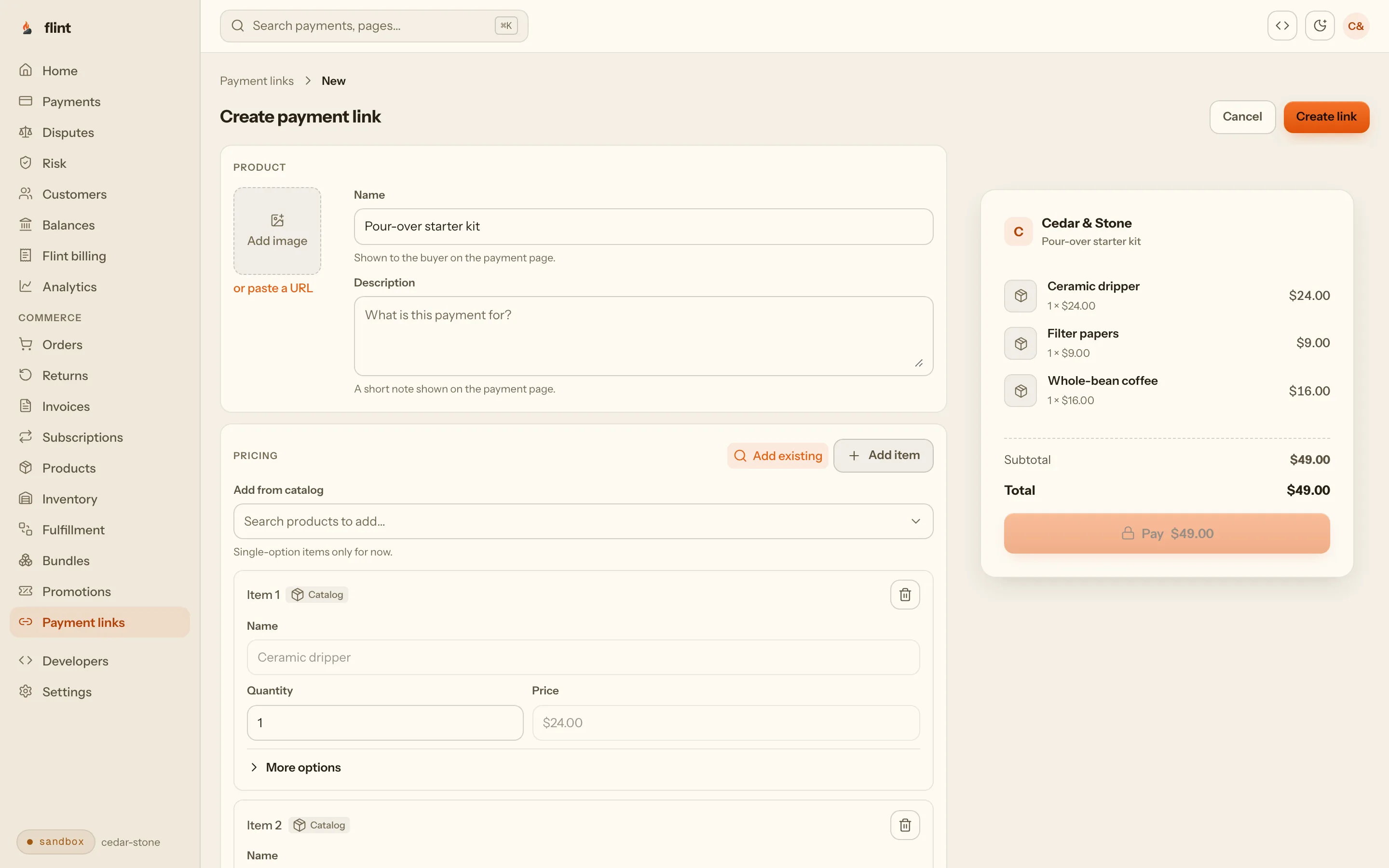
The link builder in the dashboard. No code, and nothing to deploy. Point the app at the URL
checkout.withflintpay.com/payGive your builder the URL and one rule. The agent writes an ordinary link, which is the one piece of payment code it gets right every time. If it reaches for Stripe’s old
redirectToCheckoutinstead, Stripe redirectToCheckout removed explains why that call fails on Stripe.js Clover and later.Paste into your builderAdd a Buy button for my $35 single-origin sampler. When it is clicked, open my Flint payment link: https://checkout.withflintpay.com/pay/pl_1kmn0aExample Do not put any API key or card form in the app code.Works the same in Lovable, v0, Bolt, and Replit, because every one of them can write a button that opens a URL.
No API key anywhere in the project, so there is nothing to leak when the app is public.
0 secretsNo card form in your components. Card details are entered on Flint's page.
hosted checkoutNo server, no environment variables, and no deploy step beyond the one your builder already does.
0 functionscheckout.withflintpay.com/pay/pl_1kmn0aExampleWhat the button opens: your name, your product, and a pay button with Apple Pay and Google Pay behind it. Run the store from the dashboard
app.withflintpay.comEvery payment lands as an order, and the back office is already there.
What one sale leaves behind{ "data": { "order_id": "ord_1kmn0aExample", "origin": "payment_link", "status": "closed", "payment_status": "paid", "line_items": [ { "name": "Single-origin sampler", "quantity": 2, "subtotal_money": { "amount": 7000, "currency": "USD" }, "metadata": { "payment_link_line_item_key": "single-origin-sampler" } } ], "pricing_amounts": { "total_money": { "amount": 7000, "currency": "USD" } }, "metadata": { "campaign": "fall_sampler", "custom_field_grind": "Espresso" } } }Where it came from, what sold, your campaign tag, and the buyer's answers, on a record your app never had to store.
Each payment creates an order with totals and tax computed by Flint, never by code in the page.
origin: payment_linkThe buyer gets an emailed receipt. You get the order in the dashboard with refunds one click away.
order.paidChanging the price means editing the link. The URL in your app stays the same, so there is nothing to regenerate.
PATCH /v1/payment-links/{payment_link_id}
02What you skip
Six features you never prompt for.
A store is more than a pay button. Built inside a generated app, each part is another prompt, another secret, and another thing that breaks on the next regeneration. Behind a Flint link, each one is a field on the order the sale already created.
Generated inside the app
Totals
Price math in a component
a total any visitor can edit before it is charged
Tax
A rate table the agent wrote
rates to keep current everywhere you sell
Receipts
An email service and a template
one more secret key with nowhere safe to live
Refunds
A refund screen, or none
arithmetic by hand when one item of three comes back
Buyer history
A database, a login, an orders page
tables and auth in an app that had neither
Recurring billing
A billing table and a scheduled job
renewals, failed cards, and cancellations to handle
6 things to generate · 6 things to keep working · rewritten with the app
Already on the order
Totals
pricing_amounts.total_moneycomputed on the orderTax
pricing_amounts.tax_moneytax.enabledReceipts
receipt emailorder.paidRefunds
line_items[]POST /v1/refundsBuyer history
customer_idaccount.withflintpay.comRecurring billing
subscription_plan_idPOST /v1/payment-links
1 URL in the app · 1 order per sale · 1 dashboard
03The back office
Your app has no database. The store already has one.
The first time a buyer asks where their order is, or wants one item refunded, you need a record. Every sale through a Flint link is an order in your dashboard, and every buyer has an account page you did not build.
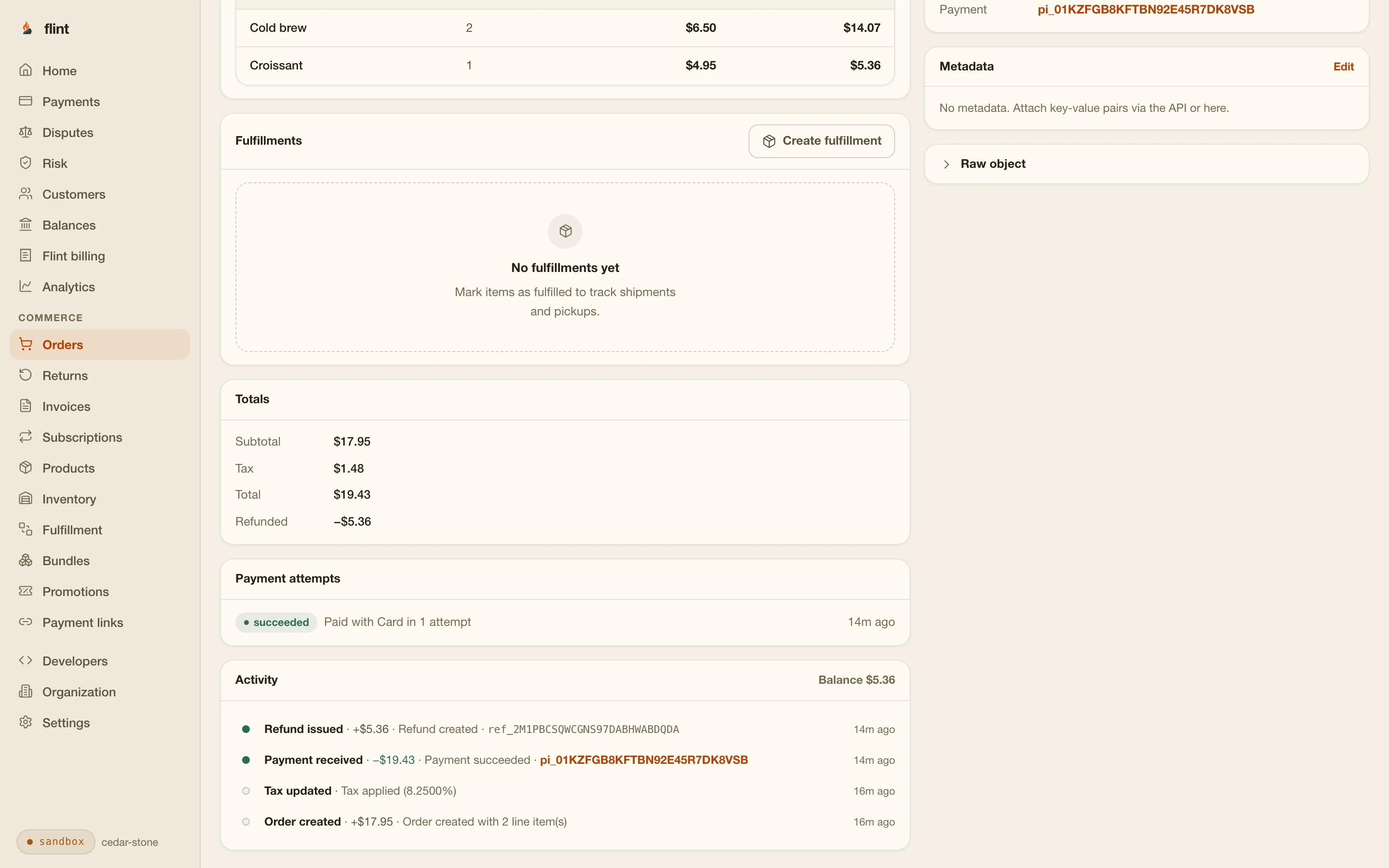
Answered from the first sale
- Who bought what, and when
- What each sale charged in tax
- What was refunded, item by item
- Which link or campaign a sale came from
- When the next payout arrives
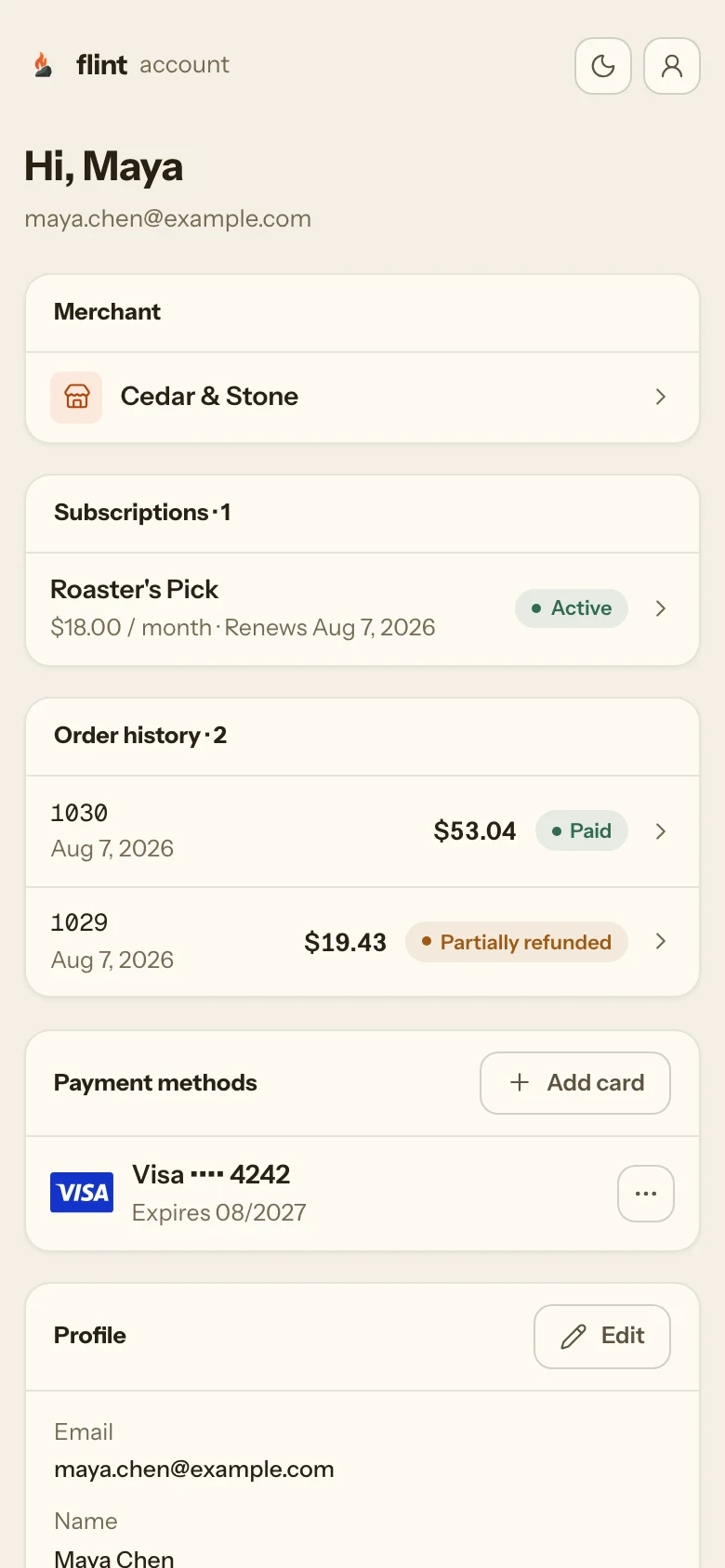
Refund one item, not a number
Pick the line item and a quantity. Flint works out what it settled for, including its share of tax, and the order shows what came back.
- POST /v1/refunds
- refunded_quantity
Receipts that send themselves
The buyer gets a receipt when the order is paid, under your name and colors, with a link to their account. There is no email service to connect.
- order.paid
Know what is selling
Orders, payments, analytics, and payouts are in the dashboard from the first sale. Tag a link once and every order it creates carries the tag.
- origin
- metadata
04Recurring revenue
Charging monthly is the same link.
Most apps that come out of a builder want a subscription, and billing is the part nobody wants to generate. Pass a plan in place of line items and the hosted page becomes a signup with your trial on it. Flint charges the card every cycle, writes each renewal as an order, and emails the buyer when a payment fails.
{
"name": "Roaster's club",
"subscription_plan_id": "plan_1kmn0aExample",
"customer_collection": { "require_email": true }
}Every completed checkout starts a subscription for that buyer, on the card the page collected. Your app still holds one URL.
Tickets, donations, and limited drops too
The same endpoint sells event tickets against a capacity that never oversells, takes donations with suggested amounts, and stops a limited drop at the limit you set. Each one is a hosted page your builder never has to draw. The payment links page shows all four.
- payment_link_type
- subscription_plan_id
- event_config
- max_completions
05Security
Nothing in the app worth stealing.
Everything a builder puts in the frontend ships to every visitor. Asked for payments, an agent will paste a key into the page and compute the total there too. With Flint the app holds a URL, and a URL with a fixed price behind it is safe to publish.
// what a prompt happily writes into the page
const API_KEY = "sk-live-8f2a..."; // now in every browser
async function pay(total) { // and totals from the client
await fetch("https://api.some-processor.com/charges", {
method: "POST",
headers: { Authorization: "Bearer " + API_KEY },
body: JSON.stringify({ amount: total * 100 }),
});
}Anyone who opens devtools can read this key, and the total can be edited before it is charged.
Every Flint key is a server credential. There is no browser key for an agent to paste, so the mistake has no valid form.
flint_live_...The app exposes a checkout URL. The amounts behind it were fixed when it was created, so publishing it costs nothing.
checkout.withflintpay.comCard fields render on Flint's hosted page, never in generated components, so card data never touches your app.
hosted checkoutTotals and tax are computed on the order, so there is no client-side math for a visitor to change.
pricing_amounts// browser code. no key, because neither call takes one.
const link =
"https://api.withflintpay.com/v1/payment-links/pl_1kmn0aExample";
async function buy(quantity) {
const page = await fetch(link + "/public").then((r) => r.json());
const checkout = await fetch(link + "/resolve", {
method: "POST",
headers: {
"Content-Type": "application/json",
"Idempotency-Key": crypto.randomUUID(),
},
body: JSON.stringify({
resolution_context: page.data.resolution_context,
quantity_overrides: { "single-origin-sampler": quantity },
}),
}).then((r) => r.json());
// open it exactly as returned
window.location.href = checkout.data.checkout_session.url;
}The two buyer-side calls take no API key, so they run from browser code. The quantity has to fit the bounds you set on the link, and the price is never the browser's to choose.
Public on purpose
The public read returns only what a buyer is allowed to see, plus a short-lived context for the one call that starts checkout. Your builder can write a product page with a quantity selector, call these two endpoints, and open the returned URL, all in frontend code, all without a secret anywhere in the project.
- GET /v1/payment-links/{payment_link_id}/public
- POST /v1/payment-links/{payment_link_id}/resolve
- quantity_overrides
06With a server
A full cart is one function.
When the app needs a cart with many products, create the order yourself. Every builder here has a server side, and one function that makes two calls is the entire backend a store needs. Flint prices the order, so the function sends items and gets back a URL.
// one server function, any runtime that has fetch.
// shown as a Supabase edge function; the body is identical
// in a Node server or a route handler.
Deno.serve(async () => {
const headers = {
Authorization: `Bearer ${Deno.env.get("FLINT_API_KEY")}`, // a secret
"Content-Type": "application/json",
};
const order = await fetch("https://api.withflintpay.com/v1/orders", {
method: "POST",
headers,
body: JSON.stringify({
line_items: [
{ name: "Single-origin sampler", quantity: 1,
unit_price_money: { amount: 3500, currency: "USD" } },
],
}),
}).then((r) => r.json());
const session = await fetch("https://api.withflintpay.com/v1/checkout-sessions", {
method: "POST",
headers,
body: JSON.stringify({
order_id: order.data.order_id,
redirects: { success_redirect_url: "https://example.com/thanks" },
}),
}).then((r) => r.json());
// the app opens this URL; the key never left the function
return Response.json({ url: session.data.checkout_session.url });
});Plain fetch, so it runs anywhere: a Supabase Edge Function, a Node server, a route handler. The key comes from the runtime's secret store and never appears in app code.
Add a server function that creates a Flint order for
the cart, then a checkout session for that order, and
returns checkout_session.url. Read FLINT_API_KEY
from my secrets. The Buy button calls the function and
opens the URL it returns. No key in the app code.Add the key to your builder's secrets first, then paste this.
The only scopes that key needs
- commerce.orders.write
- checkouts.checkout_sessions.write
Create a key that can write orders and checkout sessions and nothing else. It cannot issue refunds, read customers, or mint a broader key.
Lovable
Server work runs in Supabase Edge Functions. Put the key in a Supabase secret and the function above works nearly verbatim. No Supabase connected yet? The payment link needs none.
v0
v0 generates Next.js, so you have server actions and route handlers with env vars on Vercel. The Next.js commerce page walks the exact integration, webhooks included.
Bolt
Bolt builds full-stack Node apps, so the function is a plain server route. Set the key as an env var when you deploy, and keep it out of the generated source.
Replit
A full server plus a Secrets pane. Ask the agent to read the key from Secrets, and it stays out of the repo and out of the browser.
Building in v0 or exporting to Next.js? The Next.js commerce page has the server action, the route handler, and the webhook route. For the wider case for building a store with an agent, see sell online with AI.
07Proof
Regenerate the app. Keep the business.
Builder apps get regenerated, forked, and rebuilt, sometimes in the same week. Nothing about your store lives in one, so nothing about your store is lost when it changes.
Orders, buyers, payment history, and receipts live on Flint. Regenerating the frontend does not touch a single sale.
GET /v1/ordersThe link's URL never changes, so a rebuilt app needs the same one line it had before.
urlEvery order says where it came from, so sales from the link stay separate from anything you add later.
origin=payment_linkBuyers keep their account, their receipts, and their subscriptions through every version of your app.
account.withflintpay.comSubscriptions keep renewing while you rebuild, because billing runs on Flint and not in your app.
subscription_plan_idWhen you outgrow the builder, the integration deepens: a link, then hosted checkout, then your own frontend, on the same records with the same key.
POST /v1/checkout-sessionsreviewed 2026-09-19 against the payment links and key security guides · corrections: Flint Help
08Start
A paid test order by the end of the session.
Add a Buy button for my $35 single-origin sampler.
When it is clicked, open my Flint payment link:
https://checkout.withflintpay.com/pay/pl_1kmn0aExample
Do not put any API key or card form in the app code.Swap in your own link and product. The last sentence is the rule that keeps keys and card fields out of the generated code.
Create a link in the sandbox and paste the prompt. Click your new Buy button and pay with 4242 4242 4242 4242 and any future expiry. The paid order appears in your dashboard with its line items and tax. Going live means verifying your account, creating the link again in live mode, and swapping one URL.
Then read these
- 01
- 02
- 03
- 04
- 05
- 06
Skip the wait: npm install -g @flintpay/cli && flint signup creates your account and a sandbox key from the terminal. CLI guide
FAQ
Questions worth asking first.
How do I add payments to a Lovable app?
Create a payment link in the Flint dashboard, then prompt Lovable to open that URL from your Buy button. That is the whole integration, and it works with no Supabase connection. Once Supabase is connected, server work runs in Edge Functions: store your Flint key as a Supabase secret, create the order and checkout session inside a function, and have the app open the URL the function returns.
How do I add payments to a v0 app?
v0 generates Next.js, so you get both paths. A payment link works from any button with no server code. For a cart, use a server action or route handler with the key in a server-only env var: two calls, order then checkout session, and a redirect to the returned URL. The Next.js commerce page walks that exact code, including the webhook route that confirms payment.
How do I add payments to a Bolt or Replit app?
Both give you a server, so you can start with a payment link today and move to the two-call function when you want a cart. Keep the Flint key in the environment, Bolt sets env vars at deploy and Replit has a Secrets pane, create the order and session server-side, and send the browser the URL.
Can I accept payments with no backend at all?
Yes. A payment link is a full Flint checkout behind a URL. Create it in the dashboard or with one API call, then use it as a plain link anywhere: a button, a bio, a DM, a QR code. Every payment through it creates an order with totals and tax computed by Flint, the buyer gets an emailed receipt, and refunds work from the dashboard. If the app needs a quantity picker, the two buyer-side calls that start checkout take no API key, so they run from browser code.
Can I sell subscriptions from an AI-built app?
Yes, with the same kind of link. Create a plan, pass subscription_plan_id instead of line items, and the hosted page becomes a recurring signup with your trial on it. Every completed checkout starts a subscription for that buyer. Flint charges the saved card each cycle, writes each renewal as its own order, and emails the buyer when a payment fails. Your app holds a URL and no billing code.
Where does my API key go?
On a server, or nowhere. With a payment link the app needs no key at all, because the link is created in the dashboard and the buyer's side of it is public by design. With the server function, the key lives in your builder's secret store and the browser only receives the checkout URL. Every Flint key is a server credential, so there is no browser variant for an agent to reach for, and you can scope the function's key to the two permissions it uses.
What does a payment link give me besides the payment?
An order for every sale: what sold, the tax computed on it, who bought it, and where it came from. The buyer gets a hosted checkout with Apple Pay and Google Pay, an emailed receipt, and an account page with their order history. You get a dashboard with every order, refunds by line item, analytics, and payouts. None of it is code in your app.
What happens when I rebuild or outgrow the app?
You keep the store. Orders, buyers, payment history, and receipts live on Flint, so regenerating the frontend, in the same builder or in Next.js with your own code, does not touch a single sale. The integration deepens from a link to hosted checkout to your own frontend against the same order records, with the same key.
What does it cost to start?
Card payments are 3.79% + 35¢, with no monthly fee and unlimited test mode. The sandbox is free and needs no credit card, so you can create a link, wire the button, and pay it with a test card before you decide anything.