
Next.js · public alpha
Sell from a server action.
One server action creates the order and sends the buyer to a hosted checkout. Flint computes the totals and tax, takes the payment, emails the receipt, keeps the order history, and refunds by line item. Your app keeps its pages and its own data, and your Prisma schema never gets an Order model.
3.79% + 35¢ on cards · no monthly fee · free sandbox · no credit card
"use server";

import { Client } from "@flintpay/node";
import { redirect } from "next/navigation";

const flint = new Client({
  baseUrl: "https://api.withflintpay.com",
  apiKey: process.env.FLINT_API_KEY!,
});

export async function buy() {
  const order = await flint.orders.create({
    line_items: [
      { name: "Cold brew", quantity: "2",
        unit_price_money: { amount: "650", currency: "USD" } },
      { name: "Croissant", quantity: "1",
        unit_price_money: { amount: "495", currency: "USD" } },
    ],
  });

  const launch = await flint.checkoutSessions.create({
    order_id: order.order_id,
    redirects: {
      success_redirect_url: "https://example.com/thanks",
      cancel_redirect_url: "https://example.com/menu",
    },
  });

  redirect(launch.checkout_session.url!);
}
The whole purchase path. Line items go in, a checkout URL comes out, and the buyer is redirected. No total is sent, because Flint computes it.
two calls to a paid order · zero money tables in your schema · 574 operations when you need more
01The repo
On a payments API, your repo grows a store.
A payments API takes the payment and records an amount. What was sold, the tax on it, the refund, and the customer's history turn into files in your app, and a second copy of every sale that you keep in sync. On Flint they are fields on the order, and those files never exist.
Your repo on a payments API
Orders
Order, OrderItem, and Refund models
prisma/schema.prisma, plus every migration after it
Totals
Subtotal, discount, and tax math
lib/cart.ts, and a test for every rounding case
Payment state
A webhook that copies the sale into your tables
app/api/stripe-webhook/route.ts: checkout.session.completed to rows
Refunds
Partial refund proration, tax share included
lib/refunds.ts
Order history
An orders page, and the auth in front of it
app/account/orders/page.tsx
Back office
An admin area to look up and refund sales
app/admin/**
6 things to build, test, and migrate · 1 database to reconcile with the processor
The same store on Flint
Orders
order.line_itemsGET /v1/orders/{order_id}Totals
pricing_amountsPOST /v1/ordersPayment state
payment_statusorder.paidRefunds
line_item_allocationsPOST /v1/refundsOrder history
customer_idGET /v1/ordersBack office
the dashboardapp.withflintpay.com
2 files in your repo · 0 money tables · 1 record to read
It counts double when an agent writes the code. Asked for checkout, it will scaffold the whole left column, and every rounding bug in it is yours to find. On Flint it writes two SDK calls and a webhook route. The sell online with AI page covers building a store with an agent end to end.
Already on Stripe Checkout? The post on what Next.js and Stripe tutorials leave out walks the async payments, concurrent webhook handlers, and client-supplied prices that production adds.
02Day one
The pages you were going to build are already live.
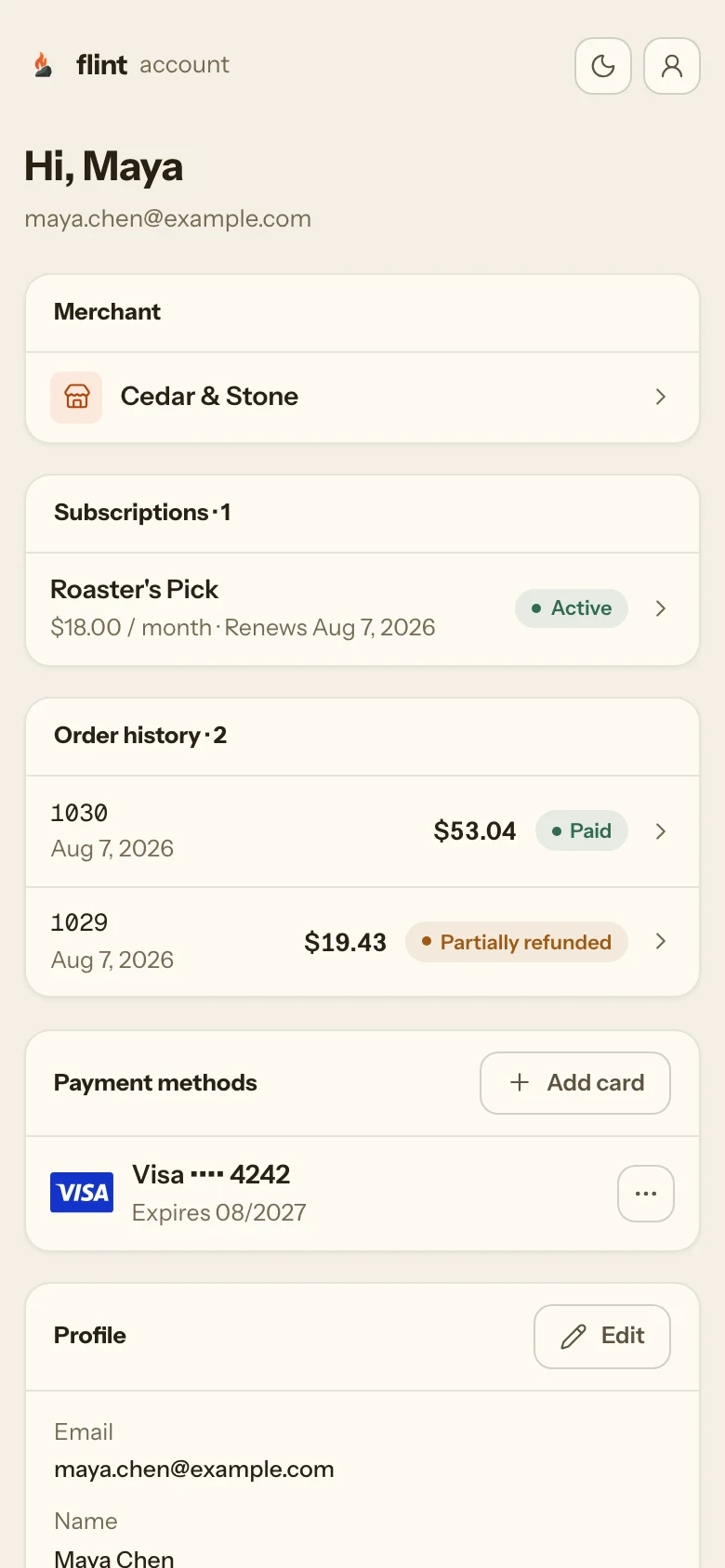
A checkout, an emailed receipt, a signed-in buyer account, and a back office come with the API key. None of them is a route in your app, so none of them is on your roadmap.
A hosted checkout under your business name that takes cards, Apple Pay, Google Pay, ACH debit, and Affirm.
POST /v1/checkout-sessionsA receipt emailed to the buyer the moment the order is paid, built from the order's own line items.
order.paidA buyer account with order history, subscriptions, and saved cards. It replaces app/account/orders and the auth in front of it.
account.withflintpay.comA dashboard with 20 sections, including orders, refunds, disputes, payouts, and analytics. It replaces app/admin.
app.withflintpay.comPayouts to your bank, each one tied back to the payments inside it.
GET /v1/payouts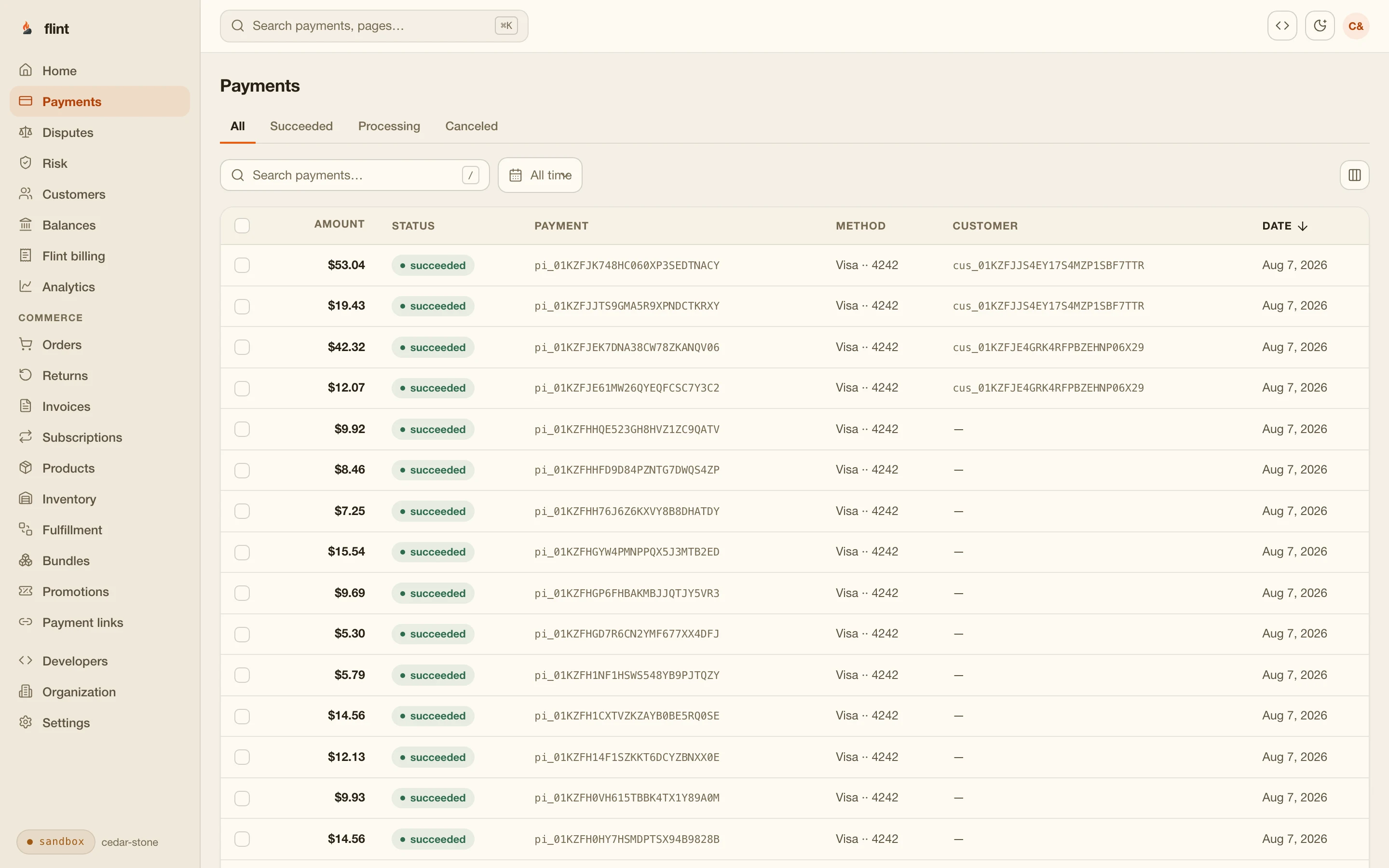
03The boundary
Nothing about money ships to the browser.
Anything in a client component goes to every visitor, the math and the key with it. Next.js already draws the line between server and client, and Flint sits entirely on the server side of it.
"use client";
// what a prompt generates when nothing pushes back

const KEY = process.env.NEXT_PUBLIC_PAY_KEY;   // in every browser now

export function Checkout({ items }) {
  const subtotal = items.reduce((sum, item) => sum + item.price * item.qty, 0);
  const total = subtotal * 1.08;               // tax, hopefully

  async function handlePay() {
    await fetch("https://api.example-payments.com/charges", {
      method: "POST",
      headers: { Authorization: `Bearer ${KEY}` },
      body: JSON.stringify({ amount: Math.round(total * 100) }),
    });
  }

  return <button onClick={handlePay}>Pay ${total.toFixed(2)}</button>;
}
It passes review. The key in a NEXT_PUBLIC_ variable is in every browser that loads the page, and a total computed in a component is a total anyone can edit before it is charged.
Every Flint API key is a server credential. There is no publishable key, so there is nothing for a client component to leak.
server-only keysYour server sends line items and Flint computes subtotal, tax, and total. No arithmetic runs where a visitor can change it.
pricing_amountsThe buyer's browser receives one thing: the hosted checkout URL. Card fields render on Flint's page, never in your components.
checkout_session.urlThe buyer pays the balance on the order record, whatever the page displayed.
settlement_amounts.outstanding_money04The integration
Four steps from create-next-app to a paid order.
All of it runs on a free sandbox key. Nothing is host-specific: server actions, route handlers, and two env vars run the same on Vercel, in a container, or on a laptop.
Put the key in a server-only env var
.env.localLeave off the NEXT_PUBLIC_ prefix and Next.js keeps both values out of every client bundle.
.env.local# .env.local # no NEXT_PUBLIC_ prefix, so Next keeps both out of every client bundle FLINT_API_KEY=your-sandbox-key FLINT_WEBHOOK_SECRET=your-endpoint-secretCreate the order and the session on the server
POST /v1/orders · POST /v1/checkout-sessionsA form calls a server action. A client component calls a route handler. Either way your server builds the order from line items it controls and gets back one URL.
app/checkout/actions.ts"use server"; import { Client } from "@flintpay/node"; import { redirect } from "next/navigation"; const flint = new Client({ baseUrl: "https://api.withflintpay.com", apiKey: process.env.FLINT_API_KEY!, }); export async function buy() { const order = await flint.orders.create({ line_items: [ { name: "Cold brew", quantity: "2", unit_price_money: { amount: "650", currency: "USD" } }, { name: "Croissant", quantity: "1", unit_price_money: { amount: "495", currency: "USD" } }, ], }); const launch = await flint.checkoutSessions.create({ order_id: order.order_id, redirects: { success_redirect_url: "https://example.com/thanks", cancel_redirect_url: "https://example.com/menu", }, }); redirect(launch.checkout_session.url!); }redirect() sends the buyer straight to checkout from the same function that created the order.
app/menu/page.tsximport { buy } from "../checkout/actions"; export default function Menu() { return ( <form action={buy}> <button type="submit">Order for pickup</button> </form> ); }The entire frontend of the purchase: a form whose action is the server action. There is no payment form to build and no SDK in the client bundle.
The order is built from line items your server controls, not from a price the browser sent.
POST /v1/ordersThe session wraps that order, so the buyer pays exactly what the record says.
POST /v1/checkout-sessionsPass an idempotency key and a double submit cannot create two orders.
Idempotency-KeyAdd the webhook route
app/api/flint/route.tsThe success redirect is a hint; the webhook is the confirmation. A buyer can close the tab before the redirect, and anyone can open the success URL directly. The route verifies the delivery and fulfills. It does not rebuild the order, because the order already exists.
app/api/flint/route.tsimport { Client } from "@flintpay/node"; const flint = new Client({ baseUrl: "https://api.withflintpay.com", apiKey: process.env.FLINT_API_KEY!, }); export async function POST(request: Request) { // route handlers do not pre-parse the body, so these are // the exact bytes the signature signs const rawBody = new Uint8Array(await request.arrayBuffer()); // throws on a bad signature or a stale timestamp const { event, known } = flint.verifyWebhook( rawBody, Object.fromEntries(request.headers), [process.env.FLINT_WEBHOOK_SECRET!], ); if (known && event.event_type === "order.paid") { // fulfill: the payload carries the order id and totals } return new Response(null, { status: 204 }); }No body-parser setting and no raw-body middleware: route handlers hand you the exact bytes the signature signs, and the SDK does the verification.
Deliveries carry Standard Webhooks headers, and the SDK checks all three with a 300 second tolerance.
verifyWebhookA failed delivery retries with backoff, up to 9 attempts over about three days. A cold start or a bad deploy does not lose a sale.
retriesEvery retry carries the same id, so deduplication is one lookup.
webhook-idOn the wire
- webhook-id
- webhook-timestamp
- webhook-signature
Events your route branches on
- order.paid
- order.refunded
- subscription.past_due
Events report what happened to the order, so the handler reads sales, not processor internals. Webhooks guide →
Test it on localhost with real signatures
flint listenThe CLI streams your sandbox's events to your dev server, signed like production, with no tunnel and no public URL. Pay the test order with 4242 4242 4242 4242 and watch the route fire.
flint listen --forward-to http://localhost:3000/api/flintThe verification code you run in development is the code you ship. CLI docs →
app.withflintpay.com/developers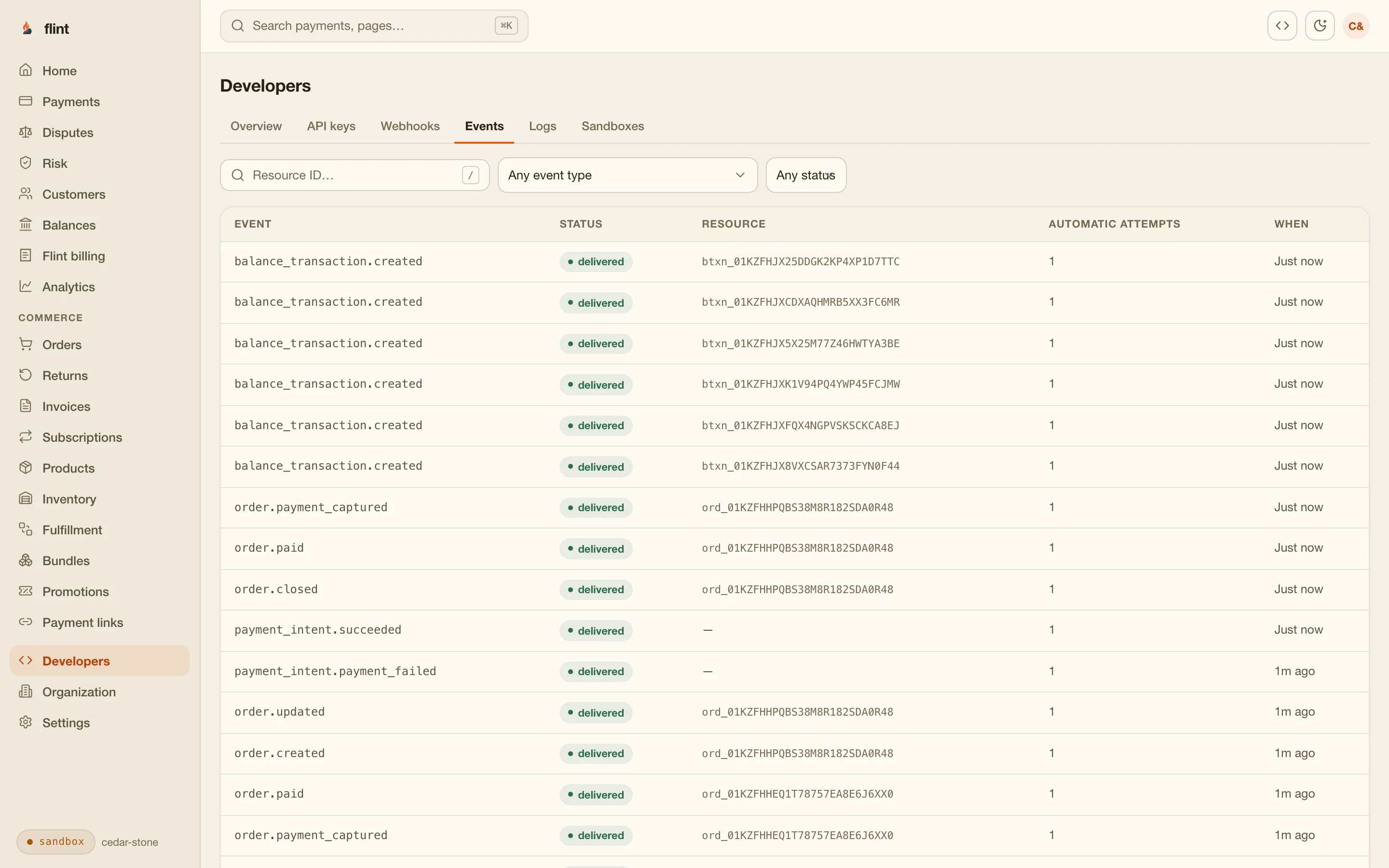
The developer console in the dashboard: API keys, webhook endpoints, the event stream, and request logs for every call your app made.
05Month two
The next feature is a call, not a migration.
Stores ask for the same things in the same order: a partial refund, order history, a discount code, a subscription. Each one attaches to the order your server action already creates, so none of them touches your schema.
Refund the croissant, not the whole order.
POST /v1/refunds · line_items[]Show customers their past orders.
GET /v1/orders · customer_idRun a 10% off code this weekend.
POST /v1/promotionsSell the beans as a monthly subscription.
POST /v1/subscriptionsStop selling what is out of stock.
POST /v1/inventory-reservationsSend a wholesale customer an invoice.
POST /v1/invoicesEvery subscription renewal is an order too, so the webhook route you wrote for one sale already handles the recurring ones. Catalog, promotions, inventory, and invoices are the same API under the same key. The commerce API page walks through all of it.
What you get with the key
Your repo keeps the storefront. Flint runs the store behind it.
Stripe processes every card · card data goes straight to Stripe · one processing fee per payment · samples validated against the published OpenAPI spec at build time
Public alpha
Alpha accounts get the changes first.
Real merchants take real payments on Flint today, and new features reach alpha accounts before general rollout. The order you create in the sandbox this afternoon is the same record you go live on.
shipped 2026-09-29 · Codes for saved details default to the auto channel
Building now?
Create an account from your terminal with flint signup. The sandbox is free, with no credit card.
06Start
One prompt, or two files by hand.
Add checkout to my Next.js app with Flint. Create
the order and the checkout session in a server
action with the sandbox key in FLINT_API_KEY, send
the buyer to the session URL, and add a webhook
route that verifies the signature with the SDK
and marks the sale fulfilled on order.paid.
Or write it yourself: the server action in the hero and the webhook route in step 3 are the whole integration.
Install the SDK
Install the CLI
Then read these, in order
- 01
- 02
- 03
- 04
- 05
FAQ
Questions worth asking first.
Why use Flint instead of Stripe Checkout in my Next.js app?
Stripe processes every Flint card payment, so the payment itself is the same. The difference is where the store lives. On a payments API your app owns the order model: a Prisma schema for orders and line items, a webhook that copies each sale into your tables, tax and discount math, refund proration, and a second copy of every sale to keep in sync with the processor. On Flint the order is the API's record. Totals and tax compute server-side, refunds take line items, order history is a query, receipts and the buyer account are already running, and your schema keeps zero money tables.
Should I use a server action or a route handler for checkout?
Both work and both stay server-side. Use a server action when a form or button in a server-rendered page starts the purchase: it creates the order and redirects to checkout in one function. Use a route handler when a client component starts it, or when something outside your app posts to you. Webhooks are always a route handler, because the sender is Flint, not your UI.
Can I call Flint from a client component?
Flint API keys are server credentials, so the call goes through a server action or a route handler. The client component collects what the buyer wants and hands it to the server; the browser only ever receives the hosted checkout URL. The key stays out of the bundle and the total stays out of reach of anyone editing JavaScript in a browser.
How do I verify Flint webhooks in the App Router?
Read the raw bytes with request.arrayBuffer(), convert the headers with Object.fromEntries(request.headers), and pass both to the SDK's verifyWebhook with your endpoint secret. It checks the Standard Webhooks headers with a 300 second tolerance and throws on a mismatch. Route handlers do not pre-parse the body, so there is no body-parser setting to turn off and no raw-body middleware to add.
How do I test Flint webhooks in Next.js locally?
Run your dev server, then run flint listen with the forward flag pointed at your webhook route. The CLI streams your sandbox's events and posts them to localhost with a real signature, so the verification code you run in development is the code you ship. No tunnel, no registered endpoint, no fake payloads.
Does this work on Vercel and other serverless hosts?
Yes. The integration is server actions, route handlers, and two environment variables, which is what every Next.js host runs. Failed webhook deliveries retry with backoff, up to 9 attempts over about three days, so a cold start or a bad deploy does not lose a sale. Every retry carries the same webhook-id, which makes deduplication one lookup.
Can Claude Code or Cursor write this integration?
Yes. Connect the Flint docs MCP server or paste SKILL.md into context and the agent works from live endpoint schemas instead of memory. There is little for it to get wrong: two SDK calls in a server action and one webhook route, with the totals, tax, and refund math on Flint's side of the API.
Do I need a database to track orders?
Not for the commerce. The order lives on Flint with its line items, totals, payment state, refunds, and history, and the dashboard reads it without any code from you. Your database holds what is yours: content, accounts, entitlements. A webhook route on order.paid is where a sale updates it.
What does it cost?
Cards cost 3.79% + 35¢, with no monthly fee. The sandbox is free and needs no credit card. One processing fee per payment covers Flint and the card processing underneath, so there is no separate processor bill.
Build the store this afternoon.
Free sandbox, no credit card. One server action and one webhook route, and the checkout, receipts, buyer account, and dashboard are already running behind them.
Skip the wait: npm install -g @flintpay/cli && flint signup creates your account and a sandbox key from the terminal. CLI guide
app/checkout/actions.ts · the first file you write