
Embedded payments for SaaS
Every business on your platform, taking payments.
Create a merchant from an email address, hand them a working API key as soon as they confirm it, and verify the business inside your own product. Their buyers pay on a checkout with their name and color on it, the money settles to their bank, and one webhook endpoint reports every merchant's sales to you. You never hold funds.
3
calls from an email address to a merchant's first API key
start, verify-email, api-key
6
systems you do not build or run
onboarding, verification, keys, readiness, events, reconciliation
6
account screens you mount in your own pages
merchant account session components
5
ways to pay on every merchant's checkout
published payment-option catalog
01What you skip
Six systems you do not build.
Payments looks like one feature until the second merchant signs up. Then it is a signup wizard, a verification UI, a credential store, a status poller, a webhook router, and a reconciliation job, and your team runs all six. On Flint each one is a field or an endpoint on the merchant, and it works the same for merchant five hundred as for merchant one.
Built on a raw processor
Onboarding
A signup wizard and an application queue
a form per requirement, rebuilt when the requirements change
Verification
Document upload, review states, reminder emails
a redirect to someone else's domain, or a compliance UI of your own
Credentials
A vault with one secret per merchant
rotation, scoping, and a lookup on every request
Can they charge yet
A poller and a status column
provider states translated into your own words
Events
A webhook router
working out whose event just arrived, then retries and replay
Reconciliation
A nightly job across every payout schedule
fees matched back to sales by hand
6 systems to build · 6 systems on call · none of them your product
Already on the merchant
Onboarding
next_stepGET /v1/onboarding/stateVerification
account_onboardingPOST /v1/merchant-account-sessionsCredentials
scopes[]POST /v1/onboarding/api-keyCan they charge yet
payments.statusmerchant.readiness.updatedEvents
merchant_idPOST /v1/webhook-endpointsReconciliation
fee_money, net_money, order_idGET /v1/balance-transactions
1 merchant record · 1 key per merchant · 1 webhook endpoint
02Onboarding
From an email address to a live merchant.
Four steps. The key arrives at step two, before verification starts, so the integration gets built while the business is being verified and not after it.
Create the merchant
POST /v1/onboarding/startSend the owner's email and name, then confirm the code Flint emails them. Those two calls create the merchant, its owner, and a private sandbox. There is no application to fill in and no queue to wait in before you can build.
curlcurl -X POST https://api.withflintpay.com/v1/onboarding/start \ -H "Content-Type: application/json" \ -H "Idempotency-Key: onboard-northside-001" \ -d '{ "email": "owner@northsidecoffee.example", "first_name": "Ada", "last_name": "Okonkwo" }'This call takes no API key. It creates the merchant that every later key belongs to.
one merchant, the first twenty minutesThe sandbox sale at 14:19 happened while a document was still outstanding. Building and verifying run side by side. Hand them a key
POST /v1/onboarding/api-keyThe first key is available as soon as can_issue_api_key is true, which is right after the email is confirmed. It is bound to the merchant's sandbox, so orders, checkout, refunds, and webhooks all work while the documents are still being collected.
curlcurl -X POST https://api.withflintpay.com/v1/onboarding/api-key \ -H "Authorization: Bearer ONBOARDING_SESSION_TOKEN" \ -H "Idempotency-Key: first-key-northside-001" \ -d '{ "name": "Northside Coffee sandbox" }'The secret is returned once, on this response. Store it against the merchant in your secrets manager.
the key, one call laterThen one key per job
- commerce.orders.write
- commerce.orders.read
- payments.payment_intents.write
- payments.payment_intents.read
- checkouts.checkout_sessions.write
- checkouts.checkout_sessions.read
Ask
POST /v1/api-keysfor three write scopes and the key carries these six, because a write scope includes its read. A key can only grant scopes it holds, so a checkout key can never mint a broader one.Verify the business inside your product
POST /v1/merchant-account-sessionsSubmit the business profile with one call, then read the state. When a step needs the owner, next_step.launch names the component to mount, and the session call returns the credentials for it. Identity, documents, the payout bank account, and the agreements are collected in your pages, under your navigation.
GET /v1/onboarding/state{ "data": { "merchant_id": "mer_1kmn0aExample", "can_issue_api_key": true, "requested_capabilities": [ "accept_card_payments", "receive_payouts" ], "requirements": { "currently_due": ["business_verification_document"] }, "next_step": { "machine_completable": false, "launch": { "method": "POST", "endpoint": "https://api.withflintpay.com/v1/merchant-account-sessions", "component": "account_onboarding", "recommended_policy": { "collection_strategy": "incremental", "future_requirements": "omit" } } } } }The response says what to render next. Copy next_step.launch into the session call and your wizard never has to interpret a requirement.
curlcurl -X POST https://api.withflintpay.com/v1/merchant-account-sessions \ -H "Authorization: Bearer MERCHANT_KEY" \ -H "Idempotency-Key: verify-northside-001" \ -d '{ "components": ["account_onboarding", "notification_banner"], "collection_strategy": "incremental", "future_requirements": "omit" }'Incremental collection asks only for what is due now. When a requirement comes up months later, the same call opens a session for that one item.
- POST /v1/onboarding/advance
- GET /v1/onboarding/state
- next_step.launch
- POST /v1/merchant-account-sessions/refresh
Go live when readiness says so
GET /v1/merchantThe merchant answers the two questions your product has: can this business charge, and can it be paid. Subscribe to merchant.readiness.updated, read the merchant when it fires, and turn checkout on in your UI when payments reports ready.
GET /v1/merchant{ "data": { "merchant_id": "mer_1kmn0aExample", "business_name": "Northside Coffee", "payments": { "status": "ready" }, "payouts": { "status": "pending", "status_reason": "pending_verification" }, "observed_at": "2026-09-19T14:04:11Z" } }Charging is cleared while payouts finish verifying. Sales made now wait in the merchant's balance and pay out when payouts clears.
Every status either one can report
- ready
- pending
- blocked
- not_available
- not_requested
Each status that is not ready comes with a reason and the requirements still outstanding.
status_reasonGoing live is a key swap. The same code that ran in the sandbox runs against real money.
Flint-Mode: live
03Checkout
Their name on the checkout. Your product around it.
The buyer is your customer's customer, so the page they pay on carries the merchant's name and color. Collect the card in your own UI with Stripe Elements, or open a hosted page with the same theme. Either way Flint confirms the payment, runs 3D Secure, and settles the order, and card details never reach your servers.
{
  "data": {
    "order_id": "ord_1kmn0aExample",
    "payment_collection": {
      "stripe": {
        "account_id": "acct_1kmn0aExample",
        "publishable_key": "pk_test_1kmn0aExample",
        "elements": {
          "next_step": "collect_payment_source",
          "submit_to": "pay_order",
          "mode": "payment",
          "amount_money": { "amount": 1053, "currency": "USD" },
          "payment_method_types": ["card"],
          "digital_wallets": ["apple_pay", "google_pay"],
          "payment_method_creation": "manual"
        }
      }
    }
  }
}
Reading the order returns that merchant's account and publishable key, so Stripe Elements mounts under the right business with no credential lookup of yours.
Totals you do not compute
Send line items and Flint prices the order, tax included. The amount on the pay button and the amount charged come from the same record.
Wallets and 3D Secure included
The same guidance lists Apple Pay and Google Pay for the merchant, and when a card needs authentication Flint hands your page the one step to run.
Retries that cannot double charge
Every write takes an idempotency key, and an order that is already paid has nothing outstanding to charge.
- payment_collection.stripe.elements
- expected_outstanding_money
- theme.primary_color
- checkout_session.url
04Beyond the card form
Every merchant gets the whole commerce API.
A processor account gives a business a way to charge a card. A Flint merchant also has orders with tax computed on them, refunds by line item, subscriptions, invoices, payment links, and customer records, all behind the key you already minted. Each one is a feature you can ship in your product without signing another vendor.
Orders and tax
Every sale is an order with line items, computed totals, and tax. Your reports read a record and never re-add a cart.
- POST /v1/orders
- pricing_amounts.tax_money
Refunds by item
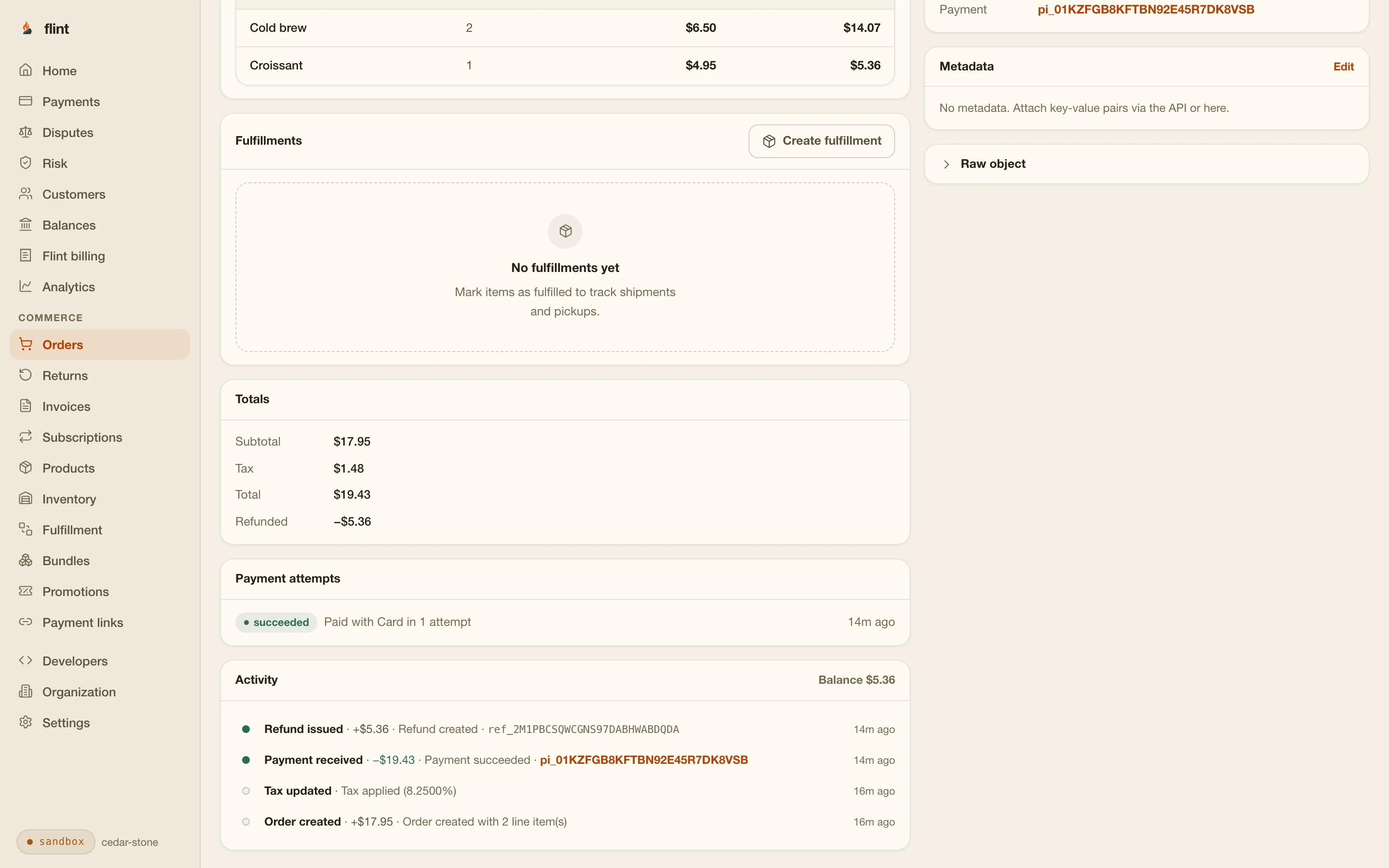
Refund one croissant and Flint works out its share of tax. Your support screen is one call.
- POST /v1/refunds
- refunded_quantity
Subscriptions
Memberships and recurring plans for your merchants, with renewals written as orders. See subscriptions.
- POST /v1/subscriptions
- subscription_plan_id
Invoices
Hosted invoices with payment terms and reminders, paid by card or bank. See invoices.
- POST /v1/invoices
Payment links
A checkout behind a URL, for the merchant who sells from a text message. See payment links.
- POST /v1/payment-links
Customers and receipts
Saved cards, order history, and emailed receipts under the merchant's name, with a buyer account page behind every receipt.
- POST /v1/customers
- customer_id
05Events
One endpoint for every merchant's events.
Register your product as a partner app. Each merchant approves it once on a hosted consent screen, you exchange the code for a token scoped to that merchant, and from then on their events arrive at one URL of yours. The merchant's id is on every envelope, so routing is a lookup.
curl -X POST https://api.withflintpay.com/v1/webhook-endpoints \
  -H "Content-Type: application/json" \
  -H "Authorization: Bearer YOUR_PLATFORM_KEY" \
  -d '{
    "url": "https://yourapp.example/flint/merchant-events",
    "event_sources": ["installed_merchants"],
    "partner_app_id": "papp_1kmn0aExample",
    "mode": "both",
    "enabled_events": [
      "order.paid",
      "refund.created",
      "payout.paid",
      "merchant.readiness.updated"
    ]
  }'
One endpoint, registered once against your app. An event is forwarded only when that merchant's install granted the matching read scope.
{
  "webhook_event_id": "whev_1kmn0aExample",
  "event_type": "order.paid",
  "payload_version": 1,
  "mode": "test",
  "merchant_id": "mer_1kmn0aExample",
  "created_at": "2026-09-19T14:19:02Z",
  "data": {
    "order_id": "ord_1kmn0aExample",
    "payment_status": "paid",
    "total_money": { "amount": 1053, "currency": "USD" },
    "outstanding_money": { "amount": 0, "currency": "USD" }
  }
}
merchant_id says whose sale this is. webhook_event_id is the same on every retry and resend, so it is your deduplication key.
{
  "access_token": "ACCESS_TOKEN",
  "refresh_token": "REFRESH_TOKEN",
  "token_type": "bearer",
  "expires_in": 3600,
  "merchant_id": "mer_1kmn0aExample",
  "partner_app_id": "papp_1kmn0aExample",
  "partner_app_install_id": "pinst_1kmn0aExample",
  "environment_grant_id": "egrt_1kmn0aExample",
  "mode": "test",
  "scope": "commerce.orders.read payments.payment_intents.read"
}
A standard authorization-code exchange. The token comes back stamped with the merchant, the install, the grant, and the mode, so a test token can never act on live data.
Replay is an API call
- Deliveries
- GET /v1/webhook-events/{webhook_event_id}/deliveries
- Resend
- POST /v1/webhook-deliveries/{webhook_delivery_id}/resend
- Merchant feed
- GET /v1/webhook-events?event_source=installed_merchants
- Live tail
- GET /v1/webhook-events/stream
Install lifecycle, as events
- partner_app.install.created
- partner_app.install.permissions_updated
- partner_app.install.environment_grant.created
- partner_app.install.environment_grant.revoked
- partner_app.install.revoked
Test and live grants are separate and each is revocable on its own, so a merchant can try your app in a sandbox before granting live access. Partner app guide
- GET /v1/oauth/authorize/preview
- POST /v1/oauth/token
- environment_grant_id
06The money
Paid out to their bank. Reconciled from your code.
Stripe processes every card, and each merchant's sales settle to that merchant's own bank account on the payout schedule they choose. Nothing routes through a platform account, so you add payments without putting a funds flow on your books. What you get is the read side: every balance movement with its fee and net, tied to the order that caused it.
| One sale at Northside Coffee | ||
|---|---|---|
| Order totalamount_money | $10.53 | |
| Processing feefee_money | $0.75 | |
| Lands in their balancenet_money | $9.78 | |
Each merchant picks a payout schedule: daily, weekly, monthly, or manual.
GET /v1/payout-settingsPayouts report their status through to arrival, and payout.paid tells your app the money landed.
payout.paidBalances separate pending funds from available funds, per merchant.
GET /v1/balances{
"data": [
{
"type": "payment",
"status": "available",
"merchant_id": "mer_1kmn0aExample",
"order_id": "ord_1kmn0aExample",
"amount_money": { "amount": 1053, "currency": "USD" },
"fee_money": { "amount": 75, "currency": "USD" },
"net_money": { "amount": 978, "currency": "USD" },
"available_at": "2026-09-21T00:00:00Z"
}
]
}One payment, one fee, one net, one order id. The nightly reconciliation job becomes a query.
Weighing a payfac registration instead? Payfac-as-a-service, compared sets the vendors side by side on onboarding, registration, and economics, and Should my SaaS become a payfac? works through the costs.
The merchant list your support team wants
Readiness reads and the event feed are enough to build the screen every platform ends up needing: who can charge, who can be paid, and who is selling.
Bank details, balances, and tax forms are components too
The session that mounted verification also mounts the screens a merchant needs for the life of the account. Changing a payout bank account, checking a balance, and downloading tax documents all happen inside your product, and you write none of those screens. Merchant account sessions
- account_onboarding
- account_management
- payouts
- balances
- tax_documents
- notification_banner
- GET /v1/balances
- GET /v1/payouts
- GET /v1/payout-settings/destinations
reviewed 2026-09-19 against the onboarding, partner app, and webhooks guides · corrections: Flint Help
07Start
Onboard your first test merchant today.
Node
CLI
Receive the merchant feed on localhost
Every merchant you onboard starts in a private sandbox with its own data, so a test merchant costs nothing and nothing goes to underwriting. Pay their first order with 4242 4242 4242 4242, any future expiry, and any CVC, and watch order.paid arrive on your endpoint with their merchant id on it. Swap the test key for a live one and the same code onboards a real business.
More sandboxes for CI, reset between runs
- POST /v1/developer/sandboxes
- POST /v1/developer/sandboxes/{sandbox_id}/reset
- GET /v1/developer/request-logs
The build, in reading order
- 01
- 02
- 03
- 04
- 05
- 06
- 07
Skip the wait: npm install -g @flintpay/cli && flint signup creates your account and a sandbox key from the terminal. CLI guide
FAQ
What platform teams ask first.
How do I add payments to my SaaS product?
Create a Flint merchant for each business on your platform with the onboarding API, mount the verification component inside your own settings pages, and collect payments with that merchant's key, either in your own checkout UI or on a hosted page that carries their name and color. Register one webhook endpoint for your app and every merchant's events arrive there with the merchant's id on the envelope.
How soon can a new merchant start building?
As soon as the owner confirms their email. Onboarding start and email verification create the merchant and a private sandbox, and the first API key is available right after, while verification is still in progress. Orders, checkout, refunds, and webhooks all work in the sandbox, so the integration is finished by the time the business is cleared to take live payments.
Do my merchants leave my product to verify their business?
No. Your backend mints a merchant account session and your page mounts the embedded component with the credentials it returns. Identity, business details, documents, the payout bank account, and the agreements are all collected inside your pages. When a requirement comes up later, the same call opens a session scoped to that one requirement.
Do I ever hold my merchants' funds?
No. Stripe processes every card, and each merchant's sales settle to that merchant's own bank account on their own payout schedule. No money routes through a platform account, so adding payments does not put a funds flow on your books. You get the read side: balances, payouts, and every balance transaction with its fee and net tied to an order.
How do I know when a merchant can take payments?
Read the merchant. It reports payments and payouts as two separate statuses, each one of ready, pending, blocked, not_available, or not_requested, with a reason and the outstanding requirements when it is not ready. Subscribe to merchant.readiness.updated and read again when it fires, then turn checkout on in your UI when payments reports ready.
What do my merchants get besides card payments?
The whole commerce API behind the same key: orders with tax computed on them, refunds by line item, subscriptions, invoices, payment links, customer records, and emailed receipts. Each merchant's owner can also sign in to the Flint dashboard for orders, refunds, disputes, and payouts. Any of those can become a feature in your product without a new vendor.
Can I keep test and live separate?
Yes. Every merchant gets a private sandbox and a test key bound to it, and the same code goes live by swapping the key. For partner installs, each install carries environment grants scoped to test or live, each revocable on its own, and the token you exchange is stamped with the merchant, the grant, and the mode it belongs to.
What does it cost to start?
The sandbox is free and needs no credit card, so you can onboard a test merchant, mount verification, and take a test payment before you decide anything. Card payments are 3.79% + 35¢, with no monthly fee and unlimited test mode. The full rate card is on the pricing page.