
Build with AI
Your agent writes the storefront.The store is already built.
Claude Code, Cursor, or any agent can write a storefront in an afternoon. On Flint it sends line items and gets back the rest of the store: computed totals and tax, a hosted checkout, emailed receipts, line-item refunds, and a dashboard. None of it is code your agent wrote, so none of it is code you have to check.
You
Build a store for my coffee shop with a hosted checkout. Use the sandbox key in my environment, and pay one test order before you tell me it works.
search_docsdocs MCPcheckout sessionsget_endpointdocs MCPexact schema for creating an orderPOST /v1/ordersFlint APIord_1kmn0aExample · $19.43POST /v1/checkout-sessionsFlint APIcheckout_session.urlPOST /v1/orders/{order_id}/payFlint APIpayment_status: paidYour agent
The store is up. I paid one test order for $19.43 and read it back as paid. The totals and tax came from Flint, not from my code.
574
API operations your agent can look up
counted from the OpenAPI spec
568
tools it can call over MCP
generated from the CLI command catalog
$0
monthly fee, with no minimum
published rate card
01The trap
A payment API makes your agent invent the store.
Ask an agent for checkout and it reaches for a payment API, charges an amount, and moves on. Everything that explains the amount is left for the model to write, in your page.
// the model does the money math in the page
const subtotal = items.reduce((s, i) => s + i.price * i.qty, 0);
const tax = subtotal * 0.08;          // a guessed rate
const total = subtotal + tax;

// then charges an opaque amount
await stripe.paymentIntents.create({
  amount: Math.round(total * 100),    // floats become cents
  currency: "usd",
});

// then invents the rest of the store:
// an orders table, refund math, receipts,
// and every place those numbers must agree
Totals in page code, tax as a guessed multiplier, and a charge that records an amount. Nothing here knows what was sold.
{
  "data": {
    "order_id": "ord_1kmn0aExample",
    "status": "open",
    "payment_status": "unpaid",
    "pricing_amounts": {
      "subtotal_money": { "amount": 1795, "currency": "USD" },
      "tax_money": { "amount": 148, "currency": "USD" },
      "total_money": { "amount": 1943, "currency": "USD" }
    },
    "settlement_amounts": {
      "paid_money": { "amount": 0, "currency": "USD" },
      "outstanding_money": { "amount": 1943, "currency": "USD" }
    }
  }
}
One call created this record. Subtotal, tax, total, and the outstanding balance were computed and stored on the server.
It gets expensive in month two. Refund one item, run a sale, add a subscription: each needs a record of what was sold, and the charge recorded an amount. So each becomes another system for the model to write from memory, and another place the numbers can disagree. On Flint the same requests are more calls against the order your agent already created.
02The order
Line items in. The arithmetic is Flint's.
Your agent sends what is being sold. Flint computes what it costs, records what was paid, and works out what comes back on a refund, down to each item's share of the tax.
curl -X POST https://api.withflintpay.com/v1/orders \
  -H "Content-Type: application/json" \
  -H "Authorization: Bearer YOUR_API_KEY" \
  -H "Idempotency-Key: order-cafe-001" \
  -d '{
    "line_items": [
      {
        "name": "Cold brew",
        "quantity": 2,
        "unit_price_money": { "amount": 650, "currency": "USD" }
      },
      {
        "name": "Croissant",
        "quantity": 1,
        "unit_price_money": { "amount": 495, "currency": "USD" }
      }
    ]
  }'
Names, quantities, and prices. The idempotency key makes a retry safe: same key, same order, no double charge.
| ord_1kmn0aExample | paid | after refund | |
|---|---|---|---|
| Cold brew × 2 | $13.00 | $13.00 | |
| Croissant × 1 | $4.95 | $4.95 | |
| Subtotalsubtotal_money | $17.95 | $17.95 | |
| Taxtax_money | $1.48 | $1.48 | |
| Totaltotal_money | $19.43 | $19.43 | |
| Paidpaid_money | $19.43 | $19.43 | |
| Refundedrefunded_money | $0.00 | $5.36 | |
- POST /v1/orders
- POST /v1/orders/{order_id}/pay
- POST /v1/refunds
- order.paid
- order.refunded
Catalog, promotions, subscriptions, and inventory attach to the same record when the store grows into them. The commerce API page covers each one.
03Already built
The rest of the store ships with the keys.
The pages your buyers see after they click Buy, and the back office you open the next morning, exist before your agent writes a line.
A hosted checkout under your name, with cards, Apple Pay, and Google Pay on it.
POST /v1/checkout-sessionsA receipt emailed to every buyer when the order is paid.
order.paidA buyer account where customers track orders, manage subscriptions, and start returns.
account.withflintpay.comRefunds by line item, from a button in the dashboard or one API call.
POST /v1/refundsPayouts to your bank, each tied back to the payments inside it.
GET /v1/payoutsWebhooks that tell the site your agent built when an order is paid or refunded.
order.paid · order.refunded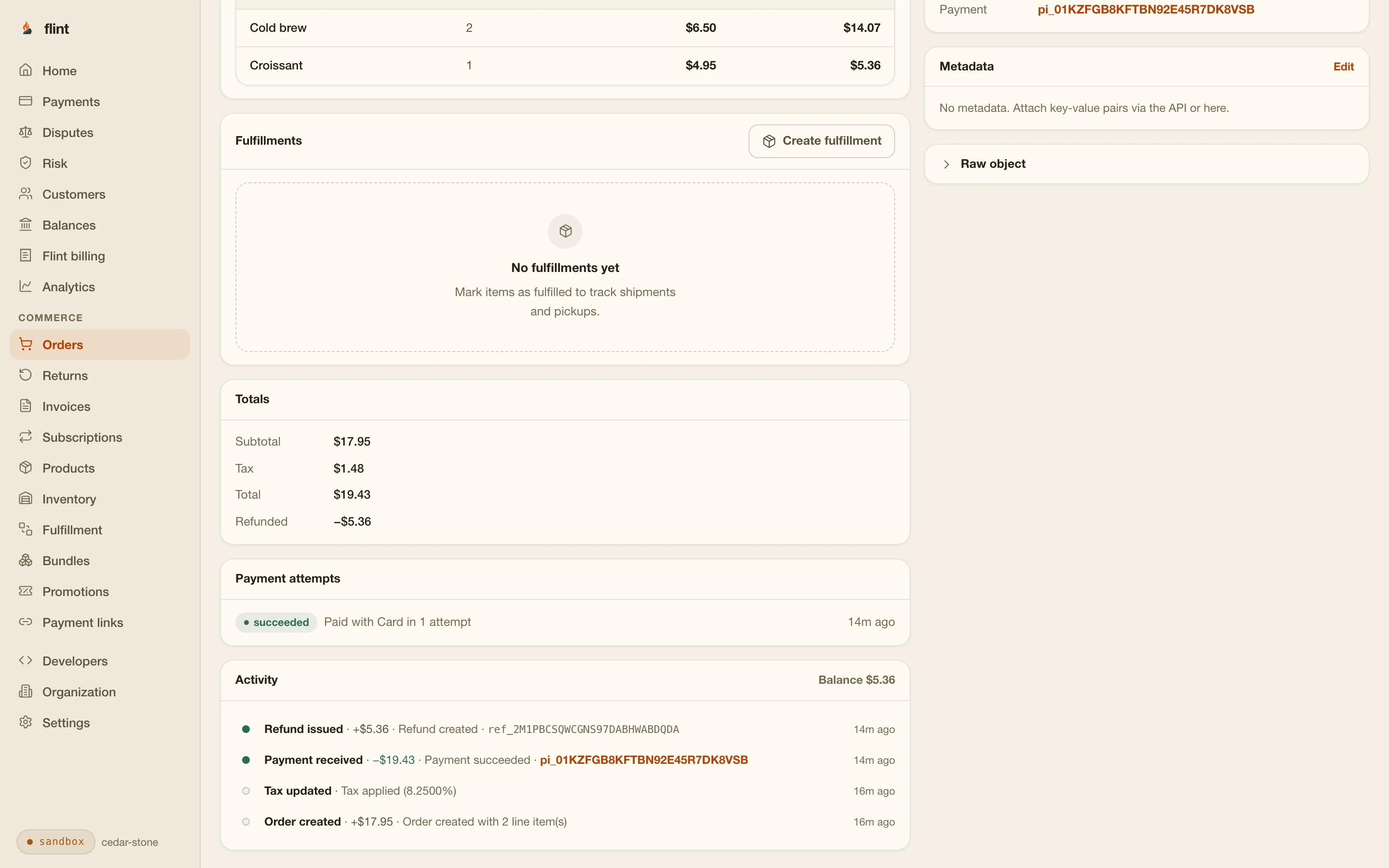
Your agent stays useful for changes to the site. Running the store day to day does not need it.
04The integration
Your agent reads the docs itself.
Flint publishes its API in the formats AI tools already read, so your agent works from the current schemas and the integration step is one line.
claude mcp add --transport http flint-docs \
  https://developers.withflintpay.com/mcp
The docs server is public and read-only. No API key, no account access, nothing to revoke.
Live docs search and exact request and response schemas over MCP, so field names come from the API and not from the model's memory.
developers.withflintpay.com/mcpThe whole public API as one dense file. Paste SKILL.md into CLAUDE.md or a system prompt.
SKILL.mdEvery docs page serves raw Markdown with .md appended, and the corpus ships as one file.
/llms.txt · /llms-full.txtThe OpenAPI spec is public, so generated code and validators work from the same contract the docs do.
api.withflintpay.com/v1/openapi.jsonA second MCP server acts on your account with your credential. Both are on the MCP page.
05The test loop
It pays a test order before you open a browser.
With a sandbox key and a test token, your agent runs the whole sale from a terminal: create the order, pay it, and read it back as paid. It finds its own mistakes before you do.
curl -X POST \
  https://api.withflintpay.com/v1/orders/ord_1kmn0aExample/pay \
  -H "Authorization: Bearer YOUR_API_KEY" \
  -H "Idempotency-Key: pay-test-001" \
  -d '{
    "action": "pay",
    "payment_source": { "token": "pm_card_visa" },
    "expected_outstanding_money": {
      "amount": 1943,
      "currency": "USD"
    }
  }'
No card form and no browser. Swap in a declining token and the same call returns the decline and its reason, so the agent can test the failure path too.
{
  "data": {
    "order": {
      "order_id": "ord_1kmn0aExample",
      "status": "closed",
      "payment_status": "paid",
      "settlement_amounts": {
        "paid_money": { "amount": 1943, "currency": "USD" },
        "outstanding_money": { "amount": 0, "currency": "USD" }
      }
    },
    "payment_attempt": {
      "order_payment_attempt_id": "opat_1kmn0aExample",
      "status": "succeeded",
      "is_resumable": false
    }
  }
}
The attempt and the order in one response: succeeded, paid, nothing outstanding.
Tools it uses to check its work
- orders.create
- orders.pay
- refunds.create
- webhook-events.list
- request-logs.list
- timeline
Run flint mcp serve and these are MCP tools. The timeline shows everything that happened to an order, request logs show each call the agent made, and webhook events show what your site was told. The testing guide lists every test card and token.
06Guardrails
Wrong turns return errors, not payments.
Your agent holds a key to a system that moves money. Flint is built so its mistakes stop at a structured error.
server-only keys
Every Flint key is a server credential, and the buyer only ever gets a hosted URL. There is no browser key for generated code to leak.
flint_test_ keys
The key's prefix decides the environment. A test key acts on your sandbox and nothing else, whatever the agent asks of it.
LIVE_ACKNOWLEDGEMENT_REQUIRED
Through the CLI and its MCP server, a live key does nothing until the agent acknowledges live mode on that specific call.
CONFIRMATION_REQUIRED
Destructive commands, and sensitive writes in live mode, fail until explicitly confirmed. The server never prompts and never assumes.
The full gate list, and why the account server runs on your machine with the key in your keychain, is on the MCP page.
07Any stack
Whatever the AI built, it plugs in.
Three depths of integration, matched to what your tool produced. All three end at the same order record, so you can start at one and move to another without starting over.
Hosted checkout
The site links out to a Flint-hosted payment page and the buyer comes back paid. Your agent builds no payment UI, and the generated frontend never touches card data.
- POST /v1/checkout-sessions
- redirects.success_redirect_url
Your own frontend
Next.js, Vite, or whatever the agent scaffolds. Create orders from the backend with plain REST or the Node SDK and take payment where you want it.
- POST /v1/orders
- POST /v1/orders/{order_id}/pay
Payment links
Sell before the site exists. Create a link in the dashboard or from the CLI and put it in a bio, a DM, or a QR code.
- POST /v1/payment-links
- GET /v1/payment-links/{payment_link_id}
Building in Next.js, or in a tool that generates it? The Next.js commerce page walks server actions, route handlers, and webhooks. Building in Lovable, v0, Bolt, or Replit? The AI app builders page covers selling with no backend at all.
08Start
One prompt from a paid test order.
Sandbox keys are free. Everything below runs against test cards, so nothing real moves while your agent iterates.
Connect the Flint docs MCP server, then build me
a small store that sells three products through a
hosted checkout. Create orders on the server with
the sandbox key in my environment, pay one with a
test card, and show me the paid order at the end.
Connect the docs server
Install the SDK and the CLI
Then read these
- 01
- 02
- 03
- 04
Skip the wait: npm install -g @flintpay/cli && flint signup creates your account and a sandbox key from the terminal. CLI guide
FAQ
Questions worth asking first.
Can I build an online store with Claude Code or Cursor?
Yes. Connect the public docs MCP server, or paste SKILL.md into the agent's context, and ask for the store. The agent works from live endpoint schemas, writes against the REST API with a sandbox key, and can create an order, pay it with a test token, and read it back as paid without a browser. When it looks right, swap in a live key.
What does my agent not have to build?
The store behind the storefront. Totals and tax are computed on the order. The hosted checkout takes cards, Apple Pay, and Google Pay under your name. Buyers are emailed a receipt and get an account where they track their orders. Refunds take line items and return each item's share of tax. Payouts, the dashboard, and webhooks are already running. Your agent writes the pages people browse and calls the API for the rest.
How do I add payments to a site built with an AI website builder?
Use hosted checkout or a payment link. Your site links out to a Flint-hosted payment page and the buyer returns paid, so the generated frontend never renders a card form or touches card data. If the builder gives you a backend, create the order there first. If it does not, create a payment link in the dashboard and point your Buy button at it.
Do I need to know how to code?
Not to start selling. Payment links and the dashboard need no code. For a storefront, the agent writes the code and you decide what you sell, what it costs, and whether the result is right. After launch you run the store from the dashboard.
Why not let the AI use a payment API directly?
Because then the model has to invent the store around the charge. A payment API takes an amount and returns a payment, so the totals live in generated page code, tax is a guessed multiplier, and nothing records what was sold, which turns refunds and receipts into a rebuild. On Flint the agent sends line items and the order carries server-computed totals, tax, payment state, and the refund path from the first call.
Is it safe to let an AI agent near payments?
Flint is built so an agent's mistake returns an error. Every key is a server credential, so there is no browser key for generated code to leak. The key's prefix decides the environment, so a test key can only act on your sandbox. Through the CLI and its MCP server, a live key does nothing until the agent acknowledges live mode on that call, and destructive or sensitive actions fail until explicitly confirmed.
What happens after the AI launches the store?
You run it like any store. Orders, refunds, payouts, and receipts are in the dashboard, buyers get emailed receipts and an account for their orders, and webhooks keep the site current. The agent stays useful for changes to the site, and nothing day to day requires it.