
Android payment gateway
Accept payments in your Android app.
Collect the card in your Kotlin or Compose app with Stripe's Android SDK, and pay a Flint order from your backend with one call. The order arrives with line items, US sales tax when you turn it on, an emailed receipt, refunds by line item, a buyer account page, and a dashboard, so your backend never builds any of them.
curl -X POST https://api.withflintpay.com/v1/orders/ord_1kmn0aExample/pay \
  -H "Authorization: Bearer YOUR_API_KEY" \
  -H "Idempotency-Key: pay-ord_1kmn0aExample-pm_1kmn0aExample" \
  -H "Content-Type: application/json" \
  -d '{
    "action": "pay",
    "payment_source": {
      "credential_type": "token",
      "token": "pm_1kmn0aExample"
    },
    "expected_outstanding_money": {
      "amount": 18000,
      "currency": "USD"
    },
    "expected_version": 1790760000,
    "buyer_contact": { "email": "sam@example.com" }
  }'
The PaymentMethod id from the app, plus the balance and version the buyer approved. Flint creates and confirms the payment in this request.
{
  "order": {
    "order_id": "ord_1kmn0aExample",
    "status": "closed",
    "payment_status": "paid"
  },
  "order_payment_attempt": {
    "order_payment_attempt_id": "opat_1kmn0aExample",
    "status": "succeeded",
    "pending_actions": []
  }
}
A 200 carries every outcome. Act on the attempt's status, not the HTTP status.
No key in the APK
Your Flint key stays on your backend. The app talks to Stripe's SDK and to your own server, never to Flint.
One call to pay
Your backend sends the card's PaymentMethod id. Flint charges the order's balance, pauses for 3D Secure when the bank asks, and marks the order paid.
No monthly fee
3.79% + 35¢ per card payment. The sandbox is free, with no credit card.
01Four steps
Order on the backend. Card in the app. One call to pay.
Your backend owns the sale and your key. The app owns the screen and the card field. Neither confirms a payment by hand: Flint does that when your backend pays the order.
Create the order on your backend
POST /v1/ordersSend catalog variant ids and quantities, and Flint prices the order, with tax when you turn it on. Then read the order: its payment_collection names the Stripe publishable key and account the app initializes Stripe's SDK with. It holds no secrets, so send it to the app as returned.
One line item from your catalogcurl -X POST https://api.withflintpay.com/v1/orders \ -H "Authorization: Bearer YOUR_API_KEY" \ -H "Idempotency-Key: order-app-7f3c" \ -H "Content-Type: application/json" \ -d '{ "line_items": [ { "type": "variant", "variant_id": "var_1kmn0aExample", "quantity": 1 } ] }'The app sends what the buyer picked. The price comes from your catalog, never from the app.
GET /v1/orders/{order_id}{ "order_id": "ord_1kmn0aExample", "version": 1790760000, "settlement_amounts": { "outstanding_money": { "amount": 18000, "currency": "USD" } }, "payment_collection": { "stripe": { "account_id": "acct_1AbcPlaceholder", "publishable_key": "pk_test_51AbcPlaceholder", "elements": { "next_step": "collect_payment_source", "submit_to": "pay_order", "amount_money": { "amount": 18000, "currency": "USD" }, "payment_method_types": ["card"] } } } }Keep the balance and version on your backend. They are what the buyer approves, and the pay call sends them back.
Collect the card in the app
Stripe.createPaymentMethodInitialize Stripe’s Android SDK with the key and account from the order, take the card in its card field, and call
createPaymentMethod. That creates a single-use credential and charges nothing.Kotlin, in the app// publishableKey and accountId come from the order's // payment_collection, which your backend passed to the app val stripe = Stripe(context, publishableKey, stripeAccountId = accountId) val params = cardInputWidget.paymentMethodCreateParams ?: return val paymentMethod = stripe.createPaymentMethod(params) // your own endpoint, which calls Flint with your key val result = backend.payOrder(orderId, paymentMethod.id)The card field is an Android View. In a Jetpack Compose screen, host it with AndroidView.
Card numbers go from Stripe's field to Stripe. They never reach your servers or Flint's.
pm_…The app never creates or confirms a PaymentIntent, so there is no client secret to fetch before the buyer pays.
next_step: collect_payment_sourceThe publishable key and account come from the order on each checkout, so the app holds no Stripe configuration of its own.
payment_collection.stripePay the order from your backend
POST /v1/orders/{order_id}/paySend the PaymentMethod id as the payment source, with the balance and version the buyer approved. Flint creates a payment for the full balance and confirms it in the same request. If the order changed since the buyer saw it, Flint refuses before charging, so the app can show the new total.
From your backend, with your keycurl -X POST https://api.withflintpay.com/v1/orders/ord_1kmn0aExample/pay \ -H "Authorization: Bearer YOUR_API_KEY" \ -H "Idempotency-Key: pay-ord_1kmn0aExample-pm_1kmn0aExample" \ -H "Content-Type: application/json" \ -d '{ "action": "pay", "payment_source": { "credential_type": "token", "token": "pm_1kmn0aExample" }, "expected_outstanding_money": { "amount": 18000, "currency": "USD" }, "expected_version": 1790760000, "buyer_contact": { "email": "sam@example.com" } }'An Idempotency-Key built from the order and the single-use card makes a network retry safe: Flint returns the first result instead of charging twice.
The response{ "order": { "order_id": "ord_1kmn0aExample", "status": "closed", "payment_status": "paid" }, "order_payment_attempt": { "order_payment_attempt_id": "opat_1kmn0aExample", "status": "succeeded", "pending_actions": [] } }succeededShow the confirmation. Fulfill from the order.paid webhook.requires_actionRun the client action in the app, then resume.failedNothing was charged. Show the decline message and take a new card.processingDon't start another payment. Resume or read the attempt again.
Run 3D Secure in the app when the bank asks
handleNextActionForPaymentWhen the issuer wants the buyer to authenticate, the attempt pauses with a pending action. Your backend passes its Stripe client secret to the app, the app runs Stripe's handleNextActionForPayment, and your backend resumes the attempt. That client secret is the only one Flint returns, and it goes to that one call.
Kotlin, in the app// action is the pending action's client action, // which your backend passed back to the app val stripe = Stripe(context, action.publishableKey, stripeAccountId = action.accountId) stripe.handleNextActionForPayment(activity, action.clientSecret) // when the result comes back to the activity, call your // backend, which resumes the attempt (below). Resume even // after an error: Flint reads the real outcome from Stripe.Then your backend resumescurl -X POST https://api.withflintpay.com/v1/orders/ord_1kmn0aExample/pay \ -H "Authorization: Bearer YOUR_API_KEY" \ -H "Idempotency-Key: resume-opat_1kmn0aExample-1" \ -H "Content-Type: application/json" \ -d '{ "action": "resume", "order_payment_attempt_id": "opat_1kmn0aExample", "expected_outstanding_money": { "amount": 18000, "currency": "USD" } }'A new Idempotency-Key, and no payment source: the resume continues the same attempt.
What the pay call returns instead{ "order_payment_attempt": { "order_payment_attempt_id": "opat_1kmn0aExample", "status": "requires_action", "is_resumable": true, "pending_actions": [ { "action_type": "payment_authentication", "client_action": { "stripe": { "account_id": "acct_1AbcPlaceholder", "publishable_key": "pk_test_51AbcPlaceholder", "payment_intent": { "stripe_js_call": "handle_next_action", "client_secret": "pi_3AbcPlaceholder_secret_XyzPlaceholder" } } } } ] } }An attempt still waiting for authentication 30 minutes after it started is canceled, and the buyer pays again with a new card.
Fulfill from the order.paid webhook or a fresh read of the order on your backend, not from what the app shows: a buyer can close the app before it hears the result. The declines and payment attempts guide covers retrying with a new card after a decline.
reviewed 2026-10-30 against the embedded payments guide and Stripe's Android docs · corrections: Flint Help
02What you skip
Your backend sends a card. The store is already there.
A charge API records an amount and a currency. What was sold, the tax on it, the receipt, and what went back on a refund are tables and jobs your backend builds and keeps in step with every payment. On Flint, all of it is the order your app's backend already created.
Around a charge API, your backend builds
The sale
An orders table your backend writes
kept in step with every charge
Prices
Totals computed in your backend
and sent to the processor as one amount
Sales tax
A tax lookup, stored per line item
recomputed on every edit and refund
Refunds
Code that maps a charge back to items
plus each item's share of the tax
Receipts
An itemized email you template and send
and resend when a refund lands
Buyer account
Order history screens in your app
plus the API behind them
6 systems to build behind the app and keep in sync
On Flint, your backend reads the order
The sale
order_idPOST /v1/ordersPrices
pricing_amountsvariant_idSales tax
tax_moneypricing_amounts.tax_moneyRefunds
line_item_allocationsPOST /v1/refundsReceipts
order_receiptsPOST /v1/orders/{order_id}/send-receiptBuyer account
account.withflintpay.comlinked from every receipt
1 order · 1 API key · 1 webhook stream
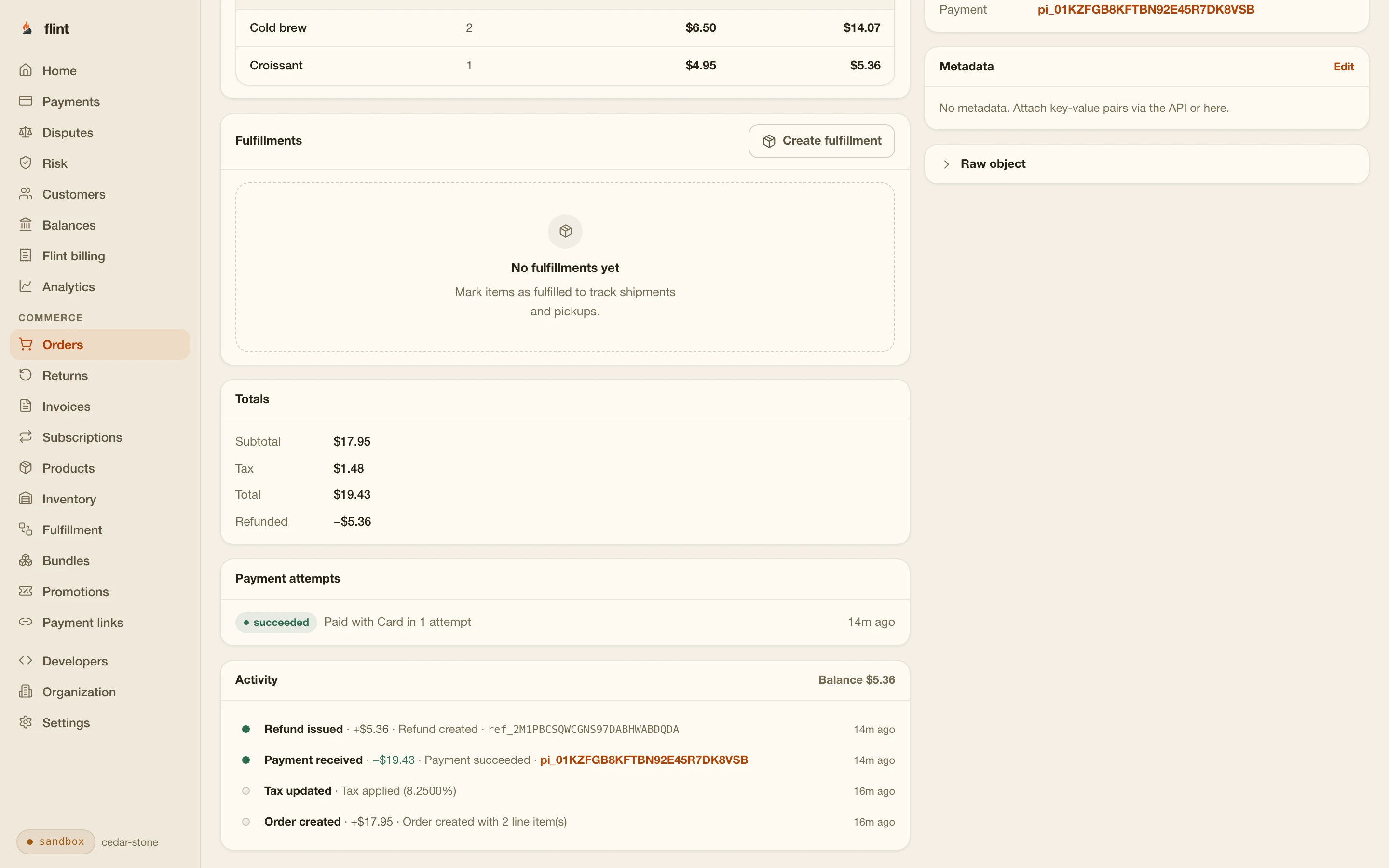
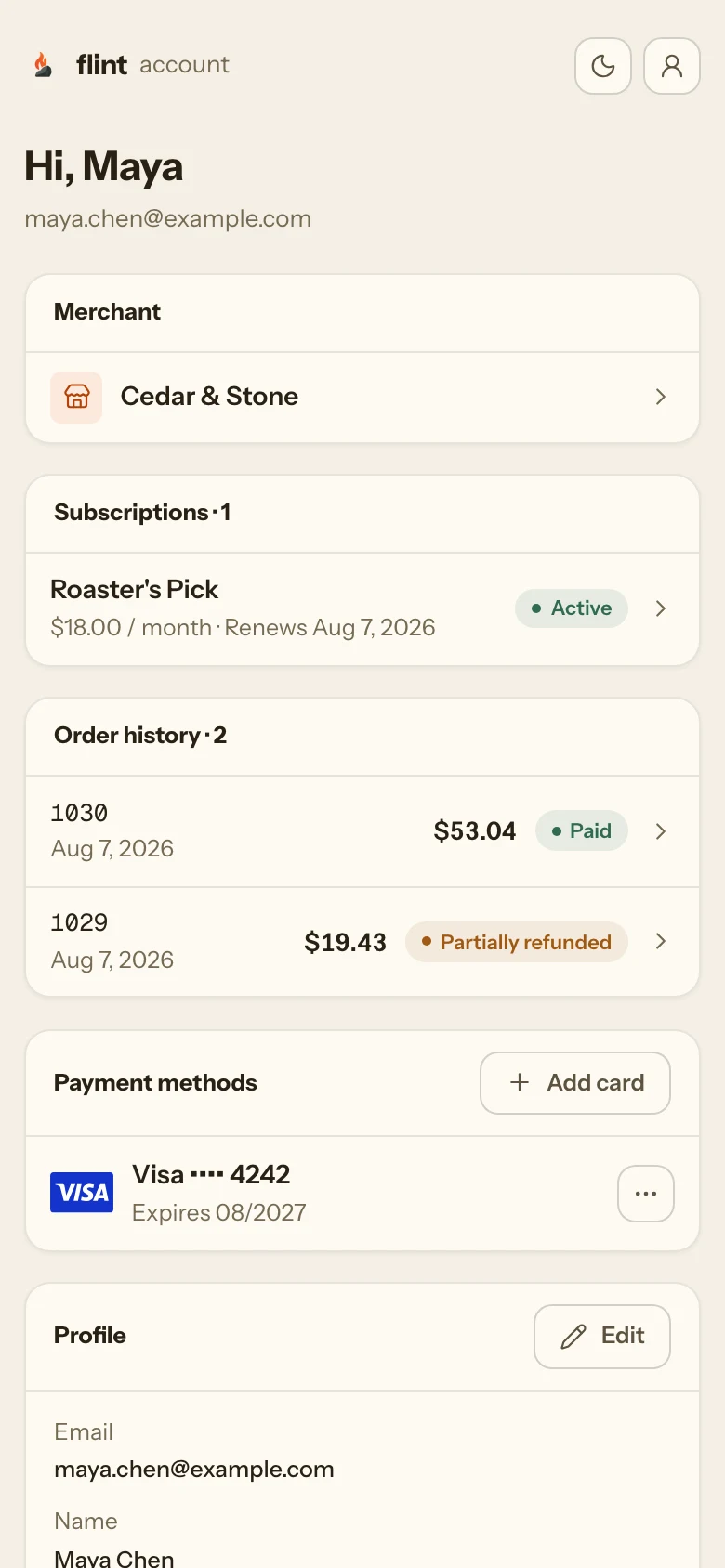
Flint calculates US sales tax on the order when you turn tax on, and a line-item refund works out each item’s share of the discount and tax for you.
A dashboard from the first sale
Orders, payments, refunds, analytics, and payouts, for whoever runs the business. Refunding one item happens there, with no admin screens to build in your app.
Subscriptions for real-world things
Sell a membership or a subscription box with a subscription plan. Flint charges each cycle, writes every renewal as its own order, and emails the buyer when a payment fails.
Gift cards and promotions
Sell your own gift cards and redeem them at Flint's hosted checkout, alongside promotion codes, on the same order record as every other sale.
03Security
Nothing in the APK can charge a card.
An Android app ships to every buyer's phone, and anything in it can be read. With Flint, the app holds a Stripe publishable key it gets from your backend at checkout, and nothing that can charge a card, change a price, or issue a refund.
Every Flint key is a secret key, and Flint has no publishable key, so no Flint credential is meant for the app. It talks to Stripe's SDK and your backend.
flint_test_ · flint_live_The app never sends an amount. Your backend sends catalog ids, Flint prices the order, and the pay call refuses a balance the buyer didn't approve.
expected_outstanding_moneyThe credential the app creates is single-use and pays one payment. Send it to your backend over HTTPS and nowhere else.
credential_type: tokenThe 3D Secure client secret is the only one Flint returns. It goes to handleNextActionForPayment, and the result comes from your backend.
client_action.stripeThe only scope your backend’s key needs
- commerce.orders.write
One scope creates and pays orders. It can’t issue refunds, read customers, or create a broader key. Key security covers scopes and rotation.
The same backend for every app
The backend calls don’t change by platform, so one server pays orders for your Android app, your iOS app, and your React Native app. Only the card field and the 3D Secure call come from each platform’s Stripe SDK.
04Google Play
Physical goods and real-world services pay outside Play billing.
Google Play's Payments policy decides which payments in your app go through Play's billing system. For physical goods and physical services, the policy says Play's billing must not be used, and that is where Flint fits.
Take payments with Flint
Physical goods, such as groceries, clothing, housewares, and electronics. Physical services, such as transportation, cleaning, airfare, gym memberships, food delivery, and tickets to live events. Google's policy says these must not use Play's billing system.
Use Google Play's billing
In-app features, digital content and goods (such as virtual currencies, extra lives, and an ad-free version), and subscriptions to digital services. Google's policy requires Play's billing for these, apart from its alternative billing programs in eligible countries.
These categories are Google’s, quoted from the Google Play Payments policy, checked 2026-10-30. Google decides how they apply to your app, so check the policy against what you sell. This isn’t legal advice.
05No card form
Or open Flint's hosted checkout in a Custom Tab.
If you'd rather not build a payment screen at all, your backend creates a checkout session for the order and the app opens its URL in a Chrome Custom Tab. Flint hosts the page with cards, Google Pay where the buyer's device supports it, promotion codes, gift cards, and the receipt.
curl -X POST https://api.withflintpay.com/v1/checkout-sessions \
-H "Authorization: Bearer YOUR_API_KEY" \
-H "Idempotency-Key: checkout-ord_1kmn0aExample" \
-H "Content-Type: application/json" \
-d '{
"type": "order",
"order_id": "ord_1kmn0aExample",
"redirects": {
"success_url": "https://studio.example.com/app/paid"
}
}'The response's url is the hosted page for this order. Flint adds checkout_session_id and order_id to the success URL.
// url is the checkout session's url, from your backend
CustomTabsIntent.Builder().build()
.launchUrl(context, Uri.parse(url))CustomTabsIntent comes from androidx.browser.
Scopes for the hosted path
- commerce.orders.write
- checkouts.checkout_sessions.write
Google Pay works on the hosted page with no setup, because the page runs on Flint's domain. It appears on devices and browsers that support it.
checkout.withflintpay.comRedirect URLs are absolute HTTPS, so the success URL is a page on your domain, not a custom scheme like myapp://. When the buyer returns to the app, ask your backend for the order's status.
redirects.success_urlThe redirect doesn't prove payment. Your backend confirms with order.paid or by reading the session.
order.paidThe checkout sessions guide covers every redirect and session setting. For a fixed product, a payment link is a hosted checkout your app can open with no backend call at all.
06Who Flint serves
US businesses, selling online in USD.
Businesses in the United States
Flint onboards US businesses and pays out in USD to the business's own bank account. Each one is verified before it takes live payments.
Prices and payouts in USD
Orders, payments, and payouts are in US dollars. Buyers can pay with cards issued anywhere.
Online payments
Flint takes online and in-app payments: your app's card field, hosted checkout, payment links, and invoices. Card readers and tap to pay aren't available.
Start
From a sandbox order to a paid test payment.
curl -X POST https://api.withflintpay.com/v1/orders/ord_1kmn0aExample/pay \
  -H "Authorization: Bearer YOUR_API_KEY" \
  -H "Idempotency-Key: pay-ord_1kmn0aExample-pm_1kmn0aExample" \
  -H "Content-Type: application/json" \
  -d '{
    "action": "pay",
    "payment_source": {
      "credential_type": "token",
      "token": "pm_1kmn0aExample"
    },
    "expected_outstanding_money": {
      "amount": 18000,
      "currency": "USD"
    },
    "expected_version": 1790760000,
    "buyer_contact": { "email": "sam@example.com" }
}'Swap in your order and the PaymentMethod id your app sends.
Create a product in your sandbox, have your backend create an order for it, and pay with 4242 4242 4242 4242, any future expiry, and any CVC. Use 4000 0025 0000 3155 to see the 3D Secure step. The paid order appears in your dashboard. Going live means verifying your business, creating your products and webhook endpoints again in live mode, and switching your backend to a live key. When the app gets product ids from your backend, it needs no new build.
3.79% + 35¢ on cards · no monthly fee · free sandbox · no credit card
Then read these
- 01Embedded paymentsCollection guidance, the pay call, and 3D Secure, field by field.
- 02Declines and payment attemptsEvery attempt status, and retrying with a new card.
- 03Checkout sessionsThe hosted page for a Custom Tab.
- 04WebhooksFulfill from order.paid.
- 05Customer accountsThe hosted buyer account, and the API to build your own.
- 06Going liveFrom the sandbox to real payments.
Or run npm install -g @flintpay/cli && flint signup to create your account and a sandbox key from the terminal. CLI guide
Sources
Where each outside fact comes from.
Apps that sell in-app features, digital content or goods, and subscriptions to them must use Google Play's billing system, and Play's billing system must not be used when payment is mainly for physical goods (such as groceries, clothing, housewares, electronics) or physical services (such as transportation, cleaning, airfare, gym memberships, food delivery, and tickets for live events). Developers in eligible countries can enroll in alternative billing programs. Google Play: Payments policy
support.google.comStripe's Android SDK collects a card in CardInputWidget, creates a PaymentMethod with createPaymentMethod, and runs 3D Secure for a PaymentIntent confirmed on the server with handleNextActionForPayment. Stripe: Accept card payments without webhooks (Android)
docs.stripe.comThe Stripe constructor takes a publishable key and an optional connected account id, and createPaymentMethod and handleNextActionForPayment use that account. Stripe Android SDK: Stripe class
stripe.devCustomTabsIntent from androidx.browser opens a URL in a browser-powered tab inside your app, and falls back to the default browser when none supports Custom Tabs. Chrome: Custom Tabs, get started
developer.chrome.com
last reviewed 2026-10-30 · corrections: Flint Help
FAQ
Questions Android developers ask first.
How do I accept payments in my Android app?
Have your backend create a Flint order and read its payment collection guidance. In the app, collect the card with Stripe’s Android SDK and createPaymentMethod, then send the PaymentMethod id to your backend. Your backend pays the order with one call to POST /v1/orders/{order_id}/pay. If the bank asks for 3D Secure, the app runs handleNextActionForPayment and your backend resumes the attempt. Fulfill from the order.paid webhook. The embedded payments guide has every field.
Does Flint have an Android SDK?
No. Your app uses Stripe's Android SDK for card entry, and your backend calls Flint's API with your secret key. Use the SDK's card field with createPaymentMethod rather than PaymentSheet, because Flint confirms the payment from your backend and only returns a client secret when the buyer has to authenticate.
Can I use Stripe in my Android app with Flint?
Yes. Flint processes cards through Stripe, and the order tells your app which publishable key and account to initialize Stripe's Android SDK with. Card numbers go from Stripe's card field to Stripe and never reach your servers or Flint's. What changes is your backend: it pays a Flint order instead of creating and confirming PaymentIntents, and the order carries the line items, tax, receipt, and refunds.
Do I have to use Google Play Billing?
It depends on what you sell. Google Play’s Payments policy requires Play’s billing system for in-app features, digital content and goods, and subscriptions to them, and says it must not be used when payment is mainly for physical goods or physical services, such as clothing, groceries, transportation, gym memberships, food delivery, and tickets to live events. Flint is for that second group. Read the policy for your own app; this is not legal advice.
Can buyers pay with Google Pay?
Yes, through Flint's hosted checkout. Your backend creates a checkout session for the order and the app opens its URL in a Chrome Custom Tab. The hosted page runs on Flint's domain, so Google Pay works there with no setup on your side, on devices and browsers that support it. The native flow in your own payment screen takes cards.
How does 3D Secure work in an Android app?
When the bank asks the buyer to authenticate, the pay call returns the attempt with status requires_action and a pending action carrying a Stripe client secret. Your backend passes it to the app, the app calls Stripe’s handleNextActionForPayment with it, and your backend resumes the attempt with action: "resume". Flint reads the outcome from Stripe. Pass that client secret only to handleNextActionForPayment and take the result from your backend. Finish 3D Secure covers every outcome.
Can I take payments without building a card form in the app?
Yes. Have your backend create a checkout session for the order and open its URL in a Chrome Custom Tab. Flint hosts the payment page with cards, and Google Pay on devices and browsers that support it. Redirect URLs are absolute HTTPS URLs, so the success URL is a page on your domain rather than a custom scheme like myapp://. When the buyer comes back to the app, ask your backend for the order's payment status, and fulfill from the order.paid webhook rather than the redirect.
What does Flint cost for an Android app?
Card payments are 3.79% + 35¢, with no monthly fee and no setup fee. On the $180 class pack in the examples, Flint's fee is $7.17. Subscription payments add 0.40%, and automatic sales tax adds 0.50% on payments where Flint collects tax. The sandbox is free and needs no credit card.
Who can use Flint?
Businesses in the United States, selling online in USD. Buyers can pay with cards issued anywhere. Each business is verified before it takes live payments, and the sandbox works before that.