
Squarespace
Sell on Squarespace without a Commerce plan.
Keep your Squarespace site on the plan it's on. Make a Flint payment link for each product, put it behind a Squarespace button or photo, and buyers pay on Flint's checkout by card, Apple Pay, Google Pay, ACH debit, or Affirm. No 2% Basic-plan fee and no Core upgrade, and every sale arrives in your Flint dashboard as an order you can ship, discount, refund, and export.
3.79% + 35¢ on cards · no monthly fee · free sandbox · no credit card

Any Squarespace plan
A payment link is a plain web address, and Squarespace's button blocks link to any address on every plan, Basic and Personal included.
No 2% fee
Squarespace's transaction fee is charged on sales through its own checkout. A Flint sale costs 3.79% + 35¢, with no Squarespace fee on top.
No monthly fee
On Basic, Flint costs less than Squarespace's fee plus processing on every order over $4.50.
01Squarespace plans, October 2026
What Squarespace charges you to sell.
Every current Squarespace plan can sell, but not at the same price. Basic adds 2% to every sale and leaves out discounts and automated tax. Getting to 0% means Core, $10 a month more paid annually or $14 more month to month, whether you sell anything that month or not.
| Plan | Plan price | Transaction fee | Card rate | Discounts and automatic tax |
|---|---|---|---|---|
| Your plan + Flint | Plan price: No change to your plan | Transaction fee: None | Card rate: 3.79% + 35¢, American Express included | Discounts and automatic tax: Yes, on any plan (automatic tax 0.50%) |
| Squarespace Basic | Plan price: $19/month paid annually, $25 paid monthly | Transaction fee: 2% of each sale | Card rate: 2.9% + 30¢; 3.2% + 30¢ on American Express | Discounts and automatic tax: Not on Basic |
| Squarespace Core | Plan price: $29/month paid annually, $39 paid monthly | Transaction fee: 0% of each sale | Card rate: 2.9% + 30¢; 3.2% + 30¢ on American Express | Discounts and automatic tax: Yes; automated tax adds a fee per calculation |
| Squarespace Plus | Plan price: $49/month paid annually, $65 paid monthly | Transaction fee: 0% of each sale | Card rate: 2.7% + 30¢; 3.2% + 30¢ on American Express | Discounts and automatic tax: Yes; automated tax adds a fee per calculation |
| Squarespace Advanced | Plan price: $99/month paid annually, $139 paid monthly | Transaction fee: 0% of each sale | Card rate: 2.5% + 30¢; 3.2% + 30¢ on American Express | Discounts and automatic tax: Yes; automated tax adds a fee per calculation |
Squarespace rates are for Squarespace Payments on US cards, from Squarespace’s pricing page and help center on 2026-10-27. Sites still on the earlier Personal, Business, or Commerce plans keep them, but Squarespace stopped selling those plans in February 2026 and a site that moves to a current plan can’t move back. On that lineup, Squarespace’s store starts on Business, with a 3% transaction fee.
Flint against selling on Squarespace Basic
If your site is on Basic, this is the choice in front of you: pay Squarespace’s fee on top of processing, or keep the site as it is and take payments through Flint.
| What you need | Flint on your Squarespace site | Squarespace Basic commerce |
|---|---|---|
| Fee on each sale | Flint on your Squarespace site: None beyond the card rate | Squarespace Basic commerce: 2% of the sale, on top of processing |
| Card rate | Flint on your Squarespace site: 3.79% + 35¢ on US cards, American Express included | Squarespace Basic commerce: 2.9% + 30¢; 3.2% + 30¢ on American Express and some business cards |
| One $40.00 order | Flint on your Squarespace site: $1.87 in fees | Squarespace Basic commerce: $2.26 in fees |
| Discount codes | Flint on your Squarespace site: Promotions in the dashboard, switched on or off per link | Squarespace Basic commerce: Discounts start on Core |
| Sales tax | Flint on your Squarespace site: Automatic tax, 0.50% of each taxed payment | Squarespace Basic commerce: Automated tax calculation starts on Core |
| Quantity limits | Flint on your Squarespace site: A minimum and maximum per order on every link | Squarespace Basic commerce: Quantity limits start on Core |
02Setup
Add Flint to a Squarespace site in six steps.
Everything here happens in the Flint dashboard and the Squarespace editor, on the Squarespace plan you already have. You don't need a code block or a developer.
Sign up for Flint and add what you sell
Create your Flint account and finish verification. Add each item you ship or hand over at pickup under Products, with its price and photo. For sizes or colors, choose Add option on the product page, then Add variants. For a class, a commission, or a one-off, you can type a name and price straight into the link instead.
Set your delivery options
Under Delivery setup, add shipping rates, local pickup, or local delivery. Buyers pick one at checkout and enter a shipping address when their choice ships.
Create the payment link
Open Payment links, click Create payment link, and keep the Standard type. Add the product from your catalog (for one with sizes, choose Let buyers choose), turn on Let the buyer choose the quantity and set a maximum, pick the delivery options, and choose whether buyers can enter a promotion code. Under After payment, choose Redirect to your site and paste the address of your Squarespace thank-you page. Create the link and copy its URL.
Add a button on your Squarespace page
In Squarespace, edit the page, click Add block or +, and choose Button. Click the pencil icon, change the button text to something like Buy now, click Attach link, and paste the Flint URL under URL. You can link a product photo the same way with an image block's link icon.
Add a thank-you page
Make a page on your Squarespace site that thanks the buyer and says when their order ships or is ready to collect. Its address is the redirect you set on the link.
Test it, then go live
Build the same link in your free Flint sandbox and pay it with a test card to see every screen your buyers will see. Then put the live link's URL behind the button.
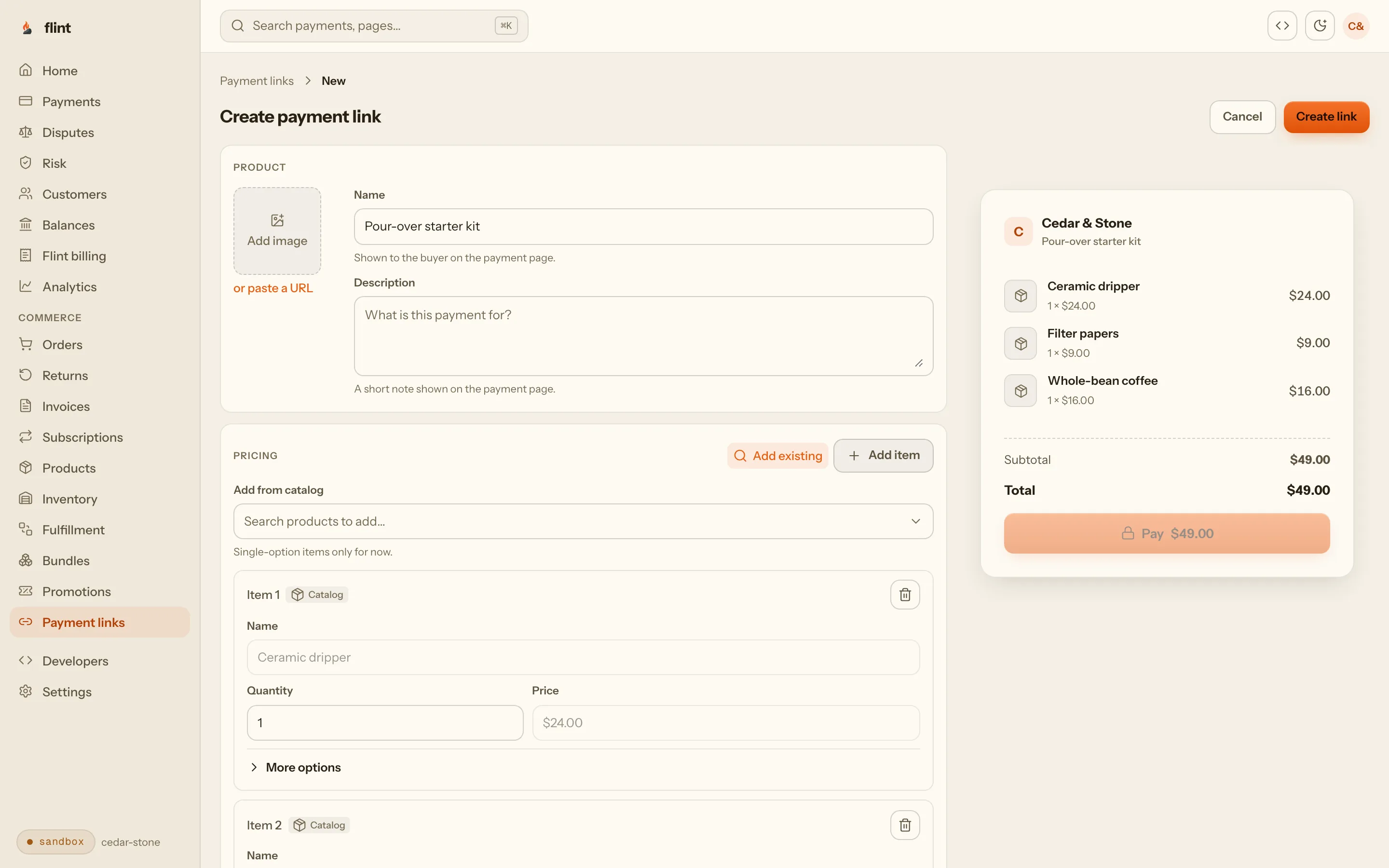
One link, every option
For a mug in three glazes, add the glazes as variants and choose Let buyers choose on the link. One Buy button under the photo, and the buyer picks the glaze at checkout.
Other places a link fits
A product photo's clickthrough URL, a text link in a description, or a Shop link in your navigation. All of them take the same URL.
On Core and above
A developer can show the link’s price and quantity on your page and start checkout from it with two calls that need no API key, in a code block with JavaScript.
03The buyer
From your button to a paid order.
Buyers click Buy now on your Squarespace page and land on the link's own page, then checkout, then back on your site.
Your brand on checkout
Set your logo and colors under Branding in the Flint dashboard. Checkout and the link page use them, and each link can carry its own product photo.
5 ways to pay
Buyers pay by card, Apple Pay, Google Pay, ACH debit, or Affirm, with no account to create first.
Delivery, codes, and tax
Buyers pick shipping, pickup, or local delivery from the options you set, enter a promotion code when the link allows it, and see the full total, tax included when you charge it, before they pay.
Back to your site
After paying, the buyer lands on your Squarespace thank-you page, or on Flint's confirmation page if you'd rather.
Emails Flint sends
A receipt when they pay and a notice when the order ships, so you aren't writing either by hand.
Checkout on your domain
Add the custom domain for $15 a month, and checkout and payment links open on an address like pay.yourstudio.com.
04Your dashboard
Every sale is a full order, not just a payment.
A payment link is the front door. Behind it, Flint keeps the record a store needs: what sold, who bought it, where it goes, and what happened after.
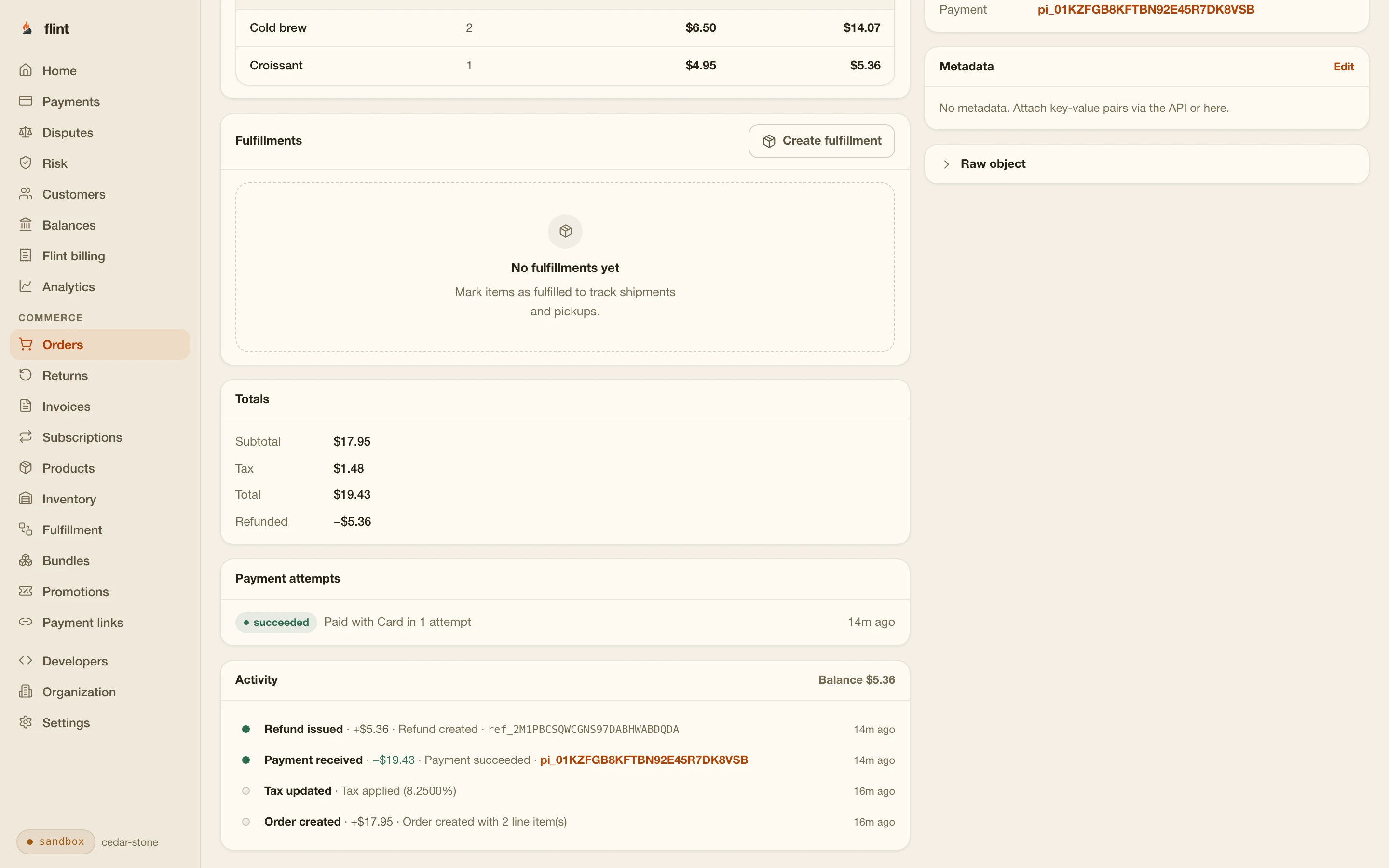
Orders with everything on them. Each payment becomes an order with its items, the buyer’s name and email, their delivery choice and address, and the payment itself.
Ship and track. Mark an order fulfilled with the carrier and tracking number, and Flint emails the buyer that it’s on the way.
Refunds and returns. Refund all or part of an order from its page, or start a return and decide what the buyer gets back.
Customers and their accounts. Buyers appear in your customer list with their orders, and they can sign in to a customer account to see their orders and start a return.
Sales by product. Each link has its own page with its payments and what it collected after refunds, so a button that sells shows up there.
Ready for the books. Export the orders you select as a CSV file, and download reports from the Reports page.
05What it costs
One month of sales, worked out.
Cedar & Stone sells ceramics from a Squarespace Basic site. In a typical month it sells 15 drippers at $40.00, $600.00 in all. Here is what selling costs each way, beyond the Basic plan the site already pays for.
| Selling cost | Flint on your Basic site | Squarespace Basic (2% fee) | Upgrade to Core, paid annually |
|---|---|---|---|
| Plan change | Flint on your Basic site: $0.00 | Squarespace Basic (2% fee): $0.00 | Upgrade to Core, paid annually: $10.00 |
| Squarespace transaction fee (2% on Basic) | Flint on your Basic site: $0.00 | Squarespace Basic (2% fee): $12.00 | Upgrade to Core, paid annually: $0.00 |
| Card processing | Flint on your Basic site: $27.99 | Squarespace Basic (2% fee): $21.90 | Upgrade to Core, paid annually: $21.90 |
| Cost to sell this month | Flint on your Basic site: $27.99 | Squarespace Basic (2% fee): $33.90 | Upgrade to Core, paid annually: $31.90 |
Flint: 3.79% + 35¢ per order. Squarespace: 2.9% + 30¢ per order on Basic and Core, plus 2% on Basic. Core costs $10 a month more than Basic paid annually. All cards are standard US cards; on American Express, Squarespace charges 3.2% + 30¢ while Flint’s rate stays the same.
Three months, three sizes
Small and seasonal shops have quiet months. Flint has no monthly fee, so a month with four orders costs four orders’ worth of fees, while the Core upgrade costs the same $10 every month.
| Month | Flint on your Basic site | Squarespace Basic (2% fee) | Upgrade to Core, paid annually |
|---|---|---|---|
| A quiet month4 orders × $45.00 = $180.00 | Flint on your Basic site: $8.22 | Squarespace Basic (2% fee): $10.02 | Upgrade to Core, paid annually: $16.42 |
| A launch month8 orders × $55.00 = $440.00 | Flint on your Basic site: $19.48 | Squarespace Basic (2% fee): $23.96 | Upgrade to Core, paid annually: $25.16 |
| A typical month15 orders × $40.00 = $600.00 | Flint on your Basic site: $27.99 | Squarespace Basic (2% fee): $33.90 | Upgrade to Core, paid annually: $31.90 |
Against Basic
Flint costs less than Squarespace's 2% fee plus processing on every order over $4.50, at any volume, and you keep the Basic price.
Against the Core upgrade
At a $40.00 average, Flint costs less up to 24 orders a month ($960) against Core paid annually, and up to 34 orders ($1,360) against Core paid monthly.
The 3.79% + 35¢ covers processing and the commerce around it: orders, delivery options, promotions, refunds, returns, and the customer account. Automatic tax is 0.50% when you turn it on. Every rate is on the pricing page.
06More than products
Anything you'd sell from a page, behind a button.
The same button and link work for the things Squarespace sites sell besides products.
Gift cards
Sell your own gift cards and let buyers redeem them at checkout. Sell gift cards online.
Event tickets
Workshops and tastings with numbered tickets and a capacity that closes sales when full. Sell event tickets.
Deposits
A fixed deposit for a commission or a booking, with the buyer’s phone number on the order. Take deposits online.
Memberships
A link that starts a subscription, with a free trial if you want one. Memberships and subscription boxes.
Donations
Suggested amounts with a minimum, on a link that counts donors and the total raised. Donation links.
Invoices
Bill a client for custom work and let Flint send the reminders. Invoices.
07Start
Put your first product behind a button.
Sign up, add one product, and make its link in your sandbox. Paste the link into a button on a test page on your Squarespace site and pay it with a test card, and you’ll see exactly what your buyers will see before anything goes live.
3.79% + 35¢ on cards · no monthly fee · free sandbox · no credit card
Then read these
- 01PricingEvery Flint rate, published.
- 02Add a store to a Framer siteThe same approach on Framer.
- 03Webflow Ecommerce alternativeSelling from a Webflow site without its Ecommerce plans.
- 04What Shopify really costsPlan, apps, and processing for a small store, if you're weighing a move.
- 05Payment linksEverything a link can sell.
Sources
Where the Squarespace numbers come from.
Basic $19, Core $29, Plus $49, and Advanced $99 a month paid annually, or $25, $39, $65, and $139 paid monthly. A 2% online store transaction fee on Basic and 0% above it. Discounts, automated tax calculation, and quantity limits are Core and above. Squarespace pricing
www.squarespace.com · checked 2026-10-27Commerce transaction fees apply to physical products, download products, service products, and donations. Squarespace Payments card rates: 2.9% + 30¢ on Basic and Core, 2.7% + 30¢ on Plus, 2.5% + 30¢ on Advanced, and 3.2% + 30¢ for American Express and some business cards on every plan. Business plan fee: 3%. Squarespace Help: Transaction fees and payment processing rates
support.squarespace.com · checked 2026-10-27No new sign-ups for Personal, Business, and Commerce plans since February 2026, and no switching back after moving to a current plan. Fully integrated commerce first appears on Business. Squarespace Help: Legacy website billing plans
support.squarespace.com · checked 2026-10-27JavaScript or an iframe in a code block needs the Core, Plus, or Advanced plan. Squarespace Help: Code blocks
support.squarespace.com · checked 2026-10-27Button blocks link to other websites through Attach link and a URL. The steps for version 7.1. Squarespace Help: Button blocks
support.squarespace.com · checked 2026-10-27Image blocks can link to other websites on any Squarespace site, except on cover pages and in auto layouts. Squarespace Help: Image clickthrough URLs
support.squarespace.com · checked 2026-10-27
last reviewed 2026-10-27 · corrections: Flint Help
FAQ
Questions Squarespace sellers ask first.
Can I sell on Squarespace without a Commerce plan?
Yes. Squarespace stopped selling its Commerce plans in February 2026, and every current plan can sell, but Basic charges a 2% transaction fee on each sale on top of card processing and leaves out discounts and automated tax. With Flint, you keep the plan you have and put a Flint payment link behind a Squarespace button. Buyers pay on Flint's checkout, and each sale becomes an order in your Flint dashboard.
Does Squarespace charge its transaction fee on sales through Flint?
Squarespace's commerce transaction fee is charged on sales made through Squarespace's own checkout: physical products, downloads, services, and donations. A buyer who clicks your button pays on Flint's checkout, so the sale never goes through Squarespace Commerce. You pay Flint's 3.79% + 35¢ per card payment, with no Squarespace fee on top.
Does it work on the Squarespace Basic or Personal plan?
Yes. A Flint payment link is an ordinary web address, and Squarespace's button blocks and image links can point at any web address. Squarespace lists no plan requirement for either, so it works on Basic and on sites still on the earlier Personal plan.
Do I need a code block or a developer?
No. A button block and a pasted URL are the whole integration. Squarespace allows JavaScript and iframes in code blocks only on Core, Plus, and Advanced, which is why script-based buy buttons and cart widgets need an upgrade and a Flint link doesn’t. If you’re on Core or above and have a developer, they can show a link’s price on your page and start checkout from it with two calls that need no API key.
Can buyers pick a size or a color?
Yes, on one link. In the Flint dashboard, give the product a Size or Color option and add its variants, each with its own price and stock count. On the payment link, choose Let buyers choose, and Flint's checkout shows a control for each option. A size that runs out shows Sold out while the others keep selling, and every order says which one sold.
Is there a shopping cart?
Flint doesn't add a cart to your Squarespace pages. Each button checks out what its link sells, which can be one item or several, such as a mug with a matching saucer at a set quantity. Most small shops selling a handful of products work this way; a developer can build a cart on Flint's API if you need one.
How do I charge shipping and sales tax?
Set shipping rates, local pickup, and local delivery under Delivery setup in the Flint dashboard and choose which ones each link offers. Buyers pick one at checkout. Turn on automatic tax in Settings and Flint calculates sales tax on each order, for 0.50% of the payment. You still decide where to register and file.
Can I offer discount codes?
Yes. Create promotions in the Flint dashboard, including code-gated ones, and choose on each link whether buyers can enter a promotion code at checkout. On Squarespace, discounts start on the Core plan.
Where do I see my orders?
In the Flint dashboard. Every payment becomes an order with its items, the buyer, their delivery choice and address, and the payment. From there you mark it shipped with a tracking number, refund all or part of it, start a return, and export orders as a CSV file. Each link also has its own page with its sales.
Do buyers leave my Squarespace site?
They pay on Flint's hosted checkout, branded with the logo and colors you set in the Flint dashboard, then land back on your Squarespace thank-you page. To put checkout on your own address, such as pay.yourstudio.com, add the custom domain for $15 a month.
What does Flint cost on a Squarespace site?
3.79% + 35¢ per card payment, with no monthly fee and no setup fee. 15 orders of $40.00 cost $27.99 in a month, against $33.90 selling on Squarespace Basic and $31.90 after upgrading to Core on annual billing. The sandbox is free.