
Payments for iOS apps
Accept payments in your iOS app, with the store already built.
Sell physical goods and real-world services from a Swift or SwiftUI app. The app collects the card with Stripe's iOS SDK, your backend pays a Flint order with one call, and every sale arrives as an order with its totals, an emailed receipt, refunds by line item, a buyer account, and a dashboard, plus US sales tax when you turn it on.

Stripe's SDK for the card
The app turns the card into a Stripe payment method. Card numbers go to Stripe and never touch your servers or Flint's.
One API from your backend
Your server creates the order and pays it with one Flint key, which never ships in the app binary.
Apple Pay, hosted
Open Flint's hosted checkout in SFSafariViewController and buyers can pay with Apple Pay, with no merchant ID to set up.
01App Store rules
Physical goods and real-world services pay outside In-App Purchase.
Apple's App Review Guidelines draw the line by what the buyer gets. Content or features unlocked inside the app go through In-App Purchase. Goods and services used outside the app go through another payment method, and that is the sale Flint is built for.
Physical goods and services used outside the app, such as products you ship or tickets to an event: Apple requires a payment method other than In-App Purchase, such as Apple Pay or credit card entry.
Guideline 3.1.3(e)Subscriptions to in-app content, premium features, game currency, and unlocking a full version: Apple requires In-App Purchase. Flint isn't for these.
Guideline 3.1.1Apple reviews every app against its own guidelines, so check your app's case against them before you submit.
App Reviewreviewed 2026-10-30 against Apple's App Review Guidelines · corrections: Flint Help
Who Flint serves
Businesses based in the United States, charging in US dollars, for online payments. Buyers can pay with cards issued anywhere.
Two ways to take the payment
Collect the card on your own screen with Stripe’s iOS SDK, or open Flint’s hosted checkout, with Apple Pay, in a Safari sheet. Both pay the same Flint order, and both start from the same backend.
02Your own checkout screen
Four steps from a cart to a paid order.
The app keeps the card field it would use with Stripe, and the backend talks to Flint. Flint confirms the payment, so there is no PaymentIntent for the app to confirm and no payment sheet configuration to keep in step with your server.
Create the order on your backend
POST /v1/ordersThe app sends variant ids and quantities. Flint prices the cart from your catalog and computes the total, so a price is never the app's to choose. Read the order back and send its payment_collection.stripe to the app.
From your server, with your secret keycurl -X POST https://api.withflintpay.com/v1/orders \ -H "Authorization: Bearer YOUR_API_KEY" \ -H "Content-Type: application/json" \ -H "Idempotency-Key: ios-cart-7f3a" \ -d '{ "line_items": [ { "type": "variant", "variant_id": "var_1kmn0aExample", "quantity": 1 } ] }'Create the product once in the dashboard's catalog. The order is the record every later step settles against.
GET /v1/orders/{order_id}{ "data": { "order_id": "ord_1kmn0aExample", "version": 1790760000, "settlement_amounts": { "outstanding_money": { "amount": 3500, "currency": "USD" } }, "payment_collection": { "stripe": { "account_id": "acct_1AbcPlaceholder", "publishable_key": "pk_test_51AbcPlaceholder", "elements": { "next_step": "collect_payment_source", "amount_money": { "amount": 3500, "currency": "USD" }, "payment_method_types": ["card"] } } } } }The publishable key and account are for Stripe's SDK and hold no secrets. Keep the balance and version on your server: they are what the buyer approves.
Collect the card in the app
STPAPIClient.createPaymentMethodStripe's card field takes the number, and one Stripe call turns it into a payment method on the account the order named. The app posts its id to your backend.
Swift, with Stripe's iOS SDK// payment_collection.stripe, as your backend read it // from the order. It holds no secrets. let stripe = STPAPIClient(publishableKey: collection.publishableKey) stripe.stripeAccount = collection.accountId // cardField is an STPPaymentCardTextField on your checkout screen let paymentMethod = try await stripe.createPaymentMethod( with: cardField.paymentMethodParams ) // your backend pays the Flint order with it let result = try await backend.pay(paymentMethodId: paymentMethod.stripeId)Card details go from the app to Stripe. Your server and Flint only see the pm_ id.
Your screen, your layout. Stripe draws only the card field. Pay the order from your backend
POST /v1/orders/{order_id}/payYour backend sends the payment method as payment_source, with the balance and version the buyer approved. Flint charges it against the order and answers with the payment attempt, whatever the outcome.
The route your app calls// the app posts the payment method id it got from Stripe app.post("/checkout/pay", async (req, res) => { const { paymentMethodId } = req.body; // the order id, balance, and version the buyer approved const quote = await loadQuote(req.user); const response = await fetch( `https://api.withflintpay.com/v1/orders/${quote.orderId}/pay`, { method: "POST", headers: { Authorization: `Bearer ${process.env.FLINT_API_KEY}`, "Content-Type": "application/json", "Idempotency-Key": `pay-${quote.orderId}-${paymentMethodId}`, }, body: JSON.stringify({ action: "pay", payment_source: { credential_type: "token", token: paymentMethodId }, expected_outstanding_money: quote.outstandingMoney, expected_version: quote.version, buyer_contact: { email: quote.buyerEmail }, }), }, ); const body = await response.json(); if (!response.ok) return res.status(response.status).json(body.error); const attempt = body.data.order_payment_attempt; res.json({ status: attempt.status, clientAction: attempt.pending_actions[0]?.client_action?.stripe ?? null, }); });Deriving the idempotency key from the order and the payment method makes a retried request safe.
The app branches on
- succeeded
- requires_action
- failed
- processing
A decline comes back as a 200 with a failed attempt and a message you can show the buyer.
last_payment_errorOn success the order closes as paid and the buyer gets an emailed receipt.
order.paidDeclines and payment attempts covers every status and the retry after a decline.
Handle 3D Secure when the bank asks
requires_actionThe attempt pauses with a pending action that carries a PaymentIntent client secret. The app hands it to Stripe's payment handler, then your backend resumes the same attempt with no new card.
Swift, with Stripe's iOS SDK// result.clientAction is pending_actions[0].client_action.stripe, // decoded with snake_case keys converted to camelCase let action = result.clientAction! let actionClient = STPAPIClient(publishableKey: action.publishableKey) actionClient.stripeAccount = action.accountId let handler = STPPaymentHandler.shared() handler.apiClient = actionClient _ = await handler.handleNextAction( paymentIntentClientSecret: action.paymentIntent.clientSecret, authenticationContext: self, returnURL: nil ) // resume even after an error: Flint reads the outcome from Stripe let resumed = try await backend.resume()Pass the client secret only to handleNextAction. Resume from your backend and read the outcome there.
What the pay call returns{ "order_payment_attempt": { "order_payment_attempt_id": "opat_1kmn0aExample", "status": "requires_action", "is_resumable": true, "pending_actions": [ { "action_type": "payment_authentication", "client_action": { "stripe": { "account_id": "acct_1AbcPlaceholder", "publishable_key": "pk_test_51AbcPlaceholder", "payment_intent": { "stripe_js_call": "handle_next_action", "client_secret": "pi_3AbcPlaceholder_secret_XyzPlaceholder" } } } } ] } }Your backend sends client_action.stripe to the app.
Fulfill from your backend, on the order.paid webhook or a fresh read of the order. A buyer can close the app before it hears the result.
order.paidIn a sandbox, 4242 4242 4242 4242 succeeds, and 4000 0025 0000 3155 asks for 3D Secure, so both branches run before you go live.
sandboxreviewed 2026-10-30 against the embedded payments guide · test cards · corrections: Flint Help
03Apple Pay and hosted checkout
Or open Flint's checkout in a Safari sheet.
Your backend creates a checkout session for the same order, and the app presents its URL in SFSafariViewController. Buyers pay with Apple Pay or a card on a page Flint hosts, with no card field in the app at all.
curl -X POST https://api.withflintpay.com/v1/checkout-sessions \
-H "Authorization: Bearer YOUR_API_KEY" \
-H "Content-Type: application/json" \
-H "Idempotency-Key: ios-checkout-7f3a" \
-d '{
"type": "order",
"order_id": "ord_1kmn0aExample",
"redirects": { "success_url": "https://shop.example.com/thanks" }
}'The response's url is a Flint checkout for this order. success_url must be an absolute HTTPS URL on your domain.
// url is the checkout session's url, from your backend
let checkout = SFSafariViewController(url: url)
checkout.delegate = self
present(checkout, animated: true)
func safariViewControllerDidFinish(_ controller: SFSafariViewController) {
// the sheet closed: ask your backend whether the order is paid
Task { await refreshOrder() }
}When the buyer taps Done, the app asks your backend. The redirect is for the buyer and proves nothing about payment.
Apple Pay works on hosted checkout with no setup: checkout runs on Flint's domain, so there is no Apple merchant ID, certificate, or domain file for you to manage.
checkout.withflintpay.comApple supports Apple Pay on the web in SFSafariViewController, so buyers can pay with Apple Pay inside your app's Safari sheet.
SFSafariViewControllerA payment link works the same way: one URL for a product, opened from a button in the app, with no backend call at all.
POST /v1/payment-linksYour backend code is the same for every mobile app. Building for Android too? See payments in an Android app. Sharing one codebase? See payments in a React Native app.
04What you skip
Your backend pays an order. The rest of the store comes with it.
A charge records an amount. A store also needs prices, tax, receipts, refunds, and order history, and in an app each one is backend code plus a screen that waits on App Review. On Flint, each one is already on the order the payment settled.
Around a charge, your backend builds
Prices
A product table your backend prices carts from
kept in step with what the app shows
Totals
An orders table and the code that sums it
has to match the charged amount to the cent
Sales tax
A tax lookup, stored per line item
recomputed on every edit and every refund
Receipts
An itemized receipt built from your order data
plus an email service to send it
Refunds
Tooling that maps a charge back to items
plus each item's share of the tax
Order history
Screens for past orders and saved cards
built and shipped through App Review
Subscriptions
Renewals, retries, and failed-payment email
a scheduler that runs every cycle
7 systems to build, test, and keep in sync
On Flint, your backend reads the order
Prices
variant_idPOST /v1/productsTotals
pricing_amountsPOST /v1/ordersSales tax
tax_moneypricing_amounts.tax_moneyReceipts
order.paidFlint emails the buyerRefunds
line_item_allocationsPOST /v1/refundsOrder history
customer_accountaccount.withflintpay.comSubscriptions
subscription_plan_idPOST /v1/subscriptions
1 order · 1 API key · 1 webhook stream
Sales tax is calculated on the order when you turn it on, from the buyer’s location; sales tax covers locations and categories. Subscriptions suit goods and services delivered outside the app, such as a coffee club or a membership; see subscription billing.
05The back office
Support, refunds, and order history, with nothing to ship through App Review.
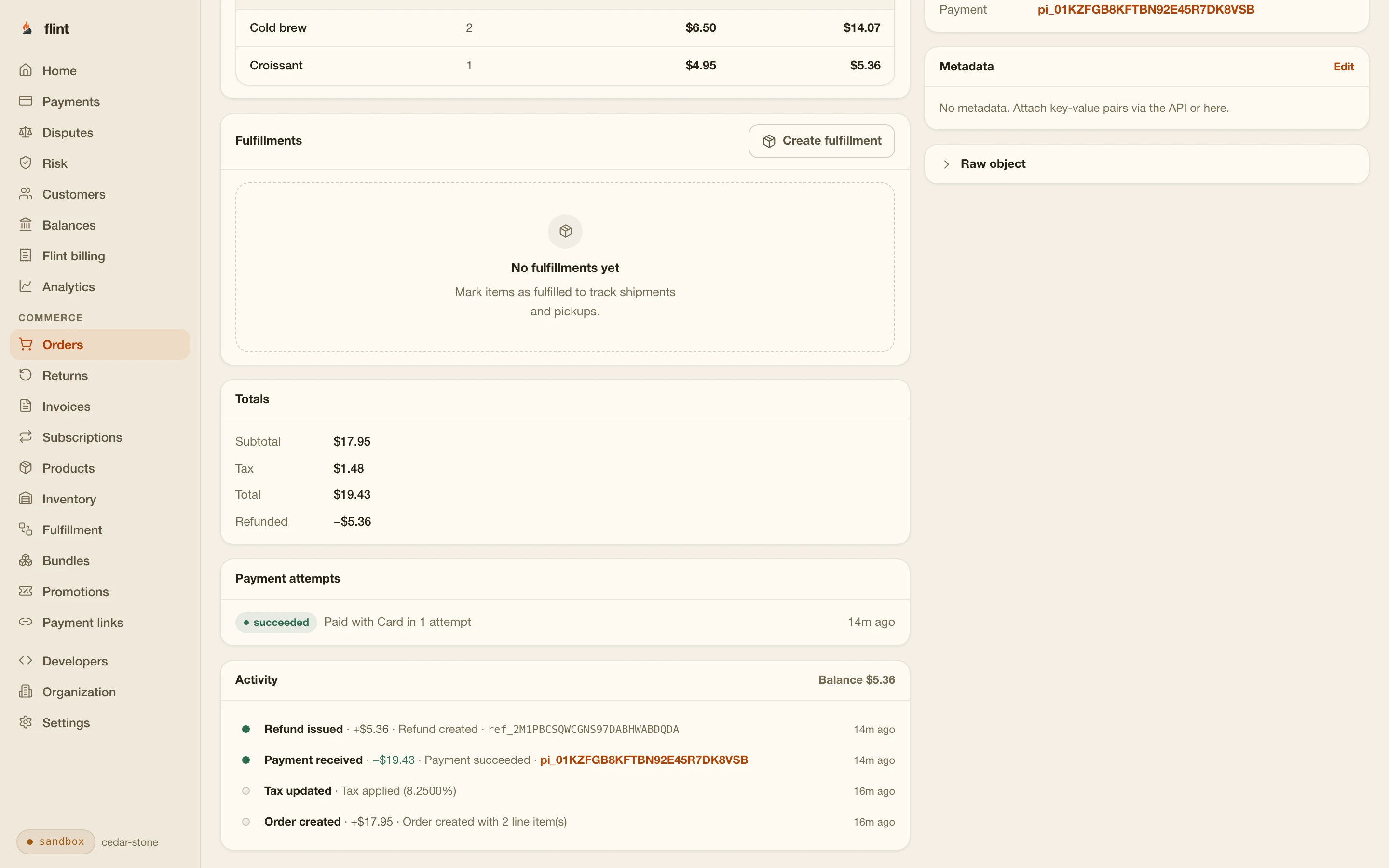
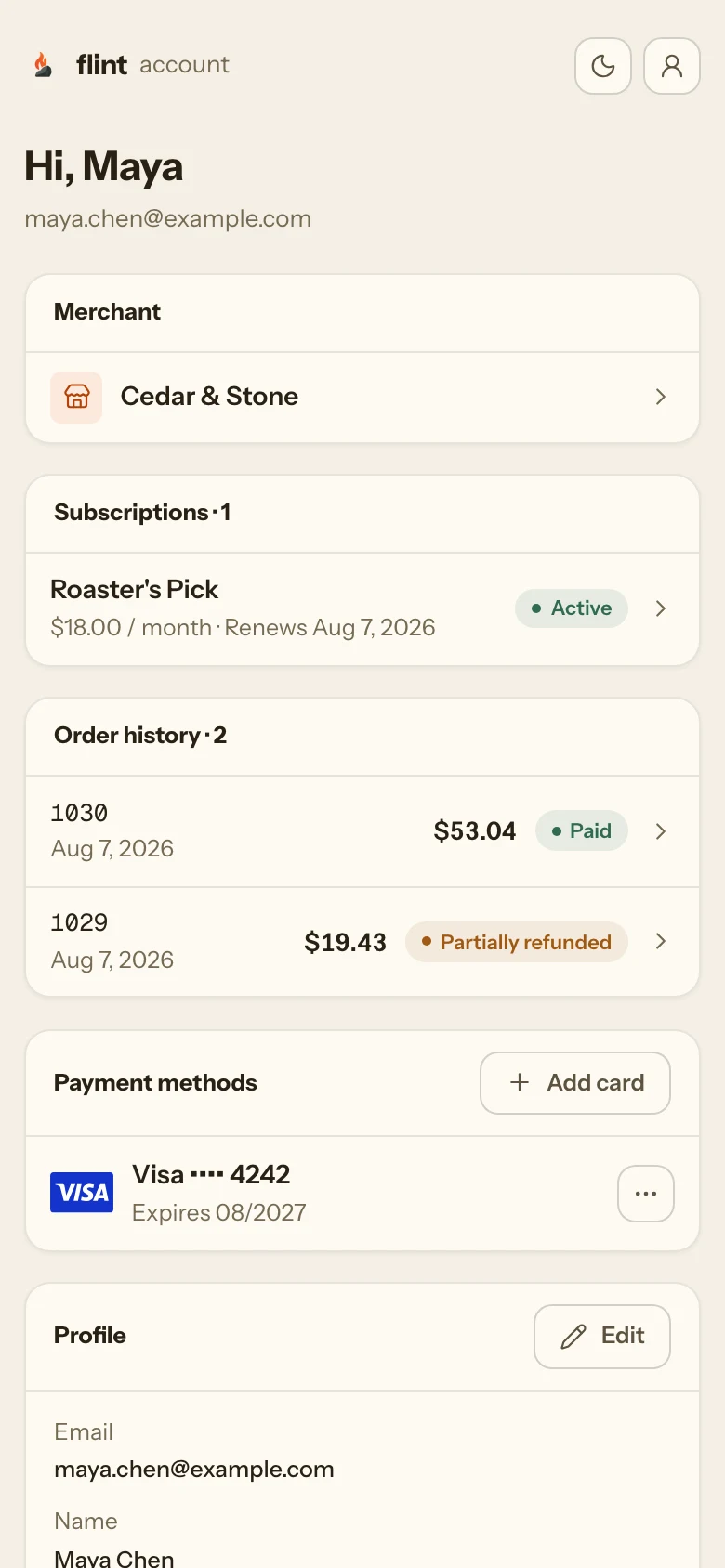
The first time a buyer asks where an order is, or wants one item refunded, you need a record and a tool. Every sale from the app is an order in your dashboard, and every buyer gets an account page that their receipt links to and your app never has to draw.
Refund one item
Pick the line item and a quantity. Flint works out what it sold for, including its share of any discount and tax, and returns the money to the card that paid. Refunds
- line_item_allocations
- tax_money
- refund.succeeded
Receipts that send themselves
The buyer gets a receipt when the order is paid, with a link to their account. You can switch any email family to send your own from the webhooks.
A buyer account you don't build
Buyers find past orders, manage subscriptions, and change a saved card, on Flint’s page or a subdomain of yours. Customer accounts
The only scopes your backend key needs
- commerce.orders.write
- checkouts.checkout_sessions.write
The key creates and pays orders and opens checkout sessions, and stays on your server. Anything shipped in an app binary is public, however it is obfuscated. Key security covers scopes and rotation.
Start
From a sandbox key to a paid test order.
curl -X POST https://api.withflintpay.com/v1/orders \
  -H "Authorization: Bearer YOUR_API_KEY" \
  -H "Content-Type: application/json" \
  -H "Idempotency-Key: ios-cart-7f3a" \
  -d '{
    "line_items": [
      {
        "type": "variant",
        "variant_id": "var_1kmn0aExample",
        "quantity": 1
      }
    ]
}'With a sandbox key, from your backend.
Create a product in your sandbox, create an order for it, and pay it from the app with 4242 4242 4242 4242, any future expiry, and any CVC. The paid order appears in your dashboard. Going live means verifying your business, creating your products and webhook endpoints again in live mode, and switching your backend to a live key. When the app gets product ids from your backend, it needs no new build.
3.79% + 35¢ on cards · no monthly fee · free sandbox · no credit card
Then read these
- 01Embedded paymentsOrder read, pay, 3D Secure, and every error.
- 02Checkout sessionsThe hosted path, redirects, and confirming payment.
- 03Apple Pay and Google Pay setupWallets on hosted checkout and on your own pages.
- 04WebhooksFulfill from order.paid and verify each delivery.
- 05Node and PHP SDKsTyped server calls for your backend.
- 06Going liveFrom the sandbox to real payments.
Or run npm install -g @flintpay/cli && flint signup to create your account and a sandbox key from the terminal. CLI guide
Sources
Where each Apple and Stripe fact comes from.
Apps that unlock features or functionality, such as subscriptions, in-game currencies, game levels, access to premium content, or a full version, must use In-App Purchase. App Review Guidelines, 3.1.1 In-App Purchase
developer.apple.comApps that let people buy physical goods or services consumed outside the app must use purchase methods other than In-App Purchase, such as Apple Pay or traditional credit card entry. App Review Guidelines, 3.1.3(e) Goods and Services Outside of the App
developer.apple.comIn iOS, Safari and SFSafariViewController support Apple Pay. Apple Pay on the Web
developer.apple.comStripe's iOS SDK provides STPPaymentCardTextField, STPAPIClient.createPaymentMethod, and STPPaymentHandler.handleNextAction for payments confirmed on a server. stripe-ios on GitHub
github.com
last reviewed 2026-10-30 · corrections: Flint Help
FAQ
Questions iOS developers ask first.
Can I use Stripe in my iOS app with Flint?
Yes. Flint processes cards through Stripe, and your app keeps Stripe's iOS SDK for card entry. The app turns the card into a Stripe payment method with STPAPIClient.createPaymentMethod, using the publishable key and account your backend reads from the Flint order, and your backend pays the order with that payment method's id. Flint confirms the payment itself, so the app doesn't call confirmPayment or present PaymentSheet. Card numbers go from the app to Stripe and never reach your servers or Flint's.
Do I have to use Apple In-App Purchase?
Apple’s App Review Guidelines require In-App Purchase to unlock features or content inside the app (3.1.1). For physical goods and services used outside the app, such as products you ship or tickets to an event, the guidelines require a payment method other than In-App Purchase, such as Apple Pay or credit card entry (3.1.3(e)). Flint is for that second kind of sale. Apple reviews each app against its own guidelines, so check your app’s case against them.
Does Flint have an iOS SDK?
No. Your app uses Stripe’s iOS SDK to collect the card, and your backend calls the Flint API over HTTPS or with Flint’s Node or PHP server SDK. Every Flint API key is a secret key that stays on your server, so no Flint code or key ships in the app binary.
Can buyers pay with Apple Pay in my iOS app?
Yes, through Flint’s hosted checkout. Your backend creates a checkout session and your app opens its URL in SFSafariViewController, which supports Apple Pay. Apple Pay works on hosted checkout with no setup, because checkout runs on Flint’s domain: there’s no Apple merchant ID, certificate, or domain file for you to manage. Flint doesn’t offer Apple Pay through a native payment sheet inside the app. Apple Pay and Google Pay setup has the details.
How does 3D Secure work in an iOS app?
When the card’s bank asks the buyer to authenticate, the pay call returns an attempt with status requires_action and a pending action whose client_action.stripe carries a PaymentIntent client secret, a publishable key, and an account. Your backend passes those to the app, the app calls STPPaymentHandler’s handleNextAction with the client secret, and your backend then resumes the attempt with action: "resume". Flint reads the outcome from Stripe and returns the same response shape as the first pay call. Handle 3D Secure covers every outcome.
How does my app know the payment went through?
The pay call answers with the attempt’s status, so the app can show a confirmation when it reads succeeded. Fulfill from your backend, on the order.paid webhook or a fresh read of the order, because a buyer can close the app before it hears the result. On the hosted path, the app asks your backend when the buyer closes the Safari sheet.
Can hosted checkout send the buyer back into my app?
A hosted session’s success_url, where the buyer lands after paying, must be an absolute HTTPS URL, so custom URL schemes such as myapp:// aren’t accepted. Point it at an HTTPS page on your domain. In SFSafariViewController the buyer then taps Done, and your app’s safariViewControllerDidFinish handler asks your backend whether the order is paid.
Which businesses can use Flint?
Businesses based in the United States, charging in US dollars, for online payments. Buyers can pay with cards issued anywhere.
What does it cost?
Card payments are 3.79% + 35¢, with no monthly fee and no setup fee. That price includes the order, the hosted checkout, emailed receipts, refunds by line item, the buyer account, and the dashboard. Subscription payments add 0.40%, and automatic sales tax adds 0.50% on payments where Flint collects tax. The sandbox is free and needs no credit card. Pricing lists every fee.