
Sell on Instagram
Take payments from Instagram and DMs, without a shop.
Make a Flint payment link for each product, put it in your bio, a Story, or a DM, and buyers pay by card, Apple Pay, or Google Pay. Each link stops at the number you have, asks for a shipping address or offers pickup, and turns every payment into an order with a receipt. You don't need a Shop or a website, and you stop matching Venmo notes to a spreadsheet.
The receipt Flint emails the buyer, and the order you ship from.
A link per product
For your bio links, a Story link sticker, a TikTok or Facebook post, or a DM.
Stops at your count
Set how many you have. Payments in progress count, so the last one sells once.
No monthly fee
3.79% + 35¢ per card payment. No setup fee and no website to pay for.
01Where Instagram checkout stands
Instagram finds the buyer. The payment happens somewhere else.
If you sell from posts and DMs, two things changed or matter more than they used to, as of October 2026.
Shops send buyers to your website
Meta’s Business Help Center says that as of September 2025, Shops on Facebook and Instagram use website checkout. The shop still shows your products, and buyers finish the purchase on your own site. Without a site, a Shop has nowhere to send them. A Flint link is a checkout page you can point them to instead.
Personal payment apps aren't for sales
Venmo’s user agreement says personal accounts may not take payment for goods from people you don’t know unless it’s marked as goods and services or goes to a business profile. Cash App’s terms call peer-to-peer payments personal and non-commercial, and PayPal’s user agreement says sellers must not ask for friends and family payments.
What breaking those rules can cost. Venmo lists held money, a limited or closed account, and reversed payments among the results of a review, and names goods and services between personal accounts as a reason for one. PayPal may remove your ability to receive friends and family payments. For a seller whose income arrives that way, a hold during a drop is the worst possible week for it.
A payment link is the tool made for this. The buyer pays you as a business, on a page with your name, and you get an order instead of a note in a feed.
02Links
One link per product, wherever your buyers already are.
A link is a web address, so it works anywhere you can paste one. Buyers don't download anything or make an account to pay.
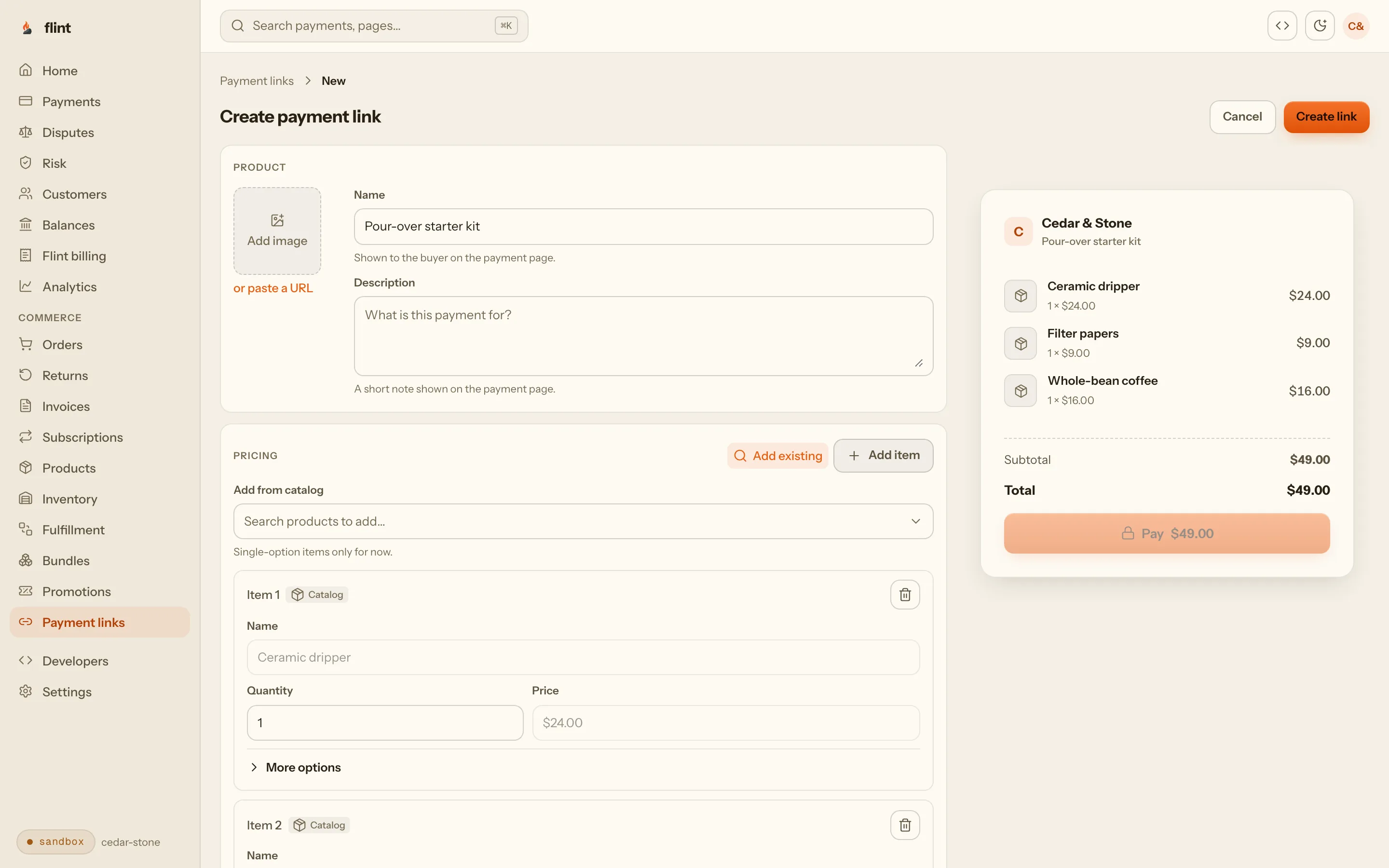
In your bio
Instagram lets you add up to five links to your profile under Edit profile, Links. Point one at this week’s drop.
On a Story
Any account can add a link sticker to a Story. One Story per product makes it one tap from seeing it to paying.
In a DM or a text
Copy the link, or a ready-made message with the product name and the link, and paste it as your reply. The same link works on TikTok, Facebook, and in a group text.
On paper
Download the link's QR code for a market table, a flyer, or the card in every box you ship.
03Drops
Sell exactly as many as you made.
A drop is a short run of pieces and a lot of people tapping at once. Each link stops on its own when the last piece sells.
Set the number, once. On each link, set Limit number of payments to how many you have, and keep the quantity at one per order. Twelve mugs means twelve payments, then the link stops.
Sizes on one link. Track stock for each size on the product page, and let buyers choose on the link. A size that runs out shows Sold out at checkout, and the others keep selling.
The last one sells once. Flint counts payments that are in progress as well as finished ones, so two buyers paying in the same second can’t both get the final piece. Nobody pays for something you then have to refund.
One per order keeps it fair. With the quantity fixed at one, nobody buys out a glaze in a single checkout. If you’d rather let buyers take two, turn on quantity for that link and set a lower payment limit to match.
Close it in your own words. After a sellout, turn the link off and give it an inactive message, like the date of the next drop. The address stays the same, so the link in your bio and old Stories shows your message instead of a dead end, and you can turn it back on for a restock.
Set an end time if you want one. A link can stop taking payments at a date and time you choose, such as Sunday night for a weekend-only drop.
04Shipping and pickup
No more asking for addresses in the thread.
Set up how buyers can get an order once, and every link offers those choices at checkout.
Shipping asks for the address. When a buyer picks shipping, checkout collects their address and adds your rate to the total before they pay.
Pickup tells them where and when. Add a pickup option at your studio, shop, or market stall with your instructions, and the buyer pays nothing for delivery.
The order remembers which. Each order shows how it reaches the buyer, so packing night starts from a list instead of a scroll through DMs. For pickup-only preorders with collection days, read preorders with local pickup.
Tracking goes out for you. Mark a package shipped with its tracking number, and Flint emails the buyer the tracking link.
05Orders, receipts, refunds
Every payment is an order, not a note in a feed.
Flint records each payment as an order with the buyer's name and email, what they bought, how it reaches them, and what they paid.
One list per drop
Each link's page shows what it collected, what was refunded, and who bought. View in Orders lists that link's orders with every filter.
Ready for your books
Select orders and export them as a CSV file for your spreadsheet, your bookkeeper, or tax time.
Receipts by email
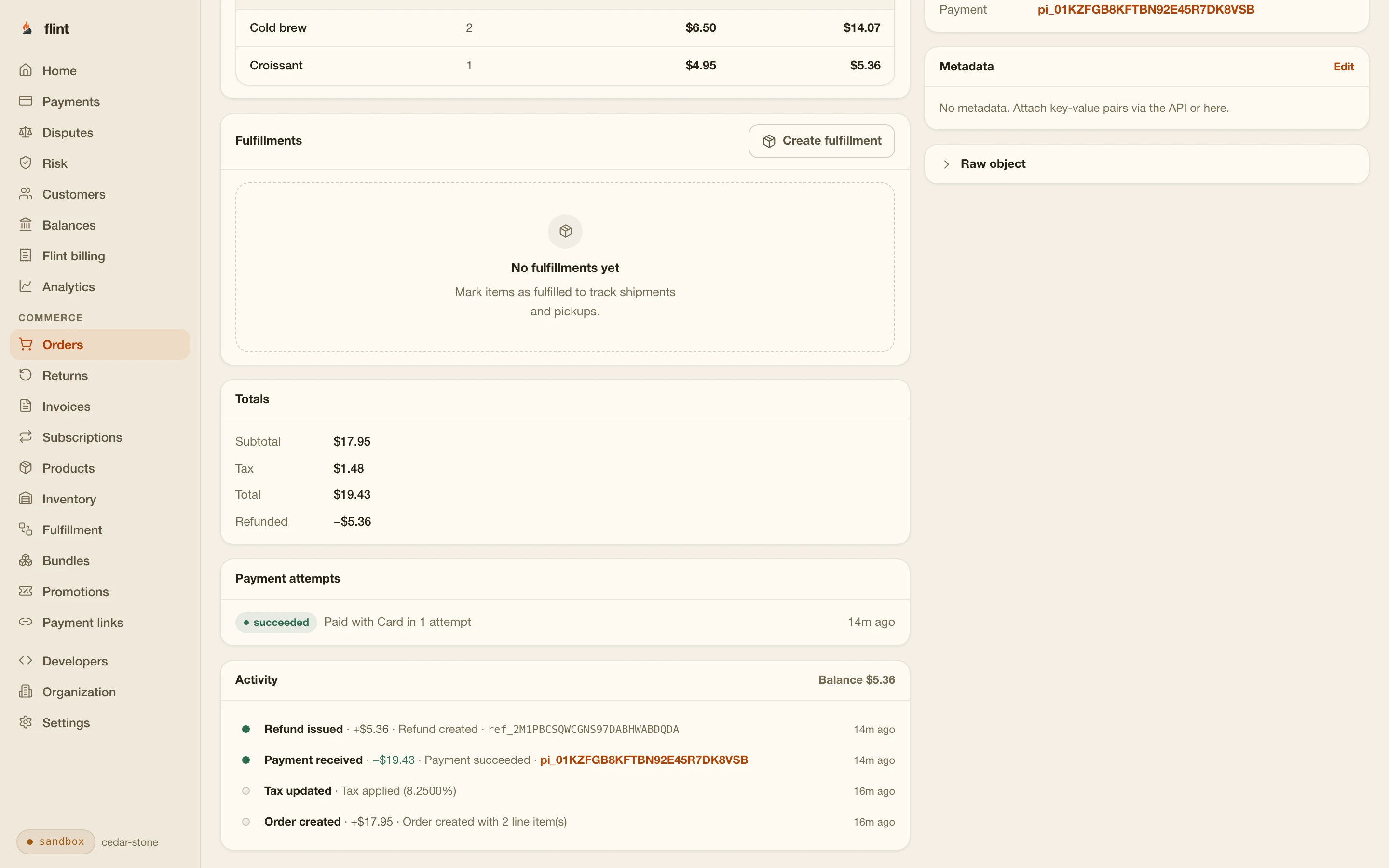
Checkout asks for the buyer's email by default. Flint sends a receipt when they pay and another when you refund.
Refunds from the order
Refund the whole order or part of it, such as the item but not the shipping, and the order keeps the history.
06A drop, worked out
Fern & Kiln's Friday mug drop.
A two-person ceramics studio that sells on Instagram. 24 wheel-thrown mugs in three glazes, $38.00 each, posted Friday at 7 PM.
Thursday night. Three products in the dashboard, one per glaze, at $38.00. Two delivery options: ship within the US for $9.00, or free pickup at the studio on Saturday. Three links, each with its glaze, both delivery options, one mug per order, and a payment limit: Speckled oat 12, Moss 8, Ink blue 4. Each link is turned off until the drop, with a message saying when it opens.
Friday, 7 PM. Turn the three links on. Post the drop with three Stories, one link sticker each, and swap the bio links to the three glazes. DMs asking “is the blue still available?” get the Ink blue link as the reply.
Friday, 7:06 PM. Ink blue hits its limit of 4. The link stops taking payments on its own. The studio turns it off with a message about the next drop, so the Story sticker still says something useful.
By Saturday. All 24 mugs sold: 15 to ship, 9 to pick up. The studio filters Orders by each link, prints the shipping list, and marks the boxes shipped with tracking numbers. Pickup buyers show their receipt at the door.
The next week. One mug arrives chipped. The studio refunds $38.00 for the mug from that order, keeps the shipping, and the buyer gets a refund receipt.
| The drop, in dollars | The drop | After one refund | |
|---|---|---|---|
| 24 mugs at $38.00 | $912.00 | $912.00 | |
| Shipping on 15 orders at $9.00 | $135.00 | $135.00 | |
| Collected from buyers | $1,047.00 | $1,047.00 | |
| Flint fees: 15 shipped orders at $2.13, 9 pickups at $1.79 | $48.06 | $48.06 | |
| Refund for one chipped mug | $0.00 | $38.00 | |
| Paid out to the studio's bank | $998.94 | $960.94 | |
07Setting it up
From sign-up to your first link.
Everything here is in the Flint dashboard. No website, developer, or code.
- 01
Add each item as a product
In the Flint dashboard, open Products and create one product for each thing you sell, with its name and price, and say that it ships or gets collected. For sizes or colors, choose Add option on the product page, then Add variants to give each one its price, and turn on Track stock for these variants to count what you have of each.
- 02
Set your delivery options
Under Delivery setup, add the ways your buyers can get an order: a shipping option with your rate, a pickup option at your studio or market stall, or both.
- 03
Make one payment link per product
Under Payment links, choose New and add the product from your catalog. For a product in sizes, choose Let buyers choose and tick the variants to offer. Pick the delivery options buyers can choose, and set Limit number of payments to the number you have, or let the stock counts close it. Add an inactive message for when it sells out.
- 04
Share the link
Copy the link or a ready-made message, or download its QR code. Put it in your Instagram bio links, on a Story link sticker, in a TikTok or Facebook post, or in a DM reply.
- 05
Ship, hand over, and refund from Orders
Every payment is an order with the buyer's contact, the item, and how it reaches them. Add a tracking number when you ship and Flint emails it to the buyer. Refund all or part of an order from the same page.
Selling the same stock in two places? A payment limit counts sales on one link. Turn on stock tracking for the product instead, and every link that sells it draws from one count. Sell a few at a market table, and record them with Adjust stock in the dashboard.
Have a site already? Put the same links behind Buy buttons on it. Add a store to a Framer site shows how. Selling seats for a workshop or a pop-up instead of products? Read event tickets with tiers and a cap.
08Compared
The DM routine, next to a link.
The same seven jobs, done by hand in the thread or by the checkout.
| The job | A Flint payment link | Orders taken by DM, paid by Venmo or Cash App |
|---|---|---|
| Taking the order | The buyer taps the link and pays. The order exists the moment they do. | You answer each DM, quote the price, and send your handle or a request. |
| Not overselling | The link stops at your number, counting payments still in progress. | You count replies in the thread and hope two people don't pay for the last one. |
| Getting the address | Checkout asks for it when the buyer picks shipping. | You ask for it in the thread and copy it out. |
| Pickup or shipping | The buyer picks one at checkout, and the order records it. | You agree on it in messages and note it somewhere. |
| Keeping track | Every payment is an order you can filter by link and export as a CSV file. | A spreadsheet or a notebook you fill in by hand. |
| Receipts | Emailed by Flint when they pay, and again when you refund. | The app's payment notice: an amount and whatever note the buyer typed. |
| Refunds | All or part of an order, from the order, and the order shows it. | Refund in the app, then fix the spreadsheet by hand. |
09Pricing
What it costs.
Per payment
3.79% + 35¢ per card payment, including Apple Pay and Google Pay. On a $38.00 order that is $1.79.
Per month
No monthly fee, no setup fee, and no website or theme to pay for. Payment links, orders, receipts, and delivery options are included.
Refunds
Flint charges nothing to refund. The fee on the original payment isn't returned.
Every rate, including invoices and optional add-ons, is on the pricing page.
10Start
Put your next drop on a link.
Sign up, add one product, and make its link. Send it to your own phone first to see exactly what your buyers will see, then post it.
3.79% + 35¢ on cards · no monthly fee · free sandbox · no credit card
Then read these
- 01Payment linksEverything a link can sell, and how it works.
- 02Preorders with local pickupTake orders ahead and hand them over on a set day.
- 03InvoicesFor a custom order agreed in a DM.
- 04Payment links guideEvery option on a link, in detail.
Sources
Where the outside facts come from.
Since September 2025, Shops on Facebook and Instagram use website checkout, and customers finish the purchase on the seller's own website. About changes to Shops and checkout on Facebook and Instagram
www.facebook.comAn Instagram profile can carry up to five links, added under Edit profile, Links. Add a website to your Instagram profile
help.instagram.comEvery account can add a link sticker to a Story, apart from new accounts and accounts that break the rules. Expanding link stickers in Stories to everyone
about.instagram.comPersonal accounts may not be used for business transactions, including accepting payment for goods from people you don't personally know, unless the payment is marked as goods and services or goes to a business profile. Goods and services between personal accounts can lead to held money, a limited account, or reversed payments. Venmo User Agreement
venmo.comThe peer-to-peer service is for personal, non-commercial purposes, and Cash App may require an account it finds selling goods and services to switch to a Business Account. Cash App Terms of Service
cash.appSellers must not ask buyers to pay as a personal transaction (friends and family), and PayPal may remove an account's ability to accept those payments if they do. PayPal User Agreement
www.paypal.com
last reviewed 2026-10-27 · corrections: Flint Help
FAQ
Questions sellers ask first.
How do I sell on Instagram without an Instagram Shop?
Make a Flint payment link for each product and share it: in your bio links, on a Story link sticker, or in a DM reply. Buyers tap it and pay by card, Apple Pay, or Google Pay on a checkout page with your name on it. Every payment becomes an order in your Flint dashboard, with the buyer's contact and how they want the item delivered. You don't need a Shop, a website, or any code.
Can I still check out inside Instagram Shops?
No. Meta's Business Help Center says that as of September 2025, Shops on Facebook and Instagram use website checkout: the shop still shows your products, and customers are sent to your own website to finish the purchase. A Flint payment link is a checkout page you can send buyers to without building a website.
Is it OK to take payment for orders on my personal Venmo or Cash App?
Read their terms before you do. Venmo's user agreement says personal accounts may not be used for business transactions, including taking payment for goods from people you don't personally know, unless the payment is marked as goods and services or goes to a business profile, and it lists held money and limited accounts among the results. Cash App's terms describe peer-to-peer payments as personal and non-commercial and let Cash App move a selling account to a Business Account. PayPal's user agreement says sellers must not ask buyers to pay as friends and family.
How do I stop a drop from overselling?
Give each product its own link, keep the quantity at one per order, and set Limit number of payments to the number you have. Flint counts payments that are in progress, so two buyers paying at the same moment can't both get the last one. When the limit is reached, the link stops taking payments. For a product in sizes on one link, track stock for each variant instead: each size shows Sold out on its own when it runs out, and the rest keep selling. Turn the link off with your own message, such as when the next drop is, and that is what anyone who taps it later reads.
Can buyers choose shipping or local pickup?
Yes. Set up a shipping option and a pickup option once in the dashboard, then pick which ones each link offers. Buyers choose at checkout, a shipping choice asks for their address, and the order records which they picked.
Do buyers get a receipt?
Yes. Checkout asks for the buyer's email unless you turn that off, and Flint emails a receipt when they pay and another if you refund them. When you mark a package shipped with a tracking number, Flint emails the tracking link too.
What if someone DMs me for something custom?
Make a link with a name and a price you type in, for that one order, and send it in the thread. For a bigger custom piece, send a Flint invoice to their email instead. Either way, the payment lands in Orders with everything else.
What does it cost?
3.79% + 35¢ per card payment, with no monthly fee and no setup fee. On a $38.00 mug collected at pickup, that is $1.79. Refunds cost nothing extra, though the original fee isn't returned.